Перейти к основному содержанию
Присоединяйся к сообществу ремонтников - Создай аккаунт

Turtle Beach Stealth Ultra Front Facing Buttons Replacement

Выберете то, что вам нужно

  1. Turtle Beach Stealth Ultra Front Facing Buttons Replacement, Back Plate: шаг 1, изображение 1 из 2 Turtle Beach Stealth Ultra Front Facing Buttons Replacement, Back Plate: шаг 1, изображение 2 из 2
    • Use tweezers to pull out rubber pieces in front of the screws.

  2. Turtle Beach Stealth Ultra Front Facing Buttons Replacement: шаг 2, изображение 1 из 2 Turtle Beach Stealth Ultra Front Facing Buttons Replacement: шаг 2, изображение 2 из 2
    • Remove the 10 mm screws using a Phillips #00 screwdriver.

  3. Turtle Beach Stealth Ultra Front Facing Buttons Replacement: шаг 3, изображение 1 из 2 Turtle Beach Stealth Ultra Front Facing Buttons Replacement: шаг 3, изображение 2 из 2
    • Remove the sticker on the back of the plate.

    • Remove the 10 mm screws from the back plate using a Phillips #00 screwdriver.

  4. Turtle Beach Stealth Ultra Front Facing Buttons Replacement: шаг 4, изображение 1 из 3 Turtle Beach Stealth Ultra Front Facing Buttons Replacement: шаг 4, изображение 2 из 3 Turtle Beach Stealth Ultra Front Facing Buttons Replacement: шаг 4, изображение 3 из 3
    • Use an iFixit opening tool to pry the front button plate and analog stick plate off.

    • Use a Phillips #00 screwdriver to remove the screws from the front plate on both sides of the controller.

    • Be cautious not to break the LCD screen while you move the opening tool around.

  5. Turtle Beach Stealth Ultra Front Facing Buttons Replacement: шаг 5, изображение 1 из 3 Turtle Beach Stealth Ultra Front Facing Buttons Replacement: шаг 5, изображение 2 из 3 Turtle Beach Stealth Ultra Front Facing Buttons Replacement: шаг 5, изображение 3 из 3
    • Use an opening tool to detach the front plate from the back.

    • You may need to work the opening tool all the way around the seam between the two plates.

  6. Turtle Beach Stealth Ultra Front Facing Buttons Replacement, Motherboard: шаг 6, изображение 1 из 2 Turtle Beach Stealth Ultra Front Facing Buttons Replacement, Motherboard: шаг 6, изображение 2 из 2
    • Use a Phillips #00 screwdriver to remove the 10 mm screws connecting the handles to the controller frame.

  7. Turtle Beach Stealth Ultra Front Facing Buttons Replacement: шаг 7, изображение 1 из 1
    • Detach the cables from the motherboard.

  8. Turtle Beach Stealth Ultra Front Facing Buttons Replacement: шаг 8, изображение 1 из 1
    • Remove the yellow ribbon cable from the handle.

  9. Turtle Beach Stealth Ultra Front Facing Buttons Replacement: шаг 9, изображение 1 из 2 Turtle Beach Stealth Ultra Front Facing Buttons Replacement: шаг 9, изображение 2 из 2
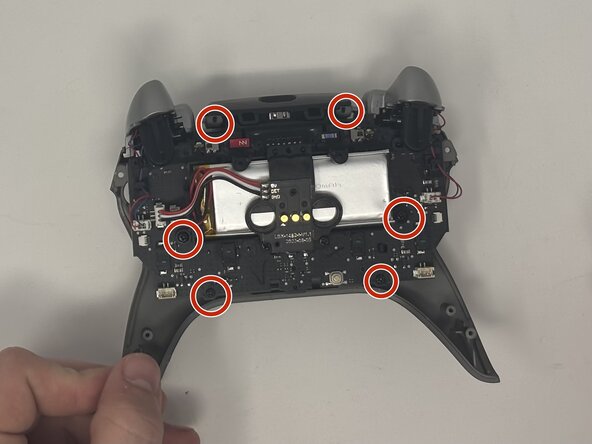
    • Remove the six 10 mm screws connected to the motherboard using a Phillips #00 screwdriver.

  10. Turtle Beach Stealth Ultra Front Facing Buttons Replacement: шаг 10, изображение 1 из 1
    • Gently pull the motherboard away from the frame.

  11. Turtle Beach Stealth Ultra Front Facing Buttons Replacement, Front Facing Buttons: шаг 11, изображение 1 из 2 Turtle Beach Stealth Ultra Front Facing Buttons Replacement, Front Facing Buttons: шаг 11, изображение 2 из 2
    • Pull the buttons out from the front plate.

Заключение

To reassemble your device, follow these instructions in reverse order.

Еще один человек закончил это руководство.

Dominic Dodge

Участник с: 09/09/25

799 Репутация

Автор 7 руководств

Команда

Utah Tech University, Team 1-7, McMurrin Fall 2025 Участник Utah Tech University, Team 1-7, McMurrin Fall 2025

UTAHTECH-MCMURRIN-F25S1G7

2 членов

Автор 7 руководств

0 Комментарии к руководству

Добавить комментарий

Статистика просмотров:

За последние 24 часов: 2

За последние 7 дней: 14

За последние 30 дней: 71

За всё время: 388