Перейти к основному содержанию
Присоединяйся к сообществу ремонтников - Создай аккаунт

VTech Kidizoom Camera Connect Shutter Button Replacement

Выберете то, что вам нужно

    1. VTech Kidizoom Camera Connect Shutter Button Replacement, Front Case: шаг 1, изображение 1 из 2 VTech Kidizoom Camera Connect Shutter Button Replacement, Front Case: шаг 1, изображение 2 из 2
      • Remove batteries and SD card before beginning disassembly!

      • Locate the four plastic screw covers denoted by the markers and gently pry them up with the metal spudger.

      Спросите у FixBot

      Добавить комментарий

    2. VTech Kidizoom Camera Connect Shutter Button Replacement: шаг 2, изображение 1 из 2 VTech Kidizoom Camera Connect Shutter Button Replacement: шаг 2, изображение 2 из 2
      • Remove all four (11mm) screws with the Philips #0 screwdriver.

      Спросите у FixBot

      Добавить комментарий

    3. VTech Kidizoom Camera Connect Shutter Button Replacement: шаг 3, изображение 1 из 3 VTech Kidizoom Camera Connect Shutter Button Replacement: шаг 3, изображение 2 из 3 VTech Kidizoom Camera Connect Shutter Button Replacement: шаг 3, изображение 3 из 3
      • Remove the two battery cartridges located on the underside of the camera.

      • Once cartridges are removed, use the metal spudger to pry open the top, bottom, and both sides of the camera.

      Спросите у FixBot

      Добавить комментарий

    4. VTech Kidizoom Camera Connect Shutter Button Replacement: шаг 4, изображение 1 из 1
      • Beware of the two black viewfinder lens falling out as you pry open the device!

      • The device should now be open and ready for further repair and/or replacement parts.

      Спросите у FixBot

      Добавить комментарий

    1. VTech Kidizoom Camera Connect Shutter Button Replacement, Shutter Button: шаг 5, изображение 1 из 1
      • Remove the purple plastic that covers the button and circuit board. It should slide right out from the slot it sits in.

      Спросите у FixBot

      Добавить комментарий

    2. VTech Kidizoom Camera Connect Shutter Button Replacement: шаг 6, изображение 1 из 1
      • Unsolder wires connected to the right side of the circuit board. Pull the wires to the side.

      Спросите у FixBot

      Добавить комментарий

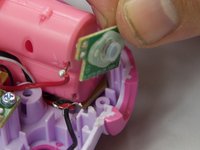
    3. VTech Kidizoom Camera Connect Shutter Button Replacement: шаг 7, изображение 1 из 2 VTech Kidizoom Camera Connect Shutter Button Replacement: шаг 7, изображение 2 из 2
      • The button/circuit board should be loose now. Gently pull out the button/circuit board to remove it from the device.

      Спросите у FixBot

      Добавить комментарий

Заключение

To reassemble your device, follow these instructions in reverse order.

Отменить: Я не выполнил это руководство.

Еще один человек закончил это руководство.

Justin Sanchez

Участник с: 02/08/16

544 Репутация

Автор 4 руководств

Команда

USF Tampa, Team 6-4, Eyestone Spring 2016 Участник USF Tampa, Team 6-4, Eyestone Spring 2016

USFT-EYESTONE-S16S6G4

4 членов

Автор 5 руководств

0 Комментарии к руководству

Добавить комментарий

Статистика просмотров:

За последние 24 часов: 0

За последние 7 дней: 6

За последние 30 дней: 35

За всё время: 1,609