Перейти к основному содержанию
Присоединяйся к сообществу ремонтников - Создай аккаунт

Xbox 360 Dual Fans Replacement

Выберете то, что вам нужно

  1. Xbox 360 Dual Fans Replacement, Hard Drive: шаг 1, изображение 1 из 2 Xbox 360 Dual Fans Replacement, Hard Drive: шаг 1, изображение 2 из 2
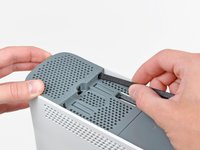
    • Grasp the hard drive assembly and press the release button while lifting its front edge.

    • Remove the hard drive assembly from the top vent.

    Спросите у FixBot
  2. Xbox 360 Dual Fans Replacement, Bottom Vent: шаг 2, изображение 1 из 1
    Инструмент, используемый на этом этапе:
    Xbox 360 Opening Tool
    $4.99
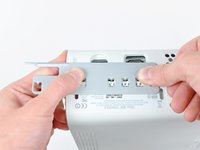
    • Stand the console vertically with the bottom edge facing up.

    • Throughout the following opening procedure, the finger of an Xbox 360 opening tool can be used in place of a spudger.

    • Insert the flat end of a spudger or the edge of an Xbox 360 opening tool into the small gap at the front edge of the bottom vent.

    • Pry the front edge of the bottom vent away from the faceplate.

    Спросите у FixBot
  3. Xbox 360 Dual Fans Replacement: шаг 3, изображение 1 из 3 Xbox 360 Dual Fans Replacement: шаг 3, изображение 2 из 3 Xbox 360 Dual Fans Replacement: шаг 3, изображение 3 из 3
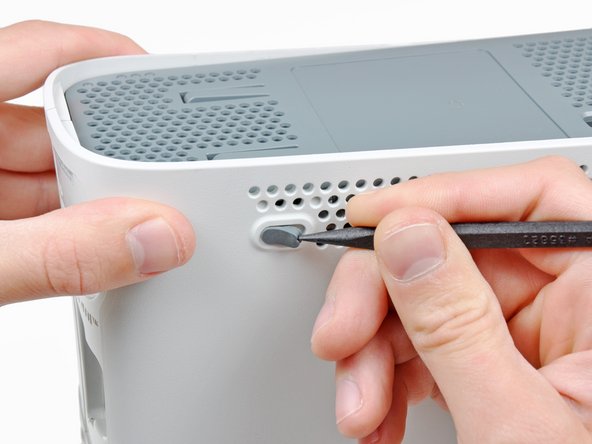
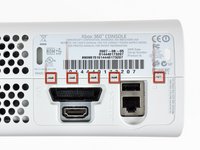
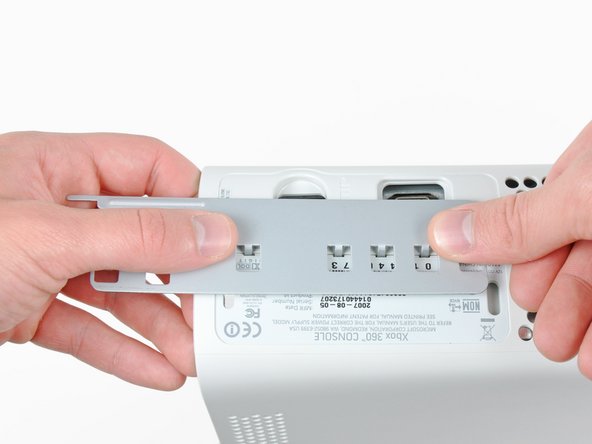
    • In the next few steps, you will use the tip of a spudger or the finger of an Xbox 360 opening tool to release the clips along the left and right sides of the bottom vent. Their locations are highlighted in red.

    • You will insert the tool into the holes molded into the white plastic side case pieces.

    Спросите у FixBot
  4. Xbox 360 Dual Fans Replacement: шаг 4, изображение 1 из 2 Xbox 360 Dual Fans Replacement: шаг 4, изображение 2 из 2
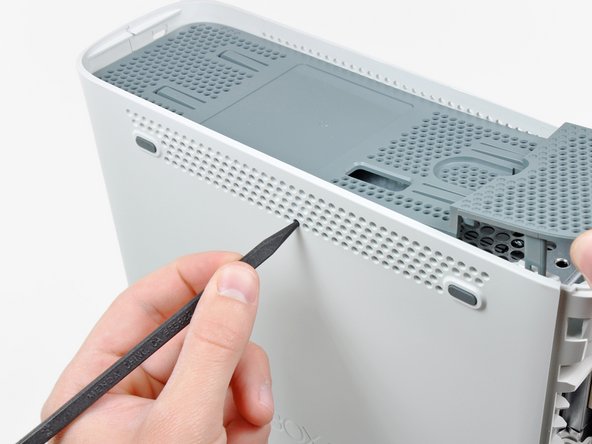
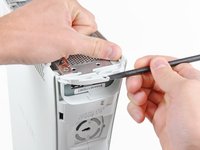
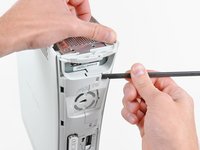
    • To release the clips, work from the front edge of the bottom vent.

    • While slightly lifting the front edge of the bottom vent, use the tip of a spudger to push the clips closest to the front of the bottom vent towards the inside of the console.

    Спросите у FixBot
  5. Xbox 360 Dual Fans Replacement: шаг 5, изображение 1 из 2 Xbox 360 Dual Fans Replacement: шаг 5, изображение 2 из 2
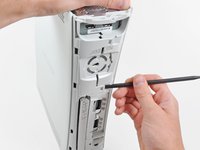
    • Repeat the same process to release the two center clips on the bottom vent.

    Спросите у FixBot
  6. Xbox 360 Dual Fans Replacement: шаг 6, изображение 1 из 2 Xbox 360 Dual Fans Replacement: шаг 6, изображение 2 из 2
    • Use the tip of your spudger to release the clips on the bottom vent nearest the back of the Xbox.

    Спросите у FixBot
  7. Xbox 360 Dual Fans Replacement: шаг 7, изображение 1 из 1
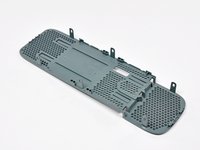
    • Remove the bottom vent from the 360.

    Спросите у FixBot
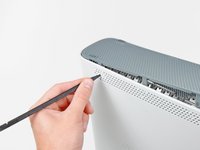
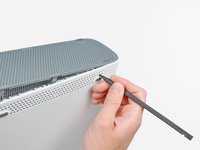
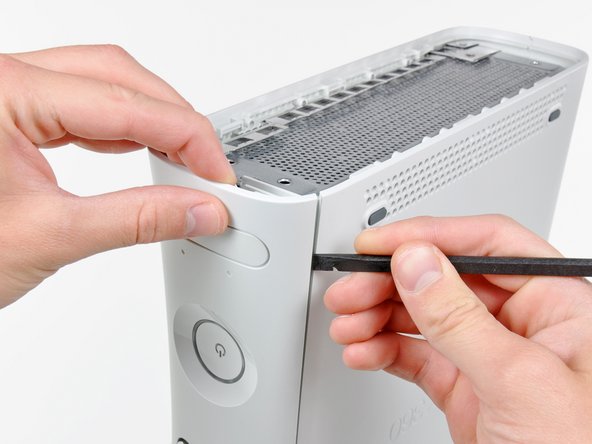
  8. Xbox 360 Dual Fans Replacement, Faceplate: шаг 8, изображение 1 из 2 Xbox 360 Dual Fans Replacement, Faceplate: шаг 8, изображение 2 из 2
    • Insert the flat edge of a spudger between the faceplate and the outer casing near the power button.

    • Run your spudger along the edge of the faceplate to release the clips securing it to the front of the console.

    • You may also accomplish this task by using the edge of the Xbox 360 opening tool, but it may scratch the plastic case.

    • Alternatively, you can use your hands to carefully pull the faceplate away from the Xbox.

    Спросите у FixBot
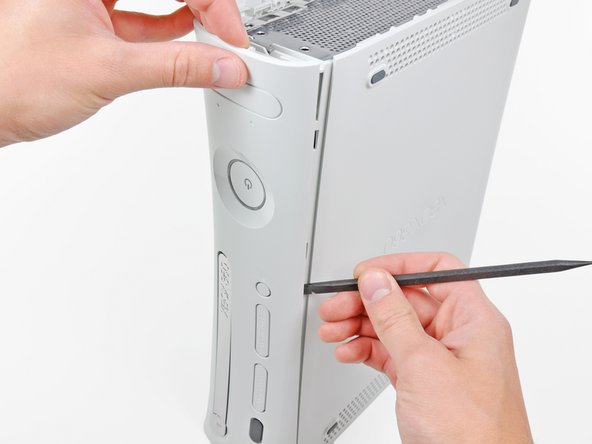
  9. Xbox 360 Dual Fans Replacement: шаг 9, изображение 1 из 1
    • Repeat the same motions as previously mentioned to release the left side of the faceplate.

    Спросите у FixBot
  10. Xbox 360 Dual Fans Replacement: шаг 10, изображение 1 из 1
    • Remove the faceplate from the front face of the console.

    Спросите у FixBot
  11. Xbox 360 Dual Fans Replacement, Top Vent: шаг 11, изображение 1 из 2 Xbox 360 Dual Fans Replacement, Top Vent: шаг 11, изображение 2 из 2
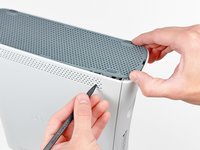
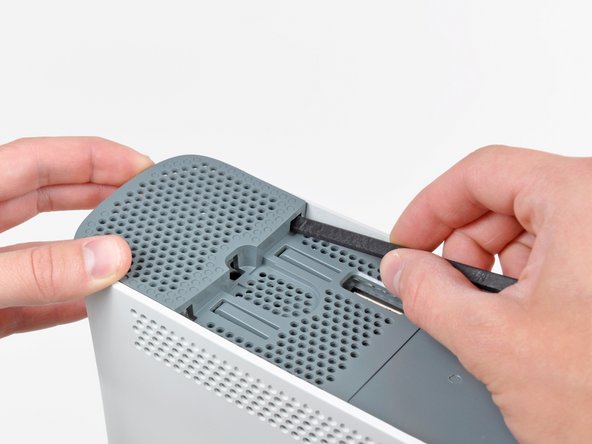
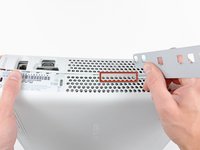
    • Stand the console vertically with the top edge facing up.

    • The top vent is secured to the console via clips. The first two clips are located underneath the top vent closest to the faceplate, as shown in the pictures.

    Спросите у FixBot
  12. Xbox 360 Dual Fans Replacement: шаг 12, изображение 1 из 2 Xbox 360 Dual Fans Replacement: шаг 12, изображение 2 из 2
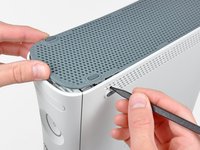
    • Insert the flat end of a spudger into the small gaps previously mentioned to release the clips.

    • You may also use the long finger of an Xbox 360 opening tool to accomplish this task.

    Спросите у FixBot
  13. Xbox 360 Dual Fans Replacement: шаг 13, изображение 1 из 3 Xbox 360 Dual Fans Replacement: шаг 13, изображение 2 из 3 Xbox 360 Dual Fans Replacement: шаг 13, изображение 3 из 3
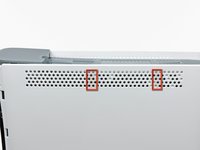
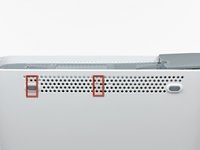
    • In the next few steps, you will use the tip of a spudger or the finger of an Xbox 360 opening tool to release the clips along the left and right sides of the top vent. Their locations are highlighted in red.

    Спросите у FixBot
  14. Xbox 360 Dual Fans Replacement: шаг 14, изображение 1 из 2 Xbox 360 Dual Fans Replacement: шаг 14, изображение 2 из 2
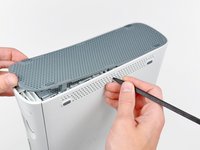
    • To release the clips, work from the middle of the top vent.

    • While slightly lifting the front edge of the top vent, use the tip of a spudger to push the clips closest to the center of the top vent towards the inside of the console.

    Спросите у FixBot
  15. Xbox 360 Dual Fans Replacement: шаг 15, изображение 1 из 1
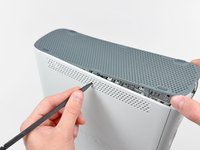
    • Use the tip of your spudger to release the clip on the top vent nearest the back of the Xbox's upper case.

    Спросите у FixBot
  16. Xbox 360 Dual Fans Replacement: шаг 16, изображение 1 из 2 Xbox 360 Dual Fans Replacement: шаг 16, изображение 2 из 2
    • The last clip is hidden underneath the rubber foot nearest the back of the console.

    • Use the tip of your spudger to release the clip on the top vent nearest the back of the Xbox.

    • Remove the top vent from the 360.

    Спросите у FixBot
  17. Xbox 360 Dual Fans Replacement, Lower Case: шаг 17, изображение 1 из 1
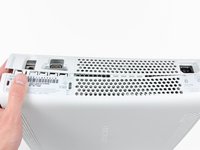
    • Stand the console vertically with the top edge facing down.

    • Carefully peel the warranty sticker off the console.

    Спросите у FixBot
  18. Xbox 360 Dual Fans Replacement: шаг 18, изображение 1 из 3 Xbox 360 Dual Fans Replacement: шаг 18, изображение 2 из 3 Xbox 360 Dual Fans Replacement: шаг 18, изображение 3 из 3
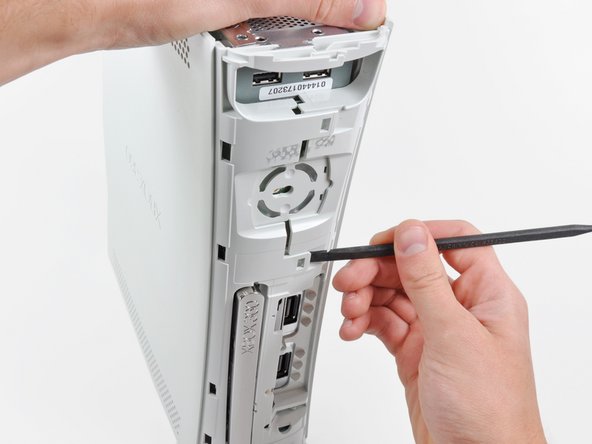
    • The upper and lower cases are attached via several latches, located in the front and back of the console. These latches must be disengaged to separate the upper case from the console.

    • Use the flat end of a spudger to release the following latches:

    • Above the front-facing USB ports.

    • Beneath the front-facing USB ports.

    • Above the Memory Unit slots.

    Спросите у FixBot
  19. Xbox 360 Dual Fans Replacement: шаг 19, изображение 1 из 1
    • Insert the flat end of a spudger and pry upwards to release the last remaining latch located above the eject button.

    Спросите у FixBot
  20. Xbox 360 Dual Fans Replacement: шаг 20, изображение 1 из 1
    • Slightly lift the front portion of the lower case to ensure that the latches in the front have been completely released.

    Спросите у FixBot
  21. Xbox 360 Dual Fans Replacement: шаг 21, изображение 1 из 2 Xbox 360 Dual Fans Replacement: шаг 21, изображение 2 из 2
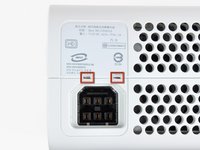
    • The upper and lower cases are held together by seven release latches located on the back of the console. Their locations are highlighted in red.

    Спросите у FixBot
  22. Xbox 360 Dual Fans Replacement: шаг 22, изображение 1 из 3 Xbox 360 Dual Fans Replacement: шаг 22, изображение 2 из 3 Xbox 360 Dual Fans Replacement: шаг 22, изображение 3 из 3
    • Press the Xbox 360 opening tool down into the clips securing the lower case to the upper case near the I/O ports.

    • While pressing down on the tool, push the lower and upper cases apart to separate the retaining clips.

    Спросите у FixBot
  23. Xbox 360 Dual Fans Replacement: шаг 23, изображение 1 из 2 Xbox 360 Dual Fans Replacement: шаг 23, изображение 2 из 2
    • While pushing the upper and lower cases apart, use the tip of a spudger or the finger of an Xbox 360 opening tool to push the long clip highlighted in red toward the center of the 360.

    • The clip should release, leaving the clips near the power connector as the only thing holding the upper and lower cases together.

    Спросите у FixBot
  24. Xbox 360 Dual Fans Replacement: шаг 24, изображение 1 из 1
    • Press the Xbox 360 opening tool down into the two remaining clips near the power connector.

    • Push the upper and lower cases apart to fully release the retaining clips.

    Спросите у FixBot
  25. Xbox 360 Dual Fans Replacement: шаг 25, изображение 1 из 1
    • Orient the console so that the front portion is facing downwards.

    • Grasp the back portion of the lower case and lift it upwards to separate it from the console.

    • Be careful not to excessively bend the lower case near the power plug, as it can crack easily.

    Спросите у FixBot
  26. Xbox 360 Dual Fans Replacement, Eject Button: шаг 26, изображение 1 из 2 Xbox 360 Dual Fans Replacement, Eject Button: шаг 26, изображение 2 из 2
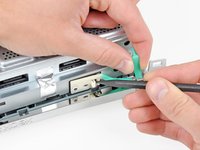
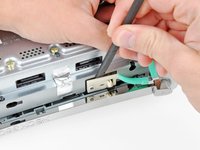
    • Use the tip of a spudger to release the clip securing the eject button to the metal casing.

    • Insert the flat end of a spudger between the eject button and the optical drive.

    • Pry the eject button off its retaining posts and remove it from the 360.

    • This can also be accomplished using an Xbox 360 opening tool.

    Спросите у FixBot
  27. Xbox 360 Dual Fans Replacement, Upper Case: шаг 27, изображение 1 из 1
    • Remove the six silver 64 mm T10 Torx screws securing the upper case to the metal casing.

    Спросите у FixBot
  28. Xbox 360 Dual Fans Replacement: шаг 28, изображение 1 из 1
    • Orient the console so that the upper case is facing upwards.

    • Lift the upper case straight up and remove it from the console.

    Спросите у FixBot
  29. Xbox 360 Dual Fans Replacement, Optical Drive: шаг 29, изображение 1 из 1
    • Peel the silver tape securing the optical drive to the metal casing.

    Спросите у FixBot
  30. Xbox 360 Dual Fans Replacement: шаг 30, изображение 1 из 1
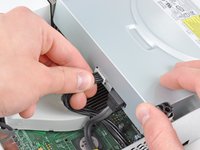
    • Slightly lift the optical drive upwards to gain clearance to disconnect the SATA and power connectors located on the backside of the optical drive.

    • Don't try to completely remove the optical drive just yet. Two cables still connect it to the motherboard.

    Спросите у FixBot
  31. Xbox 360 Dual Fans Replacement: шаг 31, изображение 1 из 2 Xbox 360 Dual Fans Replacement: шаг 31, изображение 2 из 2
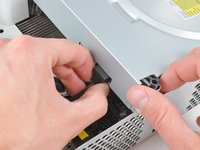
    • Grab the power connector by its cables and pull it straight out of its socket on the optical drive.

    • Disconnect the SATA data connector from its socket on the optical drive by pulling it straight away.

    Спросите у FixBot
  32. Xbox 360 Dual Fans Replacement: шаг 32, изображение 1 из 1
    • Lift the optical drive assembly out of the metal casing.

    Спросите у FixBot
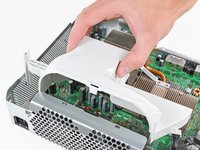
  33. Xbox 360 Dual Fans Replacement, Cooling Fan Duct: шаг 33, изображение 1 из 2 Xbox 360 Dual Fans Replacement, Cooling Fan Duct: шаг 33, изображение 2 из 2
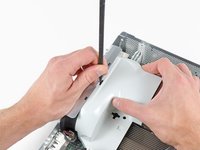
    • Insert the flat end of a spudger into the small rectangular opening on the top of the cooling fan duct.

    • Carefully release the fan duct retaining clip and remove the fan duct from the Xbox.

    • The clip can alternatively be released using the metal finger of an Xbox 360 opening tool.

    Спросите у FixBot
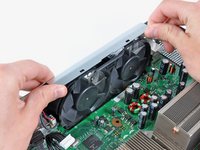
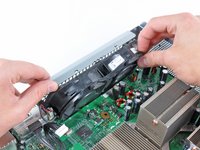
  34. Xbox 360 Dual Fans Replacement, Dual Fans: шаг 34, изображение 1 из 2 Xbox 360 Dual Fans Replacement, Dual Fans: шаг 34, изображение 2 из 2
    • While lifting the metal chassis strip above the dual fans, pull the fans toward the center of the motherboard.

    • Do not completely remove the dual fan assembly yet. Its cable is still attached to the motherboard.

    Спросите у FixBot
  35. Xbox 360 Dual Fans Replacement: шаг 35, изображение 1 из 1
    • Lift the dual fan connector straight up from its socket on the motherboard.

    • Some fan connectors have a locking tab. If yours has a locking tab, be sure to depress it while disconnecting the fan from the motherboard.

    • Remove the dual fan assembly from the console.

    Спросите у FixBot
Заключение

To reassemble your device, follow these instructions in reverse order.

42 человек успешно провели ремонт по этому руководству.

1 Комментарий к руководству

2018, still going strong. Thanks!

Ageo Hernandez - Ответить Поделиться
Добавить комментарий

Статистика просмотров:

За последние 24 часов: 2

За последние 7 дней: 34

За последние 30 дней: 185

За всё время: 53,097