Этот перевод был сделан машиной и пока не проверен человеком. Говорите на этом языке? Просмотрите его.
Введение
Следует отметить, что, хотя эта модификация добавит дополнительное место для хранения данных на вашей консоли, она нарушает условия обслуживания Xbox Live и потенциально может привести к блокировке в Xbox Live.
Здесь я покажу довольно простую замену самого жесткого диска внутри корпуса HDD для 360. Microsoft делает обновление жесткого диска дорогим или сложным, ограничивая выбор вариантов для такого обновления. Это руководство описывает, как физически разобрать корпус диска и заменить его на ваш новый блестящий жесткий диск WD. Да, по какой-то причине это должен быть диск Western Digital. Один из следующих серий дисков:
-WD Scorpio серий BEVS/BEAS
-WD Scorpio Blue серий BEVS/BEVT
-WD Scorpio Black серий BEKT/BJKT
-WD VelociRaptor серий
Я посмотрел на Newegg.com и нашел диск Scorpio Black объемом 250 ГБ со скоростью вращения 7200 об/мин, кэшем 16 МБ и скоростью передачи данных 3,0 Гбит/с примерно за 65 долларов. Я бы, вероятно, порекомендовал именно его, поскольку он предлагает лучшее соотношение цены и качества и стоит примерно вдвое дешевле, чем Microsoft попросит с вас за диск объемом 250 ГБ.
Выберете то, что вам нужно
-
-
-
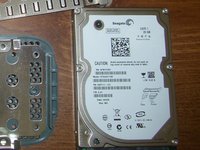
Вот он. Стандартный жесткий диск на 20 ГБ для Xbox 360.
-
Обратите внимание на проприетарный разъем. Внутри находится вполне стандартный 2,5-дюймовый SATA-накопитель...
-
Я сделал эти снимки, когда собирал его обратно, поэтому гарантийная наклейка Microsoft выглядит немного странно.
 Спросите у FixBot
-
-
-
Это аннулирует гарантию только на накопитель, а не на консоль, так как гарантии на них раздельные.
-
Переходите к выкручиванию четырех винтов Torx T6.
-
-
-
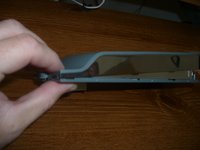
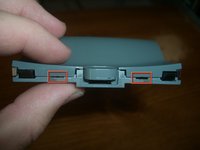
Удерживая верхнюю часть привода, аккуратно потяните её вверх относительно нижней половины. Задняя часть поднимется при повороте, так как передняя часть соединена двумя пластиковыми защелками.
-
Эти защелки проще всего открыть, повернув верхний корпус примерно на 30º, а затем уверенным движением потянув его вверх.
-
-
-
-
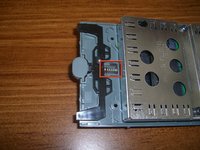
Открутите четыре винта Torx T10.
-
Сдвиньте крышку к задней части корпуса и снимите её. К сведению: на каждом винте есть небольшая капля фиксатора резьбы.
-
-
-
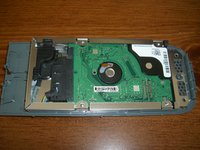
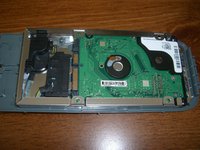
Вот как выглядят внутренности во всей своей красе.
-
Четыре винта, которые удерживали крышку, также фиксировали накопитель, поэтому просто отсоедините разъем SATA, и накопитель будет почти свободен.
-
-
-
Чтобы извлечь накопитель, нужно немного отогнуть назад пластиковую часть нижней крышки корпуса. Это не должно ничего сломать, главное — не переусердствуйте и не гните слишком сильно.
-
-
-
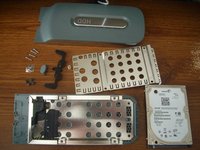
Все детали разобраны. Адаптерный кабель, скорее всего, извлечется, так как он, похоже, не закреплен напрямую, но для его снятия потребовалось бы деформировать металлический корпус, а я не хотел этого делать.
-
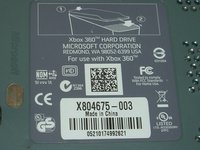
Интересно отметить, что накопитель работает при 5 В и 0,62 А, хотя на корпусе указано 5 В и 1 А. Интересно, куда деваются остальные 380 мА.
-
Также стоит отметить: это накопитель Seagate, в то время как для апгрейда на 250 ГБ, о котором я упоминаю в описании, требуется накопитель WD. Если я правильно понял, это связано с тем, что программное обеспечение для форматирования диска, чтобы его распознала ваша 360, написано под прошивку WD.
-
-






Для сборки вашего устройства возьмите новый жесткий диск и выполните эти инструкции в обратном порядке.
Отменить: Я не выполнил это руководство.
67 человек успешно провели ремонт по этому руководству.

6 Комментарии к руководству
I happen to have an external HD enclosure (the original HD had a platter crash) that works perfectly to mount the XBox 360 HD to my PC for all sorts of uses, allowing for either USB or external SATA connectivity. :D
Link to article seems to be down. Any mirrors? It woulb be much appreciated, Thanks
Sounds and looks easy enough. But will replacing a 20 go drive with a 250 go drive now need any formatting or can I just plug it in and work?
Hola, buenas tardes, realice todos estos pasos y al instalar el disco no lo reconoce. Probe con otro disco y probe con el mismo que acababa de sacar y no lo reconoce. Enchufe el disco por medio de un cable al USB exterior y si lo reconoce.
Ahora supongo que es un problema en la coneccion del disco en su lugar original, puede ser en el cable o en el enchufe. Lo que quiero saber es si estoy bien orientado, o si existe algo que pase por alto y me esta generando este problema. Gracias
solo determitae marche di hardisk funzionano con la xbox 360 in piu devi installare il firmware o il software per farlo riconoscere e questo lo fai da pc ci sono molte guide in merito su youtube ciaooooooo
