Перейти к основному содержанию
Присоединяйся к сообществу ремонтников - Создай аккаунт

Zune Flash 2nd Generation Back Cover Replacement

Выберете то, что вам нужно

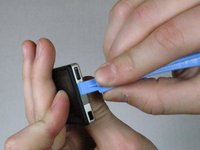
  1. Zune Flash 2nd Generation Back Cover Replacement, Back Cover: шаг 1, изображение 1 из 2 Zune Flash 2nd Generation Back Cover Replacement, Back Cover: шаг 1, изображение 2 из 2
    • Prior to disassembly, verify the hold switch is engaged to ensure the device will not turn on during the procedure.

    • If the device turns on while it is being disassembled it could cause irreversible damage to the device.

    • PICS MAKE NO SENSE.

    Спросите у FixBot

    Добавить комментарий

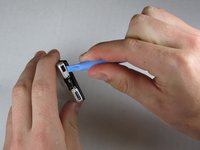
  2. Zune Flash 2nd Generation Back Cover Replacement: шаг 2, изображение 1 из 2 Zune Flash 2nd Generation Back Cover Replacement: шаг 2, изображение 2 из 2
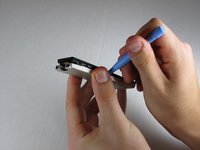
    • Remove the top metal clip by inserting a Zune opening tool in between the faceplate and back cover and pulling gently back as shown in the images.

    • You should hear a 'click' as the clip detaches from the device.

    Спросите у FixBot

    Добавить комментарий

  3. Zune Flash 2nd Generation Back Cover Replacement: шаг 3, изображение 1 из 1
    • Remove the two screws shown using a Y00 Tri-Wing screwdriver.

    Спросите у FixBot

    Добавить комментарий

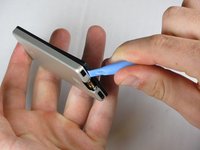
  4. Zune Flash 2nd Generation Back Cover Replacement: шаг 4, изображение 1 из 3 Zune Flash 2nd Generation Back Cover Replacement: шаг 4, изображение 2 из 3 Zune Flash 2nd Generation Back Cover Replacement: шаг 4, изображение 3 из 3
    • Insert the Zune opening tool between the faceplate and the back cover, starting from the top and slowly work your way around the device.

    Спросите у FixBot

    Добавить комментарий

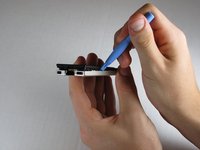
  5. Zune Flash 2nd Generation Back Cover Replacement: шаг 5, изображение 1 из 3 Zune Flash 2nd Generation Back Cover Replacement: шаг 5, изображение 2 из 3 Zune Flash 2nd Generation Back Cover Replacement: шаг 5, изображение 3 из 3
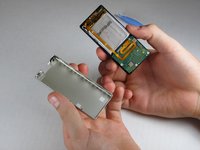
    • Work your way around the Zune until the back cover comes free. Remove the back plate and set it aside.

    Спросите у FixBot

    Добавить комментарий

Заключение

To reassemble your device, follow these instructions in reverse order.

Отменить: Я не выполнил это руководство.

ybahman

Участник с: 11/01/09

139 Репутация

Автор 4 руководств

Команда

Cal Poly, Team 9-20, Regan Fall 2009 Участник Cal Poly, Team 9-20, Regan Fall 2009

CPSU-REGAN-F09S9G20

5 членов

Автор 7 руководств

0 Комментарии к руководству

Добавить комментарий

Статистика просмотров:

За последние 24 часов: 4

За последние 7 дней: 11

За последние 30 дней: 51

За всё время: 4,169