Перейти к основному содержанию
Присоединяйся к сообществу ремонтников - Создай аккаунт

iMac Intel 21.5" EMC 2308 RAM Replacement

Выберете то, что вам нужно

    1. iMac Intel 21.5" EMC 2308 RAM Replacement, Access Door: шаг 1, изображение 1 из 2 iMac Intel 21.5" EMC 2308 RAM Replacement, Access Door: шаг 1, изображение 2 из 2
      • Loosen the three Phillips screws securing the access door to the bottom edge of your iMac.

      • These screws will remain captive in the access door.

      • Remove the access door from your iMac.

      • During reassembly, fasten the access door loosely and align it with the pocket cut into the outer case of the iMac before fully tightening the screws.

      Спросите у FixBot

      Добавить комментарий

    1. iMac Intel 21.5" EMC 2308 RAM Replacement, RAM: шаг 2, изображение 1 из 1
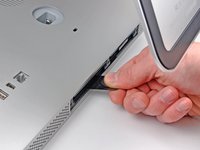
      • Use the sharp tip of a spudger to pull the black plastic RAM tabs out of the memory bay.

      Спросите у FixBot

      Добавить комментарий

    2. iMac Intel 21.5" EMC 2308 RAM Replacement: шаг 3, изображение 1 из 2 iMac Intel 21.5" EMC 2308 RAM Replacement: шаг 3, изображение 2 из 2
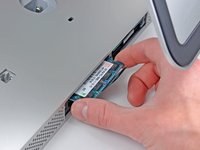
      • Pull the black plastic RAM tab away from your iMac to eject the RAM chip.

      • Grab the RAM chip by its edges and pull it straight out of its slot.

      • If two RAM chips are installed, repeat this process for the other chip.

      Спросите у FixBot

      Добавить комментарий

Заключение

To reassemble your device, follow these instructions in reverse order.

Отменить: Я не выполнил это руководство.

112 человек успешно провели ремонт по этому руководству.

1 Комментарий к руководству

There needs to be a little bit of important discucssion about getting the new RAM properly seated into the slots. Otherwise, great instructions!

Mary - Ответить Поделиться

Добавить комментарий

Статистика просмотров:

За последние 24 часов: 2

За последние 7 дней: 20

За последние 30 дней: 84

За всё время: 91,223