Введение
Use this guide to replace the earpiece speaker in your iPhone 15 Plus.
If the sound coming through your iPhone, especially during phone calls, sounds like static or crackling, your earpiece speaker may need to be replaced.
You'll need replacement back glass adhesive to complete this repair.
Выберете то, что вам нужно
-
-
Unplug any cables from your phone.
-
Hold the power and either volume buttons and slide to power off your phone.
-
-
-
If your screen or back glass is badly cracked, lay overlapping strips of packing tape over the glass to protect yourself and make disassembly easier.
-
-
-
Measure 3 mm from the tip and mark the opening pick with a permanent marker.
-
-
-
Use a P2 pentalobe driver to remove the two 7.7 mm-long screws on either side of the charging port.
-
-
-
Cut two strips of tape, apply them along the long edges of the phone, and fold them over the screen to secure it.
-
-
-
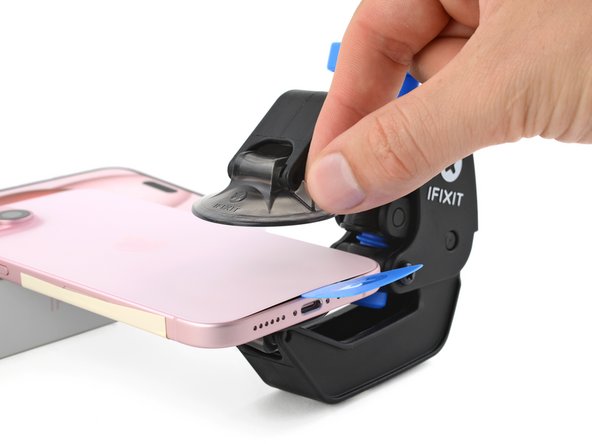
Pull the Anti-Clamp's blue handle backward to unlock the arms.
-
With the back glass facing up, slide the arms over the right edge of your phone, with one suction cup on the back glass and the other on the screen. Center the suction cups near the bottom edge.
-
Support your phone so it rests level while between the Anti-Clamp's arms—a small box works well.
-
Squeeze the cups together to create suction.
-
-
-
Pull the blue handle forward to lock the arms.
-
Turn the handle one full turn (360 degrees) or until the cups start to stretch.
-
As the cups stretch, make sure they stay vertically aligned with each other. If they keep slipping, remove the Anti-Clamp and apply tape for the cups to stick to.
-
-
-
Use a hair dryer or heat gun to heat the bottom edge of the back glass until it's hot to the touch.
-
Wait up to a minute for the adhesive to separate and a gap to form between the back glass and the frame.
-
Insert an opening pick into the gap.
-
Remove the Anti-Clamp using the pull tabs on the suction cups.
-
Skip the next two steps.
-
-
-
Use a hair dryer or heat gun to heat the bottom edge of the back glass until it's hot to the touch.
-
-
-
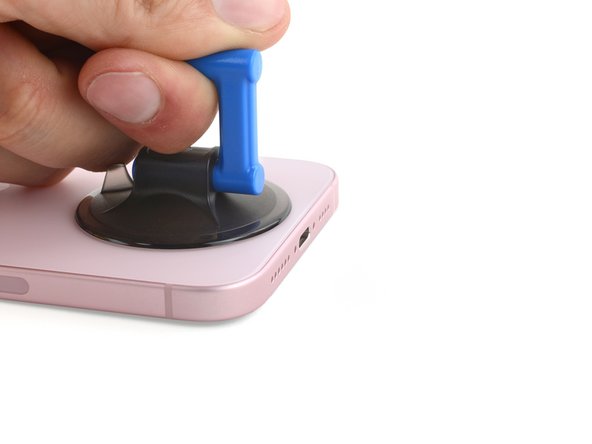
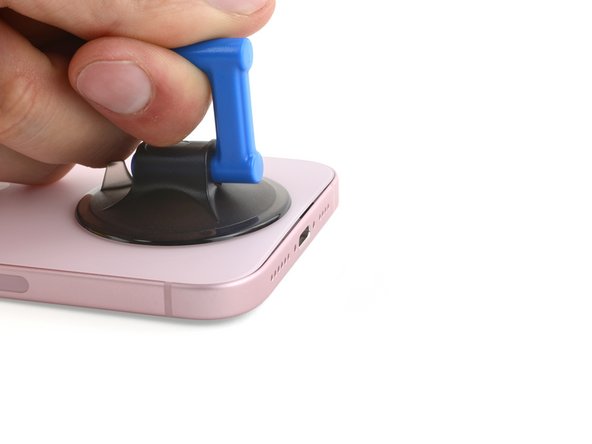
Apply a suction handle to the bottom edge of the back glass.
-
Pull up on the handle with a strong, steady force to create a gap between the back glass and the frame.
-
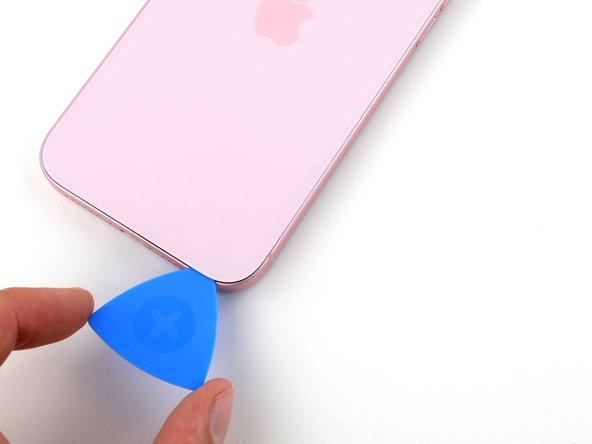
Insert the tip of an opening pick into the gap.
-
-
-
There's a delicate cable connecting the back glass to the phone, right next to the volume up button. Don't insert your pick here to avoid slicing the cable.
-
There are multiple spring contacts around the perimeter of the phone. Be extra careful not to insert your pick deeper than suggested in each step to avoid bending these contacts.
-
-
-
Slide your pick back and forth along the bottom edge to separate the adhesive.
-
Leave your pick inserted in the bottom right corner to prevent the adhesive from re-sealing.
-
-
-
-
Heat the right edge of the back glass until it's hot to the touch.
-
-
-
Rotate your pick around the bottom right corner and slide it halfway up the right edge or until you feel a hard stop at a clip securing the back glass.
-
Leave this pick inserted to prevent the adhesive from resealing.
-
-
-
Heat the left edge of the back glass until it's hot to the touch.
-
-
-
Insert a second opening pick at the bottom edge.
-
Rotate the second pick around the bottom left corner.
-
Slide this pick up to the top left corner to separate the adhesive.
-
Leave this pick inserted to prevent the adhesive from resealing.
-
-
-
Heat the top edge of the back glass until it's hot to the touch.
-
-
-
Rotate your second opening pick around the top left corner and slide it to the top right corner to separate the adhesive.
-
Leave this pick in place to prevent the adhesive from resealing.
-
-
-
Heat the top right corner of the back glass until it's hot to the touch.
-
-
-
Rotate the second opening pick around the top right corner and slide it to the volume up button to separate the adhesive.
-
-
-
Gently swing open the back glass to the right of the phone.
-
Rest the back glass against a raised surface so it doesn't strain the cable.
-
-
-
Use a tri-point Y000 driver to remove the two 1.3 mm-long screws securing the lower connector cover.
-
-
-
Use tweezers to slide the cover toward the top of the phone to unlatch it from the logic board.
-
Remove the cover.
-
-
-
Hold the back glass upright with one hand and rotate the bottom edge to the left to reveal the battery press connector just below the volume buttons.
-
Use the tip of an opening pick to pry up and disconnect the battery press connector from the logic board.
-
-
-
Use your tri-point Y000 driver to remove the 0.9 mm-long screw securing the middle connector cover.
-
-
-
Use the flat end of a spudger or your finger to push the cover toward the bottom of the phone and unclip its top edge.
-
Remove the cover.
-
-
-
Use an opening pick to pry up and disconnect the wireless charging coil and NFC connector.
-
-
-
Remove the back glass.
-
This is a good point to test your repair before sealing up your phone. Temporarily reconnect the battery and back glass, power on your phone, and make sure it works as expected. Power it back down and continue reassembly.
-
Use this guide to reapply adhesive and install your back glass.
-
-
-
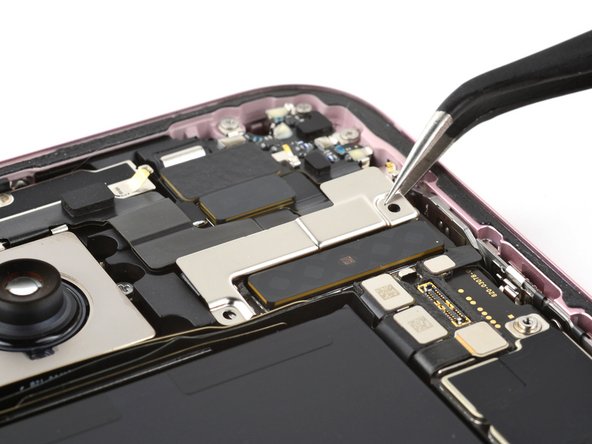
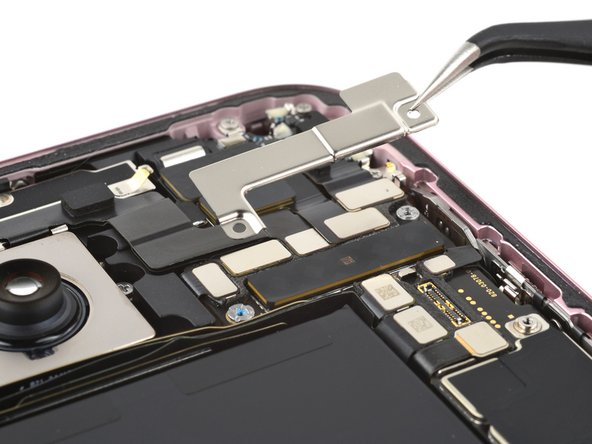
Use your tri-point Y000 driver to remove the two 1.3 mm‑long screws securing the upper connector cover.
-
Remove the cover.
-
-
-
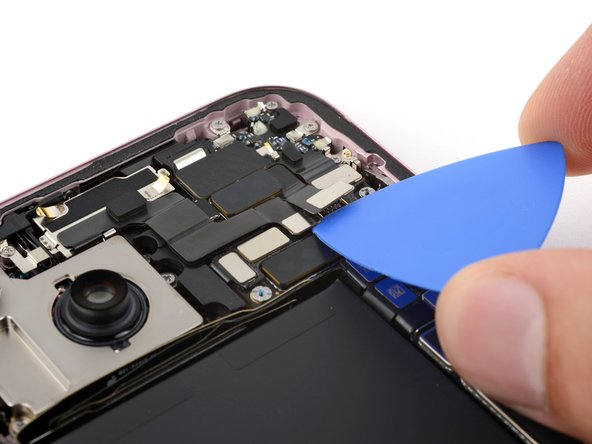
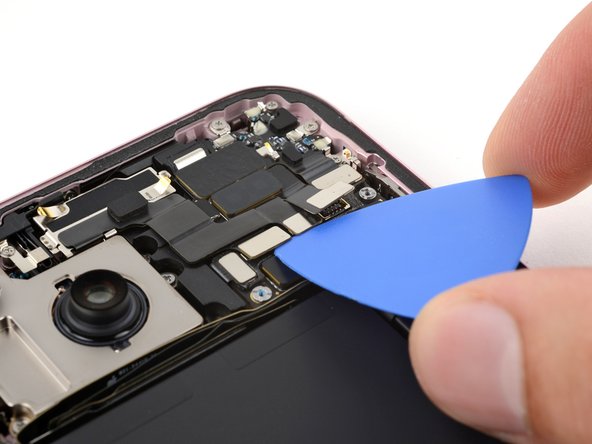
Use the tip of an opening pick to pry up and disconnect the antenna, front sensors, and front camera press connectors (three connectors in total).
-
-
-
Use tweezers or your fingers to pull the front camera and sensors out of their recess in the frame and remove them.
-
-
-
Use the tip of an opening pick to pry up and disconnect the earpiece speaker press connector.
-
-
-
Use a Phillips #000 driver to remove the seven screws securing the earpiece speaker:
-
Five 1.6 mm‑long screws
-
Two 1.3 mm‑long screws
-
-
-
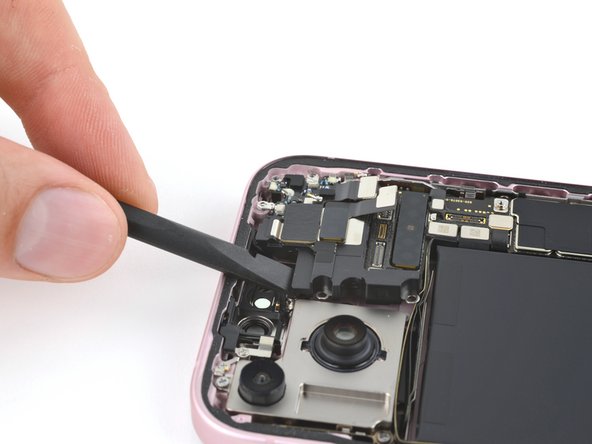
Insert the flat end of a spudger between the top left edge of the earpiece speaker and pry up until you can grab it with your fingers.
-
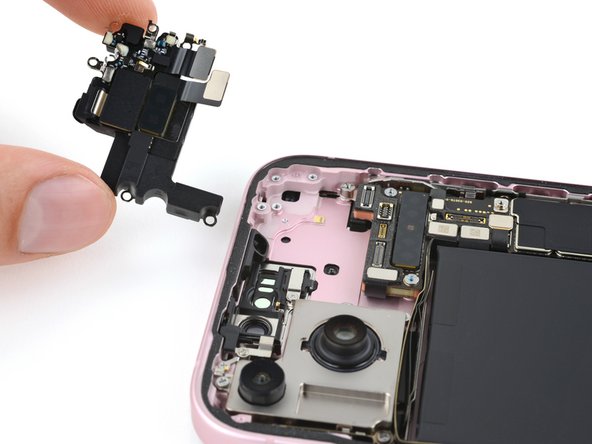
Remove the earpiece speaker.
-
-
-
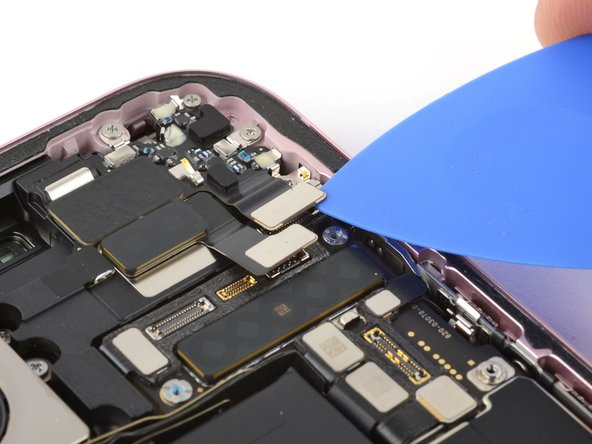
Insert your opening pick between the antenna and the earpiece speaker.
-
Slide the pick under the antenna and pry up to separate the adhesive securing it.
-
Remove the antenna
-
-
-
Remove any leftover adhesive from the earpiece speaker and antenna.
-
Before sticking the antenna to the earpiece speaker, fasten the earpiece speaker to the frame and install the front camera and sensors. Connect all three press connectors.
-
Apply a small piece of thin, double-sided tape, such as Tesa tape, to the antenna.
-
Finally, connect the antenna press connector, then stick it onto the earpiece speaker.
-














To reassemble your phone, follow these instructions in reverse order.
Take your e-waste to an R2 or e-Stewards certified recycler.
Repair didn’t go as planned? Try some basic troubleshooting, or ask our Answers community for help.
To reassemble your phone, follow these instructions in reverse order.
Take your e-waste to an R2 or e-Stewards certified recycler.
Repair didn’t go as planned? Try some basic troubleshooting, or ask our Answers community for help.
Отменить: Я не выполнил это руководство.
Еще один человек закончил это руководство.



