Перейти к основному содержанию
Присоединяйся к сообществу ремонтников - Создай аккаунт

iPod Shuffle 1st Generation Memory Board Replacement

Выберете то, что вам нужно

  1. iPod Shuffle 1st Generation Memory Board Replacement, Hold Switch: шаг 1, изображение 1 из 1
    • Before opening your iPod, ensure that the hold switch is in the locked position.

    Спросите у FixBot

    Добавить комментарий

  2. iPod Shuffle 1st Generation Memory Board Replacement: шаг 2, изображение 1 из 1
    • Use a spudger to pry up the white plastic hold switch.

    Спросите у FixBot

    Добавить комментарий

  3. iPod Shuffle 1st Generation Memory Board Replacement, Casing: шаг 3, изображение 1 из 1
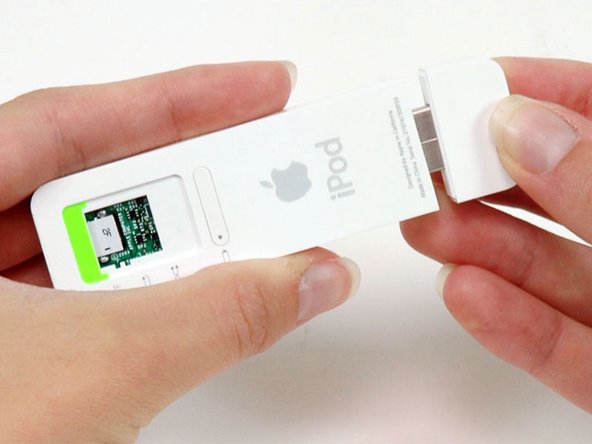
    • If present, remove the cap from the USB port.

    Спросите у FixBot

    Добавить комментарий

  4. iPod Shuffle 1st Generation Memory Board Replacement: шаг 4, изображение 1 из 1
    • The following step can be challenging and time consuming. Be sure to go slowly and have patience to prevent damaging your iPod.

    • Use an Exacto knife to separate the glue holding the USB port on the iPod. Run the knife along the seam between the two sections of the iPod until the glue is separated. Expect to run the knife along this edge 20-30 times before the glue will be entirely freed.

    Спросите у FixBot

    Добавить комментарий

  5. iPod Shuffle 1st Generation Memory Board Replacement: шаг 5, изображение 1 из 1
    • Continue to run the knife around all four edges of the USB port until the glue is released. You may be able to gently wiggle the knife from side to side to help release the glue.

    Спросите у FixBot

    Добавить комментарий

  6. iPod Shuffle 1st Generation Memory Board Replacement: шаг 6, изображение 1 из 1
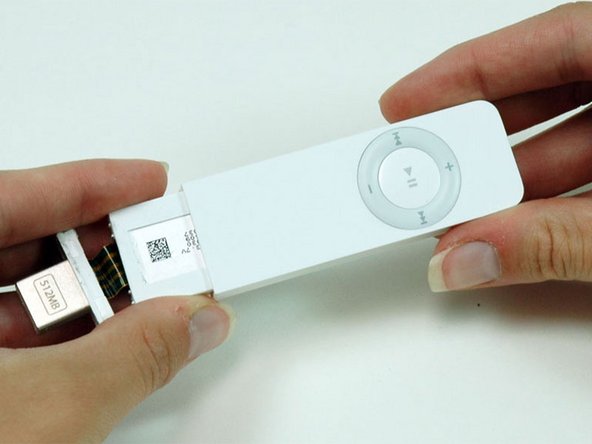
    • Use a spudger to push on the headphone jack and slide the USB port out of its housing.

    • If the USB port doesn't come free, check to make sure all the glue holding the USB port in place has been released. Pulling on the USB port itself is not recommended as there is a fragile ribbon cable that can be ripped if the USB port suddenly comes free.

    Спросите у FixBot

    Добавить комментарий

  7. iPod Shuffle 1st Generation Memory Board Replacement: шаг 7, изображение 1 из 1
    • After the USB port comes free, carefully slide it out of its housing. Don't pull it out too far because there's still a ribbon cable connecting it to the logic board.

    Спросите у FixBot

    Добавить комментарий

  8. iPod Shuffle 1st Generation Memory Board Replacement: шаг 8, изображение 1 из 1
    • Continue to slide the iPod out of its casing by using a spudger to push on the logic board near the headphone jack.

    Спросите у FixBot

    Добавить комментарий

  9. iPod Shuffle 1st Generation Memory Board Replacement: шаг 9, изображение 1 из 1
    • Turn the iPod so that the click wheel is facing up. This will prevent the battery indicator from falling out.

    • If the battery indicator does fall out, don't forget to replace it prior to reassembling the iPod. Getting the battery indicator back in place can be tricky. You'll have to slide it in from the end of the iPod's casing and get it to fall into its slot in the casing.

    • Slide the iPod out of its casing.

    Спросите у FixBot

    Добавить комментарий

  10. iPod Shuffle 1st Generation Memory Board Replacement, USB Port: шаг 10, изображение 1 из 1
    • Use a spudger to flip up the black plastic tab holding the USB port ribbon in place. The black tab will rotate up 90 degrees, releasing the ribbon cable.

    Спросите у FixBot

    Добавить комментарий

  11. iPod Shuffle 1st Generation Memory Board Replacement: шаг 11, изображение 1 из 1
    • Carefully peel the yellow USB ribbon up from the battery.

    Спросите у FixBot

    Добавить комментарий

  12. iPod Shuffle 1st Generation Memory Board Replacement: шаг 12, изображение 1 из 1
    • Slide the USB ribbon out of its connector.

    • Lift the USB port and detached ribbon cable out of the iPod.

    Спросите у FixBot

    Добавить комментарий

  13. iPod Shuffle 1st Generation Memory Board Replacement, Battery & Logic Board: шаг 13, изображение 1 из 1
    • Gently pull back the white plastic framework to free the left edge of the logic board. Pull up on the logic board slightly to prevent the logic board from falling back into place.

    Спросите у FixBot

    Добавить комментарий

  14. iPod Shuffle 1st Generation Memory Board Replacement: шаг 14, изображение 1 из 1
    • Repeat the same procedure on the opposite side to free the logic board from the white plastic casing.

    Спросите у FixBot

    Добавить комментарий

  15. iPod Shuffle 1st Generation Memory Board Replacement: шаг 15, изображение 1 из 1
    • Lift the logic board up to disconnect it from the memory board beneath. Don't remove the logic board from the iPod yet, because it's still connected to the battery.

    Спросите у FixBot

    Добавить комментарий

  16. iPod Shuffle 1st Generation Memory Board Replacement: шаг 16, изображение 1 из 1
    • Turn the iPod over and use your finger to push the battery through the hole in the casing. The battery is attached to the plastic framework with a mild adhesive.

    • Lift the battery and logic board out of the iPod.

    Спросите у FixBot

    Добавить комментарий

  17. iPod Shuffle 1st Generation Memory Board Replacement, Memory Board: шаг 17, изображение 1 из 1
    • Peel up the translucent tape securing the memory board to the edge of the white plastic framework. It is only necessary to peel up the tape on one side, as the other side will be freed while removing the memory board.

    Спросите у FixBot

    Добавить комментарий

  18. iPod Shuffle 1st Generation Memory Board Replacement: шаг 18, изображение 1 из 1
    • Lift the memory board out of the framework and peel the tape off the other side of the framework.

    • The white plastic framework is not very strong. Be careful not to exert too much force on the thin plastic arm when peeling off the tape.

    Спросите у FixBot

    Добавить комментарий

Заключение

To reassemble your device, follow these instructions in reverse order.

Отменить: Я не выполнил это руководство.

6 человек успешно провели ремонт по этому руководству.

iRobot

Участник с: 09/24/09

1 Репутация

Автор 636 руководств

1 Комментарий к руководству

What an excellent piece of instructional documentation! I have a friend who edits mainframe system operational manuals for system maintenance. I'll share it with them.

WJIM - Ответить Поделиться

Добавить комментарий

Статистика просмотров:

За последние 24 часов: 1

За последние 7 дней: 16

За последние 30 дней: 75

За всё время: 13,202