Перейти к основному содержанию
Присоединяйся к сообществу ремонтников - Создай аккаунт

Выберете то, что вам нужно

Эта разборка - неруководство по ремонту. Чтобы отремонтировать Picstart Plus Development Programmer, воспользуйтесь нашим сервисным руководством.

    1. Picstart Plus Development Programmer Teardown, Picstart Plus Development Programmer Teardown: шаг 1, изображение 1 из 3 Picstart Plus Development Programmer Teardown, Picstart Plus Development Programmer Teardown: шаг 1, изображение 2 из 3 Picstart Plus Development Programmer Teardown, Picstart Plus Development Programmer Teardown: шаг 1, изображение 3 из 3
      • Remove 4 Phillips screws located on the back side of the holding plate.

      • After the screws are removed, remove the case of the development programmer.

      • Carefully take out the circuit board with component side facing up. Put the case aside.

      Спросите у FixBot

      Добавить комментарий

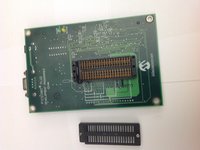
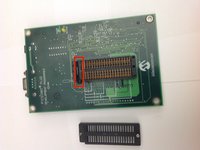
    2. Picstart Plus Development Programmer Teardown: шаг 2, изображение 1 из 2 Picstart Plus Development Programmer Teardown: шаг 2, изображение 2 из 2
      • Disconnect the microcontroller module from the main board using a spudger or a similar tool.

      • Set the microcontroller module aside.

      Спросите у FixBot

      Добавить комментарий

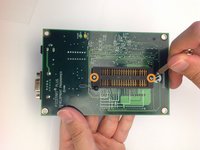
    3. Picstart Plus Development Programmer Teardown: шаг 3, изображение 1 из 2 Picstart Plus Development Programmer Teardown: шаг 3, изображение 2 из 2
      • Flip over the mainboard so that the component side is facing down and remove the small Pan head screws that holds the cover of the IC holder

      • Remove the cover of the IC holder.

      Спросите у FixBot

      Добавить комментарий

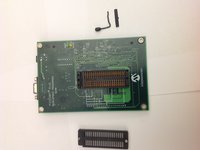
    4. Picstart Plus Development Programmer Teardown: шаг 4, изображение 1 из 2 Picstart Plus Development Programmer Teardown: шаг 4, изображение 2 из 2
      • Remove the IC holder lever along with the small metal plate that covers the lever.

      • Set the lever and the lever cover aside.

      Спросите у FixBot

      Добавить комментарий

    5. Picstart Plus Development Programmer Teardown: шаг 5, изображение 1 из 1
      • Congratulations! You have completely dismantled the PICSTART Plus Development Programmer!

      • All the extracted components are shown in the picture.

      Спросите у FixBot

      Добавить комментарий

Brad

Участник с: 11/17/13

656 Репутация

Автор 2 руководств

0 Комментарии к руководству

Добавить комментарий

Статистика просмотров:

За последние 24 часов: 6

За последние 7 дней: 13

За последние 30 дней: 49

За всё время: 3,130