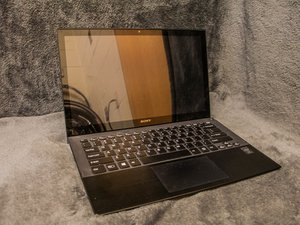
I steped on my vaio pro 13. The Display is not broken but there are imprints on the panel. So I want to replace the display. The problem is there are no screws around the display. Have you an idea how i can replace the display?
Прокрутите эту тему, чтобы найти подходящее место для этого комментария. Затем нажмите "Прикрепить комментарий к этому сообщению", чтобы переместить его.
1 Комментарий
I need help my Sony vaio pro 13 svp132a1cm. the power button light is dim and charging light is on but it won’t turn on I have tried everything if any one can help that will be great
Because the touch/lcd is fixed to the lid with double-sided tape around the edges, I found it impossible to remove the unit without cracking the extremely brittle touchscreen layer. However, once the touch/lcd was out, it was quite easy to fit the new unit, fixing it in place using replacement tape. I wouldn't touch this unit again, but if I were forced to do this again, esp where I needed to preserve the existing display, I would first remove the whole lid from the base - remove the bezel at bottom (clicks apart) - undo the two screws at the bottom of the touch/lcd which holds the unit in place along the bottom edge - part the lid from the touch/lcd along the side seam - maybe prying it open just a few millimeters with a suitable plastic tool, then separate the tape from the touch/lcd and lid using a sharp blade before moving on to the next section, working slowly around the unit until it is ready to lift out of the lid.
Прокрутите эту тему, чтобы найти подходящее место для этого комментария. Затем нажмите "Прикрепить комментарий к этому сообщению", чтобы переместить его.
1 Комментарий:
Apparently this display could be treated like a "glued in" cellphone display where one should use a heat gun or hair drier to soften the glue before removal.
Hi, here are some photos of the screen/lcd cable replacement that we have recently completed for our customer
Ok so some very important points THIS IS AN ALUMINIUM FRAME!!!!!!!!!! So be extremely careful when undertaking this repair!
Use a heat gun/hair dryer at low settings to heat up the glue that is used to attach the aluminium bezel, this will help to separate the glue and help to keep the bezel from bending as much as possible. GO SLOW, trust me you do not want a bent and buckled bezel as it will be nigh on impossible to fix properly and you will end up having to buy a replacement!
After you have heated up the glue use a pry PLASTIC!!!! pry tool/credit card to slowly slide under the bezel, we started at the top to minimise risk to any wires at the bottom area where we expect to see lvds wires, wifi wires etc.
We then moved all the way around both sides and freed the majority of the bezel, then we were able to open the bezel down and away from the LCD slightly to see the glue at the bottom part of the bezel and freed that gently with a razor, now that we could see the wires it was safe to do as knew we couldnt cut any wirers GO CAREFUL and you will be fine.
Below are some pictures of the bezel removed and you will clearly see that ours is still slightly bent but after using high grade 4965 TEAS double sided tape and some pressure clamps the finished job is 99% so very happy
Прокрутите эту тему, чтобы найти подходящее место для этого комментария. Затем нажмите "Прикрепить комментарий к этому сообщению", чтобы переместить его.
Прокрутите эту тему, чтобы найти подходящее место для этого комментария. Затем нажмите "Прикрепить комментарий к этому сообщению", чтобы переместить его.
Прокрутите эту тему, чтобы найти подходящее место для этого комментария. Затем нажмите "Прикрепить комментарий к этому сообщению", чтобы переместить его.
Прокрутите эту тему, чтобы найти подходящее место для этого комментария. Затем нажмите "Прикрепить комментарий к этому сообщению", чтобы переместить его.
5 Комментариев:
How do you actually take it off, as I cannot seem to see any screws to be able to take it off
I need help my Sony vaio pro 13 svp132a1cm. the power button light is dim and charging light is on but it won’t turn on I have tried everything if any one can help that will be great.
Прокрутите эту тему, чтобы найти подходящее место для этого комментария. Затем нажмите "Прикрепить комментарий к этому сообщению", чтобы переместить его.

 2
2  1
1 




1 Комментарий
I need help my Sony vaio pro 13 svp132a1cm. the power button light is dim and charging light is on but it won’t turn on I have tried everything if any one can help that will be great
из Hasnain