
ΠŸΠ΅Ρ€Π΅ΠΉΡ‚ΠΈ ΠΊ основному ΡΠΎΠ΄Π΅Ρ€ΠΆΠ°Π½ΠΈΡŽ
ΠŸΡ€ΠΈΡΠΎΠ΅Π΄ΠΈΠ½ΡΠΉΡΡ ΠΊ сообщСству Ρ€Π΅ΠΌΠΎΠ½Ρ‚Π½ΠΈΠΊΠΎΠ² - Π‘ΠΎΠ·Π΄Π°ΠΉ Π°ΠΊΠΊΠ°ΡƒΠ½Ρ‚

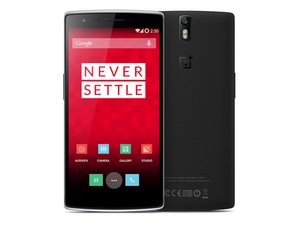
Launched in spring of 2014, the OnePlus One packs a 5.5" display and runs the Android-based CyanogenMod 12S operating system. Model "ONE A0001."

Phone got wet touch screen problems

My OPO had a quick (1 second)drop in a toilet. It was in a protective case, inside of a leather holster. I wasn't wearing a belt and the holster slipped off of my pants. When I pulled it out and wiped it off with a paper towel, the screen was totally unresponsive. I was away from home and there was no rice to be found. I tried to shut it off but when I pushed the power button, I couldn't press shut down or restart on the display. (I later discovered that continually holding the power button shuts off the phone.) I put it in a bag of rice overnight and for the most part, it worked. Now, when I scroll the screen (like through my contacts) it's very touchy, opening the contact that my finger landed on to start the scroll over and over. I've tried adjusting the 'Touch & Hold Delay' but it makes no difference. Sometimes, it won't recognize when I try to make a selection near the bottom of the screen so I have to rotate my phone to landscape. But when I use the onscreen keyboard at the bottom (in portrait) everything works except when I press the 'a' key, it often pushes the shift key as well. Does this sound like a problem that replacing the screen would fix? It's irritating, but right now I can live with it.

ΠžΡ‚Π²Π΅Ρ‚ Π½Π° этот вопрос Π£ мСня Ρ‚Π° ΠΆΠ΅ ΠΏΡ€ΠΎΠ±Π»Π΅ΠΌΠ°

Π­Ρ‚ΠΎ Ρ…ΠΎΡ€ΠΎΡˆΠΈΠΉ вопрос?

Π‘Ρ‡Π΅Ρ‚ 3
Π”ΠΎΠ±Π°Π²ΠΈΡ‚ΡŒ ΠΊΠΎΠΌΠΌΠ΅Π½Ρ‚Π°Ρ€ΠΈΠΉ

1 ΠΎΡ‚Π²Π΅Ρ‚

НаиболСС ΠΏΠΎΠ»Π΅Π·Π½Ρ‹ΠΉ ΠΎΡ‚Π²Π΅Ρ‚

Most people think of rice when their phone comes in contact with water. The truth is rice does not do much for a water damaged phone. The best thing to do when your phone comes in contact with water is to disassemble the phone and remove the battery as soon as possible. Then clean the motherboard and other parts with 90% or higher isopropyl alcohol and a small soft bristle brush, toothbrush works well. Doing this helps remove minerals left behind by water when it dries. If the minerals from the water are not cleaned from the motherboard and other parts then corrosion, or possible shorting may end up damaging the components inside the phone.

Cleaning with isopropyl alcohol may help fix your issues with the digitizer not functioning properly. As there may be some corrosion present on the digitizers cable end or its connection on the logic board leading to a poor connection.

If cleaning with isopropyl alcohol does not help you may need to replace the digitizer eventually.

Also there are many instructional videos on sites like YouTube that will show you how to clean your water damaged phone with isopropyl alcohol. Hope this helps and best of luck.

Π‘Ρ‹Π» Π»ΠΈ этот ΠΎΡ‚Π²Π΅Ρ‚ ΠΏΠΎΠ»Π΅Π·Π΅Π½?

Π‘Ρ‡Π΅Ρ‚ 3
Π”ΠΎΠ±Π°Π²ΠΈΡ‚ΡŒ ΠΊΠΎΠΌΠΌΠ΅Π½Ρ‚Π°Ρ€ΠΈΠΉ

Π”ΠΎΠ±Π°Π²ΡŒΡ‚Π΅ свой ΠΎΡ‚Π²Π΅Ρ‚

frank manerchia Π±ΡƒΠ΄Ρƒ Π²Π΅Ρ‡Π½ΠΎ Π±Π»Π°Π³ΠΎΠ΄Π°Ρ€Π΅Π½.
Бтатистика просмотров:

Π—Π° послСдниС 24 часов: 0

Π—Π° послСдниС 7 Π΄Π½Π΅ΠΉ: 4

Π—Π° послСдниС 30 Π΄Π½Π΅ΠΉ: 32

Π—Π° всё врСмя: 27,218