
ΠŸΠ΅Ρ€Π΅ΠΉΡ‚ΠΈ ΠΊ основному ΡΠΎΠ΄Π΅Ρ€ΠΆΠ°Π½ΠΈΡŽ
ΠŸΡ€ΠΈΡΠΎΠ΅Π΄ΠΈΠ½ΡΠΉΡΡ ΠΊ сообщСству Ρ€Π΅ΠΌΠΎΠ½Ρ‚Π½ΠΈΠΊΠΎΠ² - Π‘ΠΎΠ·Π΄Π°ΠΉ Π°ΠΊΠΊΠ°ΡƒΠ½Ρ‚

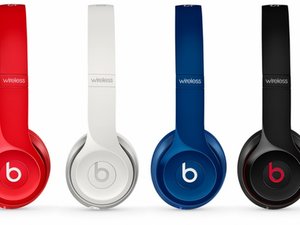
Beats Solo 2 Wireless headphones are a wireless version of the Beats Solo 2. Released in 2014. Model number: MHNG2AM/A.

Beats won't turn on

Whenever I try to turn on my beats solo 2 wireless, the lights just all flash white and followed by one red light, and then the same thing 2 more times. I am not trying to reset my beats when I am turning them on, and I tried charging my beats to full battery, and when I turn my beats on I know I am not holding the power button to long or to short. Apple won't take my headphones to repair since they are 5 days over the warranty... Please help.

ΠžΡ‚Π²Π΅Ρ‚ Π½Π° этот вопрос Π£ мСня Ρ‚Π° ΠΆΠ΅ ΠΏΡ€ΠΎΠ±Π»Π΅ΠΌΠ°

Π­Ρ‚ΠΎ Ρ…ΠΎΡ€ΠΎΡˆΠΈΠΉ вопрос?

Π‘Ρ‡Π΅Ρ‚ 6
5 ΠšΠΎΠΌΠΌΠ΅Π½Ρ‚Π°Ρ€ΠΈΠ΅Π²

I have the same issue. Did you get any solution to it ?

ΠΈΠ·

Hello,

Yesterday I was at the gym and my Beats Solo Wireless 2 Active turned off out of nowhere. I turned them back on but they would turn off again within 10-45 seconds each time. I plugged them in to charge but the LED lights indicate that the battery is 100% full. I have reset them multiple times. I now can get them to turn on approximately 1 in every 5 times that I press the power button.

Any suggestions?

Thanks

ΠΈΠ·

I have same problem after a few weeks I repaired my solo 2, I also had power off problem, so I had to plug 3.5mm cord to turn it off! Is it about short circuit or any software problem?

ΠΈΠ·

same problem too.

ΠΈΠ·

I found someone in America who repairs them start price $120 or they swap you their pair they have aready to go if they go over repair price they call you.

support@joesge.com look up his youtube channle.

I have also narrow done to 5 issues

1charge port

2battery

3power button pbc

4main wires

5aux port

ΠΈΠ·

Π”ΠΎΠ±Π°Π²ΠΈΡ‚ΡŒ ΠΊΠΎΠΌΠΌΠ΅Π½Ρ‚Π°Ρ€ΠΈΠΉ

8 ΠžΡ‚Π²Π΅Ρ‚ΠΎΠ²

НаиболСС ΠΏΠΎΠ»Π΅Π·Π½Ρ‹ΠΉ ΠΎΡ‚Π²Π΅Ρ‚

I have the beats solo wireless 2 and for some reason I could not get the headphones to powers onβ€”even after like 30 resets. I think this is some kind of glitch in the beats headphone themselves. I’ve noticed they will not turn on after I use the aux chord for a wired connection.

However, I have been able to successfully get them to power up twice with this method.

  1. Plug them into your laptop using the USB chord **Note: I used the beats one that was included. Also I was on the beats updater website (you will need to download the software). Each time the updater was able to identify my headphonesβ€”not sure if this was part of the solution, but i did do this each time.
  2. Also plug in your aux chord into your computer and the headphones.
  3. While plugged up hold the power button for 3 seconds. **Note: You may be able to skip thisβ€”I’m only including this because this is what I didβ€”not sure if it impacted it or not.
  4. At the same time remove BOTH the aux chord and the USB chord from the headphones.
  5. Lastly, blow into the the Auxillary port. β€”Again may be able to skip β€”but I did do this both times.

Π‘Ρ‹Π» Π»ΠΈ этот ΠΎΡ‚Π²Π΅Ρ‚ ΠΏΠΎΠ»Π΅Π·Π΅Π½?

Π‘Ρ‡Π΅Ρ‚ 3

4 ΠšΠΎΠΌΠΌΠ΅Π½Ρ‚Π°Ρ€ΠΈΠ΅Π²:

Worked for me! Thanks.

ΠΈΠ·

It worked for me too. I tryed two times only conecting and desconecting the cables and didn't work. Then I opened this https://www.beatsbydre.com/support/how-t... and i tried again with the website opened and worked! Thanks

ΠΈΠ·

Cool. Thanks it worked for me on the first try. Prior to this I tried resetting mine multiple times by holding the power button for 10 seconds then letting go. White lights & then the red light would flash 3 times but still wouldn't power on. (note: I didn't use the beats app at all)

ΠΈΠ·

Thank you so much. It worked

ΠΈΠ·

Π”ΠΎΠ±Π°Π²ΠΈΡ‚ΡŒ ΠΊΠΎΠΌΠΌΠ΅Π½Ρ‚Π°Ρ€ΠΈΠΉ

Fixed mine. I have a first-gen wireless. I tried these combinatons:

1. power button + b-button 120s or 10s, usb-plugged in or not

2. power button + volume down 120s or 10s, usb-plugged in or not

3. power button + volume up 120s or 10s, usb-plugged in or not

The only combo that worked for me was: power button + volume up 120s usb-plugged-in. Spend about 2 hours researching and trying out all combinations.

Hope it will work for you too.

ps. also tried

- plugging-in/unplugging 3.5mm audio cable (didn't work)

- tried to update firmware (new computer usb-c couldn't even detect the headphones)

- reset using beats support page instructions (didn't work)

Π‘Ρ‹Π» Π»ΠΈ этот ΠΎΡ‚Π²Π΅Ρ‚ ΠΏΠΎΠ»Π΅Π·Π΅Π½?

Π‘Ρ‡Π΅Ρ‚ 2

3 ΠšΠΎΠΌΠΌΠ΅Π½Ρ‚Π°Ρ€ΠΈΠ΅Π²:

Thanks a lot. Worked for me.

ΠΈΠ·

Thank you! This worked for me!

I had just used the AUX to plug in to my Switch after not using anything but Bluetooth to connect to my phone for years.

Holding up and power for 120s (yep, two full minutes) solved the problem. At least for now.

It did quickly power off for a second.

ΠΈΠ·

I got a new pair of Dr Dre Beats Solo twos for some reason the fuel lights are on and they won't come off I've tried everything to turn them off and they won't turn off can you please help me with this situation

ΠΈΠ·

Π”ΠΎΠ±Π°Π²ΠΈΡ‚ΡŒ ΠΊΠΎΠΌΠΌΠ΅Π½Ρ‚Π°Ρ€ΠΈΠΉ

You have a short circuit on the wires in the left side. It's a group of 5 wires coming from the PCB to the 3.5 mm connector. Those wires get smashed by the vibration and start to short or simple opens killing a channel.

It is a though job, but you have to open the left side, top and bottom, loose the cables (glued and soldered) and try to isolate the wires making sure they aren't broken.

It is a micro connector with 5 wires. The red one is the control that probably is shorting.

blue and black are pos left and right and green and gold are the neg left and right.

Π‘Ρ‹Π» Π»ΠΈ этот ΠΎΡ‚Π²Π΅Ρ‚ ΠΏΠΎΠ»Π΅Π·Π΅Π½?

Π‘Ρ‡Π΅Ρ‚ 2

1 ΠšΠΎΠΌΠΌΠ΅Π½Ρ‚Π°Ρ€ΠΈΠΉ:

I am sure this is what is happening to mine. I have opened up the headset completely and inspected the wires but they all look OK. I also tried to separate all wires so they are not touching. Once in a while I can get the headset to turn on, but if I move/touch anything at all it goes off again (which is why I am convinced it is a short as you suggested). I have tried to isolate what I move that turns it off to id the short, but no success. The wires seem to be inserted/soldered into the chip, and not sure I can pull them out without damaging and don't think I could get them back in....everything is very small. Any other advice and exactly what am I looking for? Thanks!

ΠΈΠ·

Π”ΠΎΠ±Π°Π²ΠΈΡ‚ΡŒ ΠΊΠΎΠΌΠΌΠ΅Π½Ρ‚Π°Ρ€ΠΈΠΉ

So I had a similar problem, my beats would only stay on if connected to the USB. Basically I thought I needed a new battery, so I bought for 20 dollars on eBay. But, I wanted to see if I can open them up and make sure I can do it myself. Very easy. Right ear cup, pry it open but try not to damage anything, and connect and reconnect the battery.

Π‘Ρ‹Π» Π»ΠΈ этот ΠΎΡ‚Π²Π΅Ρ‚ ΠΏΠΎΠ»Π΅Π·Π΅Π½?

Π‘Ρ‡Π΅Ρ‚ 2

1 ΠšΠΎΠΌΠΌΠ΅Π½Ρ‚Π°Ρ€ΠΈΠΉ:

When you connected and reconnected the battery, did you take the whole battery out or just disconnected the cord

ΠΈΠ·

Π”ΠΎΠ±Π°Π²ΠΈΡ‚ΡŒ ΠΊΠΎΠΌΠΌΠ΅Π½Ρ‚Π°Ρ€ΠΈΠΉ

Hi Maks,

Have you tried to reset them?

The Beats support page has a KB page about it.

https://www.beatsbydre.com/support/how-t...

I hope this helps.

Π‘Ρ‹Π» Π»ΠΈ этот ΠΎΡ‚Π²Π΅Ρ‚ ΠΏΠΎΠ»Π΅Π·Π΅Π½?

Π‘Ρ‡Π΅Ρ‚ 0

5 ΠšΠΎΠΌΠΌΠ΅Π½Ρ‚Π°Ρ€ΠΈΠ΅Π²:

You haven't found anything yet? Besides the reset thingy

ΠΈΠ·

Did anyone find a solution to this? I have the same problem and it is not working, it's my first time trying to connect to the wireless mode as well.

ΠΈΠ·

I actually had the same problem I went on YouTube and figured out how to open them up unhooked the battery for about 5 minutes hooked it back up and they worked like new...

ΠΈΠ·

I actually had the same problem.. went on YouTube figured out how to open them up... which is very carefully because on the videos they don't tell you there's a wire connected to the side cap.. then I unhooked the battery for about 5 minutes hooked it back up and wouldn't you know it those suckers are working like new

ΠΈΠ·

The thing that John did, did not help mine

ΠΈΠ·

Π”ΠΎΠ±Π°Π²ΠΈΡ‚ΡŒ ΠΊΠΎΠΌΠΌΠ΅Π½Ρ‚Π°Ρ€ΠΈΠΉ

Omggg I found a solution

when it flashes keep pressing the power button till it flashes all light again then go to your phone connect it and it WORK!!!! Omfggg I am so happy

Π‘Ρ‹Π» Π»ΠΈ этот ΠΎΡ‚Π²Π΅Ρ‚ ΠΏΠΎΠ»Π΅Π·Π΅Π½?

Π‘Ρ‡Π΅Ρ‚ 0
Π”ΠΎΠ±Π°Π²ΠΈΡ‚ΡŒ ΠΊΠΎΠΌΠΌΠ΅Π½Ρ‚Π°Ρ€ΠΈΠΉ

Like when it press all white light then red light or a single light keep pressing it till all white light flash

maybe you see a double white light pop up and pause

try the volume down and power button press and hold for 10 sec again and then let it flash them lights and press power button again and it will flash all white light for connect and go connect with your phone and it work

mine work omfgg

Π‘Ρ‹Π» Π»ΠΈ этот ΠΎΡ‚Π²Π΅Ρ‚ ΠΏΠΎΠ»Π΅Π·Π΅Π½?

Π‘Ρ‡Π΅Ρ‚ 0
Π”ΠΎΠ±Π°Π²ΠΈΡ‚ΡŒ ΠΊΠΎΠΌΠΌΠ΅Π½Ρ‚Π°Ρ€ΠΈΠΉ

My beats solo 2 wireless won’t turn on at all it only turns on when I’m the charging cable but as soon as I take it off and try to turn it on it doesn’t come on I tried resetting it but the headphones won’t even turn on literally

Π‘Ρ‹Π» Π»ΠΈ этот ΠΎΡ‚Π²Π΅Ρ‚ ΠΏΠΎΠ»Π΅Π·Π΅Π½?

Π‘Ρ‡Π΅Ρ‚ 0
Π”ΠΎΠ±Π°Π²ΠΈΡ‚ΡŒ ΠΊΠΎΠΌΠΌΠ΅Π½Ρ‚Π°Ρ€ΠΈΠΉ

Π”ΠΎΠ±Π°Π²ΡŒΡ‚Π΅ свой ΠΎΡ‚Π²Π΅Ρ‚

Maks McMuffin Π±ΡƒΠ΄Ρƒ Π²Π΅Ρ‡Π½ΠΎ Π±Π»Π°Π³ΠΎΠ΄Π°Ρ€Π΅Π½.
Бтатистика просмотров:

Π—Π° послСдниС 24 часов: 1

Π—Π° послСдниС 7 Π΄Π½Π΅ΠΉ: 6

Π—Π° послСдниС 30 Π΄Π½Π΅ΠΉ: 43

Π—Π° всё врСмя: 44,396

