ΠŸΠ΅Ρ€Π΅ΠΉΡ‚ΠΈ ΠΊ основному ΡΠΎΠ΄Π΅Ρ€ΠΆΠ°Π½ΠΈΡŽ
ΠŸΡ€ΠΈΡΠΎΠ΅Π΄ΠΈΠ½ΡΠΉΡΡ ΠΊ сообщСству Ρ€Π΅ΠΌΠΎΠ½Ρ‚Π½ΠΈΠΊΠΎΠ² - Π‘ΠΎΠ·Π΄Π°ΠΉ Π°ΠΊΠΊΠ°ΡƒΠ½Ρ‚

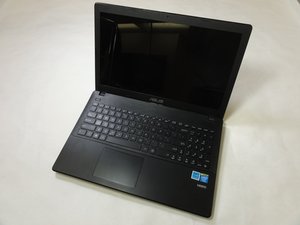
ASUS D550MA-DS01 β€” это Π½ΠΎΡƒΡ‚Π±ΡƒΠΊ, Π²Ρ‹ΠΏΡƒΡ‰Π΅Π½Π½Ρ‹ΠΉ ΠΊΠΎΠΌΠΏΠ°Π½ΠΈΠ΅ΠΉ ASUS Π² 2013 Π³ΠΎΠ΄Ρƒ.

ASUS Laptop boot problems

I have an asus laptop. I got windows 8.1 on it. One day, when i tried to turn it on, it said preparing automatic repair, followed by a black screen(but it was still on). I left it on for 2 days, and decided to manually shut it down. The problem persisted. One day, after many tries, i got access to it. Then i tried setting up windows 7, in hope that it was just a problem with windows 8.1. It wasn't. When windows 7 was installing, it needed to restart. When it did, it took me to a screen with the boot manager, now having two options. Windows setup, and windows 8.1. When it went to that screen, I let it automatically go on windows setup, which was highlighted. It froze at the screen where it said starting windows with the logo. After waiting a while, i manually shut it down. Now, i couldnt access anythingn except the "aptio setup utility" when i press f2 on boot. Ive tried booting it with a flash drive(i have no discs) that had windows 8.1 setup. It didnt boot it. I also tried with windows 7 and same outcome. I was able to boot a linux mint cinnamon. It didnt work for any other os i tried. When i tried to boot with windows 8.1, 7, and linux i burned the iso to the flashdrive. If anyone knows the problem, please tell me. I have been trying to solve this for over a month

ΠžΡ‚Π²Π΅Ρ‚ Π½Π° этот вопрос Π£ мСня Ρ‚Π° ΠΆΠ΅ ΠΏΡ€ΠΎΠ±Π»Π΅ΠΌΠ°

Π­Ρ‚ΠΎ Ρ…ΠΎΡ€ΠΎΡˆΠΈΠΉ вопрос?

Π‘Ρ‡Π΅Ρ‚ 2
1 ΠšΠΎΠΌΠΌΠ΅Π½Ρ‚Π°Ρ€ΠΈΠΉ

White screen , aption utility

ΠΈΠ·

Π”ΠΎΠ±Π°Π²ΠΈΡ‚ΡŒ ΠΊΠΎΠΌΠΌΠ΅Π½Ρ‚Π°Ρ€ΠΈΠΉ

7 ΠžΡ‚Π²Π΅Ρ‚ΠΎΠ²

НаиболСС ΠΏΠΎΠ»Π΅Π·Π½Ρ‹ΠΉ ΠΎΡ‚Π²Π΅Ρ‚

This sounds like it might have some bad sectors on the HDD. In BIOS you should be able to have it run a check on the health of the HDD.

Π‘Ρ‹Π» Π»ΠΈ этот ΠΎΡ‚Π²Π΅Ρ‚ ΠΏΠΎΠ»Π΅Π·Π΅Π½?

Π‘Ρ‡Π΅Ρ‚ 1

1 ΠšΠΎΠΌΠΌΠ΅Π½Ρ‚Π°Ρ€ΠΈΠΉ:

how do i do the check of health?

ΠΈΠ·

Π”ΠΎΠ±Π°Π²ΠΈΡ‚ΡŒ ΠΊΠΎΠΌΠΌΠ΅Π½Ρ‚Π°Ρ€ΠΈΠΉ

Hi , We need to first fix the Boot Record then check and fix hard drive errors.

1.Make sure you can boot to your Windows 7 installation usb drive.

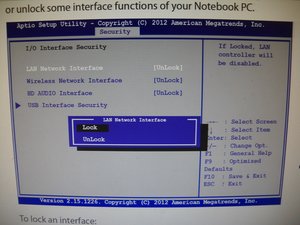
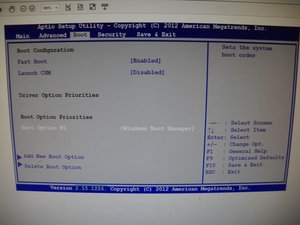
You have to go in bios to security option then disable USB security so it will be able to boot to USB drive, then go to boot options and add New boot option that will be the USB, then make it boot option 1.

Π˜Π·ΠΎΠ±Ρ€Π°ΠΆΠ΅Π½ΠΈΠ΅

2. Restart the computer with the optical disk or USB drive inserted and boot to it. Press any key when prompted to boot to the Windows USB.

3. At the language and keyboard selection screen press Shift+F10 to open a Command Prompt. You should see X=Sources>, now type bootrec /fixmbr, it will say completed successfully. Stay at the command prompt, now on to the check disk

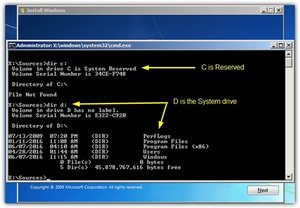
4. What is usually the system C drive may not be here because if there is a system reserved partition it will occupy C instead. To find out type Dir C: and if it says β€œC is System Reserved” try Dir D: and so on until you find the drive with Program Files, Users and Windows folders.

Π˜Π·ΠΎΠ±Ρ€Π°ΠΆΠ΅Π½ΠΈΠ΅

5. Now you know the assigned letter for the system drive you can run Check Disk

At command prompt X=Sources> type the letter of drive you found in previous step, example X=Sources>d:

You should see this now D:\> type chkdsk d: /f

You should see this D:\>chkdsk d: /f then hit enter to fix hard drive

If it says do you want to force dismount answer YES

If all goes well you should now be able to do a clean windows install

Have a great day

Π‘Ρ‹Π» Π»ΠΈ этот ΠΎΡ‚Π²Π΅Ρ‚ ΠΏΠΎΠ»Π΅Π·Π΅Π½?

Π‘Ρ‡Π΅Ρ‚ 0

6 ΠšΠΎΠΌΠΌΠ΅Π½Ρ‚Π°Ρ€ΠΈΠ΅Π²:

OK, so I have the windows 7 installation on my flash drive. I can't boot with it though. Maybe its because I'm dual booting? I tried turning off fast boot in the BIOS, but it wont show up as an option for booting, and wont boot automatically.

ΠΈΠ·

You have to go in bios to security option then disable USB security so it will be able to boot to USB drive, then go to boot options and add New boot option that will be the USB, then make it boot option 1

ΠΈΠ·

i dont see any usb security under the security tab, is it the secure boot control?

ΠΈΠ·

That is probably it, secure boot control, you should be able to disable it, may be a little different than how I explained it, just as long as you can boot to USB drive.

ΠΈΠ·

it didnt let me boot it, even though i turned off secure boot control, i looked up alot of things and none worked, i believe it worked when i was getting linux mint so idk

ΠΈΠ·

ΠŸΠΎΠΊΠ°Π·Π°Ρ‚ΡŒ Π΅Ρ‰Ρ‘ 1 ΠΊΠΎΠΌΠΌΠ΅Π½Ρ‚Π°Ρ€ΠΈΠΉ

Π”ΠΎΠ±Π°Π²ΠΈΡ‚ΡŒ ΠΊΠΎΠΌΠΌΠ΅Π½Ρ‚Π°Ρ€ΠΈΠΉ

I got this from Eassus.

"Upon the 'Preparing automatic repair' window, press-and-hold Power button 3 times to forcefully shut down the machine. The system will enter boot repair page after 2-3 times of reboot, choose Troubleshoot, then go on to Refresh PC or Reset PC."

Of course, some data may be gone, and you may come across some problems but you can read the entire article here: https://www.easeus.com/resource/fix-prep...

Π‘Ρ‹Π» Π»ΠΈ этот ΠΎΡ‚Π²Π΅Ρ‚ ΠΏΠΎΠ»Π΅Π·Π΅Π½?

Π‘Ρ‡Π΅Ρ‚ 0

1 ΠšΠΎΠΌΠΌΠ΅Π½Ρ‚Π°Ρ€ΠΈΠΉ:

this doesnt work, maybe because im dual booting?

ΠΈΠ·

Π”ΠΎΠ±Π°Π²ΠΈΡ‚ΡŒ ΠΊΠΎΠΌΠΌΠ΅Π½Ρ‚Π°Ρ€ΠΈΠΉ

Hi

Just go to bios and make csm enable

After that save and try

Π‘Ρ‹Π» Π»ΠΈ этот ΠΎΡ‚Π²Π΅Ρ‚ ΠΏΠΎΠ»Π΅Π·Π΅Π½?

Π‘Ρ‡Π΅Ρ‚ 0
Π”ΠΎΠ±Π°Π²ΠΈΡ‚ΡŒ ΠΊΠΎΠΌΠΌΠ΅Π½Ρ‚Π°Ρ€ΠΈΠΉ

App Navigator | Drag and drop to rearrange and manage your app windows across display

Π‘Ρ‹Π» Π»ΠΈ этот ΠΎΡ‚Π²Π΅Ρ‚ ΠΏΠΎΠ»Π΅Π·Π΅Π½?

Π‘Ρ‡Π΅Ρ‚ 0
Π”ΠΎΠ±Π°Π²ΠΈΡ‚ΡŒ ΠΊΠΎΠΌΠΌΠ΅Π½Ρ‚Π°Ρ€ΠΈΠΉ

Keyboard macet

Π‘Ρ‹Π» Π»ΠΈ этот ΠΎΡ‚Π²Π΅Ρ‚ ΠΏΠΎΠ»Π΅Π·Π΅Π½?

Π‘Ρ‡Π΅Ρ‚ 0
Π”ΠΎΠ±Π°Π²ΠΈΡ‚ΡŒ ΠΊΠΎΠΌΠΌΠ΅Π½Ρ‚Π°Ρ€ΠΈΠΉ

Remember to back up your important data before proceeding with any troubleshooting steps.

Check Hardware:

RAM: Try removing and reseating the RAM sticks. Test each stick individually if you have multiple.

Hard Drive: Run diagnostic tests on the hard drive to check for errors. You can use tools provided by the hard drive manufacturer or use third-party diagnostic software.

Other Components: If possible, test with different components like the power supply or display to isolate the issue.

Re-create Bootable Media:

Ensure you're using a reliable method to create bootable media. Use tools like Rufus or the Media Creation Tool provided by Microsoft.

Verify the integrity of the ISO files you're using.

Access BIOS/UEFI:

Check the boot order in the BIOS/UEFI to ensure the bootable media is listed first.

Disable any security features like Secure Boot that might interfere with booting from USB.

Attempt Windows Recovery:

If you can access Windows Recovery Environment (WinRE), try using the Startup Repair or System Restore options.

You might need to create a Windows installation media to access WinRE.

Clean Install:

If all else fails, consider a clean installation of Windows. This will erase all data, so back up important files beforehand.

Π‘Ρ‹Π» Π»ΠΈ этот ΠΎΡ‚Π²Π΅Ρ‚ ΠΏΠΎΠ»Π΅Π·Π΅Π½?

Π‘Ρ‡Π΅Ρ‚ 0
Π”ΠΎΠ±Π°Π²ΠΈΡ‚ΡŒ ΠΊΠΎΠΌΠΌΠ΅Π½Ρ‚Π°Ρ€ΠΈΠΉ

Π”ΠΎΠ±Π°Π²ΡŒΡ‚Π΅ свой ΠΎΡ‚Π²Π΅Ρ‚

Rokpoko Π±ΡƒΠ΄Ρƒ Π²Π΅Ρ‡Π½ΠΎ Π±Π»Π°Π³ΠΎΠ΄Π°Ρ€Π΅Π½.
Бтатистика просмотров:

Π—Π° послСдниС 24 часов: 0

Π—Π° послСдниС 7 Π΄Π½Π΅ΠΉ: 2

Π—Π° послСдниС 30 Π΄Π½Π΅ΠΉ: 18

Π—Π° всё врСмя: 7,384