

Cannot click left button
I bought this gear for around 1 year but it seems broken. I cannot click right properly. I have to click multiple times to complete the task.
Это хороший вопрос?
Счет
27
Репутация: 325
 2
2
 2
2
 1
1
I bought this gear for around 1 year but it seems broken. I cannot click right properly. I have to click multiple times to complete the task.
Это хороший вопрос?
Репутация: 37
2
In this case, the only thing I can see is that click left button is broken.
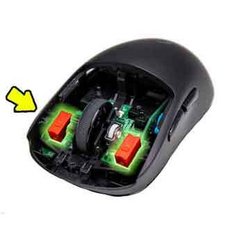
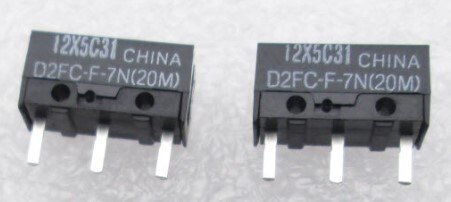
Был ли этот ответ полезен?
where can i buy those parts?
mostly you can buy it from online shopping.
Pudieras adjuntar alguna pagina de donde encontrarlo ?
Oh, man, need another switch ((
On your pic don't Logitech MX Master 3S
The switch shown is wrong. The original part number is EVQ-P0D07K. This part is more clicky but may last longer: EVQ-P0E07K. Kailh Mute Button 6 * 6 * 7.3mm may work as well.
Репутация: 13
1
Same stupid problem exactly after 1 year so that its not covered under warranty, i guess they intentionally made it for one season.
Был ли этот ответ полезен?
Репутация: 13
1
I had the same issue, I got some HUANO Yellow mouse switches from Ali Express about a year ago and they have not had any issue and sound way better.
From what I can tell, this is a common issue in the Logitech mice with their switches. I'm not sure about newer models but all the ones I have owned have had issues with the mouse switches after a year or two.
Был ли этот ответ полезен?
Репутация: 13
1
I ran into the same problem — suddenly the left mouse click stopped working properly, while all the other buttons were working fine. This was quite unexpected for me because I had only used the mouse for work for less than three years and had never had any issues with it before.
I tried all the usual recommendations: switching USB ports, updating the necessary software, and even connecting the mouse to my laptop (I had previously used it only with my PC). Nothing helped. The only remaining option seemed to be replacing the click switch itself, but I didn’t really want to do that, so I decided to just use another mouse I had.
After a few months, I decided to investigate the issue again. First, I disassembled the mouse to visually inspect the switch. Everything looked fine, and it sounded exactly the same as the right click, which was still working perfectly. I was disappointed again — but then I suddenly realized something.
The problem appeared around the same time I bought a Logitech Pro X TKL keyboard, which also works through a receiver. I tried temporarily unplugging the keyboard receiver — and that immediately fixed the issue. The mouse click started working correctly again. So the problem was actually caused by signal interference.
Why didn’t I check that right away when the problem first appeared? Because shortly after buying the keyboard, I also started using another mouse — a Logitech Superlight. Only a few weeks after buying the keyboard did I switch back to my MX Master 3S, so I didn’t immediately connect the issue with the keyboard receiver.
I hope this helps someone. If you don’t have a keyboard with a receiver that could cause interference, it might still be worth trying to disconnect other devices that use wireless receivers. In my case, I have five different receivers connected, and the keyboard receiver turned out to be the one causing the problem.
Был ли этот ответ полезен?
thanks for your info! It is a communication problem indeed. I connected it trough bluetooth first then the left button didn't worked 50% of the time suddenly. The moment I connected the bolt usb receiver the problem was gone.
Репутация: 13
1
I had this exact same issue a few months ago and fixed it by taking the mouse apart and putting a couple small pieces of tape on the underside of the left mouse button that makes contact with the switch. The switch simply wasn't being depressed enough when clicking, and adding that millimeter of tape helped, but didn't fully fix the issue. I also applied a drop of WD-40 to the switch. That, along with the tape, has it working properly again. I talked about this a bit and linked to some videos on my blog if you want to read further. I hope this helps others.
Был ли этот ответ полезен?
I'll assume you're no longer in warranty. The buttons have a low MTBF, if cleaning them and ensuring the plastics didn't wear such that a bit of adhesive is needed to build up more contact with the switch, you'll need to find some 6x6x4.3 mm microswitches to replace them with. The Kailh Mute/Silent microswitches (they call them tact switch http://www.kailh.com/en/Products/TS/ I believe) in that dimension can be found online. Amazon, Ali Express, etc will send you a manageable quantity, (Kailh sends 1000) for a couple of times the normal unit price.


The build is okay, but a small 3D puzzle. You will have a better time desoldering the worn out switches if you have a board holder, and some wick, or something pointedly for removing solder.
You'll want to replace the feet after closing it up again because the screws are under the feet.
Был ли этот ответ полезен?
Репутация: 7,9к
5
6
1
My biggest issue with the 3S, 2S and any other mouse is dirt accumulation.
Check under the levers and clean out the optics.
Был ли этот ответ полезен?
I somehow doubt that "cleaning the optics" will fix their issue with clicking... :)
started yesterday for me after 2 years. Left clicks are not registering properly.
Был ли этот ответ полезен?
I spoke with Logitech Support and they told me to follow the following steps.
1. Clean the button/key with compressed air.
2. Verify the product or receiver is connected directly to the computer and not to a hub, extender, switch or something similar.
3. Unpair/repair or disconnect/reconnect hardware.
4. Upgrade firmware if available.
5. Windows only — try a different USB port. If it makes a difference, try updating the motherboard USB chipset driver [support.logi.com/hc/en-us/articles/36002...].
6. Try on a different computer. Windows only — if it works on a different computer, then the issue might be related to a USB chipset driver.
7. If you’re not sure if the problem is a hardware or software issue, try switching the buttons in the settings (left click becomes right click and right click becomes left click). If the problem moves to the new button it is a software setting or application issue and hardware troubleshooting cannot resolve it. If the problem stays with the same button it is a hardware issue.
Step 1 seemed to fix my issue (at least for now). Step 7 confirmed that the buttons were working.
I can update on how it holds up if I remember.
Был ли этот ответ полезен?
I had the exact same issue, was already looking into taking it apart trying WD-40 and potentially soldering a new button on. But just now I opened Logi Options + and the entire problem is done. Didn't even change any settings, just openin git fixed it.
Был ли этот ответ полезен?
За последние 24 часов: 11
За последние 7 дней: 93
За последние 30 дней: 404
За все время: 17,736









5 Комментариев
Many people, including myself, have the same issue. The button switches are low quality and work for a few months. Then start working intermittently. Logitech are aware of this issue and do nothing. There are no replacement switches offered here or instructions for replacement (requires soldering).
Personally, this is the last time I'm investing money in Logitech.
из Ivan Vazharov
Same for me, poor form for an expensive product and only after 14 months
из Stewart Wilson
Same here, warranty of two yrs just over.
из PaulJ.
You have to replace the switches inside. My mouse lasted 2 years before the switch broke.
из Jared Harris
There is a known issues with the switches that were used for these models. I tried the tape method, so my click could more easily push down on the switch, but it's better to try replacing the switches that don't work.
из Jared Harris