Перейти к основному содержанию
Присоединяйся к сообществу ремонтников - Создай аккаунт

Ethernet doesn´t work

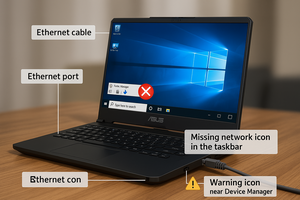
I Plug my ethernet cable to laptop and it doesnt show the ethernet icon, so it doesnt work

Ответ на этот вопрос У меня та же проблема

Это хороший вопрос?

Счет 1

1 Комментарий:

Hi! What does device manager tells you on the laptop? Any question or exclamation marks? Is the ethernet driver up to date? Did you tried a new re-install?

из

Добавить комментарий

1 ответ

=== ***Quick Troubleshooting Steps

Изображение
  • ===
  • Check Ethernet Cable & Port:
    • Test the cable on another device.
    • Inspect laptop port for dust or bent pins.
  • Update/Reinstall Network Drivers:
    • Go to Device Manager → Network Adapters.
    • If you see Realtek Ethernet Controller, right-click → Update Driver.
    • If missing, go to Asus support site and install latest LAN driver for your model.
  • Enable Ethernet Adapter:
    • Control Panel → Network & Sharing → Change Adapter Settings.
    • Right-click Ethernet → Enable (if disabled).
  • Check BIOS Settings:
    • Restart and enter BIOS (usually F2 or DEL).
    • Ensure LAN Controller is enabled.
  • Try Different Port or Router:
    • Rule out router issues by connecting to another port or router.
  • Hardware Fault (if all fails):
    • If Ethernet still doesn’t work, the port might be physically damaged—consider using a USB to Ethernet adapter as a workaround.

Был ли этот ответ полезен?

Счет 0
Добавить комментарий

Добавьте свой ответ

Gaming Brothers буду вечно благодарен.
Статистика просмотров:

За последние 24 часов: 3

За последние 7 дней: 13

За последние 30 дней: 47

За всё время: 407