

Replaced battery ifixit battery
I went through several calibration and reset SMC but still showing 100% charged and shutting down automatically whit 60% charge left. They’re is no low battery warning
Это хороший вопрос?
Счет
0
Репутация: 11
 2
2
I went through several calibration and reset SMC but still showing 100% charged and shutting down automatically whit 60% charge left. They’re is no low battery warning
Это хороший вопрос?
Репутация: 1
3
Your iFixit battery likely has faulty calibration or firmware, causing macOS to misread charge levels—contact iFixit for a replacement or warranty check.
Был ли этот ответ полезен?
Репутация: 7,8к
33
 36
36
 8
8
@wolfganggessl Go to your finder and go to your macbook under locations, navigate to the library / preferences / then delete the 3 or 4 files com.apple.power* / empty the trash then reboot and see if that made any difference. These files will be created new upon reboot.
Был ли этот ответ полезен?
HI I found the location off the files but I got 5 related to Power
com.apple.powerlogd
com.apple.powerlogd.plist.ADTPLF3
com.apple.powerlogd.plist.W67mu8n
com.apple.PowerManagement.CA179EC3-39EC-5B20-8053-C973A39C784B
com.apple.PowerManagement
Just delete all 5 ?
@wolfganggessl I am using a 2015 15" model, I have 3 - com.apple.powerlogd / com.apple.PowerManagement.EADC2779-E9B8-560C-AC0B-B65836358999 & com.apple.PowerManagement. I would think it would be OK to delete all 5 as they should be auto generated upon reboot.
Interesting!!
I deleted all 5 files rebooted and checked in finder again now I got 3 files recreated
I let you know If it worked after one more calibration sickle
Thank you much for the help
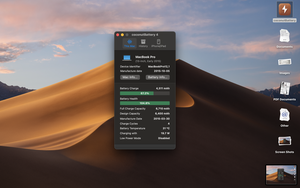
@wolfganggessl Install this app https://www.coconut-flavour.com/coconutb... and post the info together with the system/power report to cross check.
hi still not working sundown this time whit about 70% left
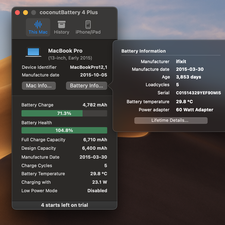
the coconut image is up top
Battery Information:
Model Information:
Serial Number: C01514329YEF90MI5
Manufacturer: ifixit
Device Name: bq20z451
Pack Lot Code: 3230
PCB Lot Code: 3230
Firmware Version: 2d31
Hardware Revision: 322d
Cell Revision: 3036
Charge Information:
Fully Charged: No
Charging: No
Full Charge Capacity (mAh): 6710
State of Charge (%): 78
Health Information:
Cycle Count: 5
Condition: Normal
System Power Settings:
AC Power:
System Sleep Timer (Minutes): 1
Disk Sleep Timer (Minutes): 10
Display Sleep Timer (Minutes): 10
Wake on AC Change: No
Wake on Clamshell Open: Yes
Wake on LAN: Yes
AutoPowerOff Delay: 259200
AutoPowerOff Enabled: 1
Display Sleep Uses Dim: Yes
Hibernate Mode: 3
PrioritizeNetworkReachabilityOverSleep: 0
Battery Power:
System Sleep Timer (Minutes): 1
Disk Sleep Timer (Minutes): 10
Display Sleep Timer (Minutes): 10
Wake on AC Change: No
Wake on Cl
За последние 24 часов: 0
За последние 7 дней: 2
За последние 30 дней: 16
За всё время: 254


2 Комментариев
Can you post a snapshot of CoconutBattery App main window and post it here so we can see it.
из DanJ
MacBook just shut down this time whit 67% left
Im no expert in this this is why I'm asking here but is it possible the % reported is correct and the Ifixit battery replacement's BMS is faulty
would explain thad I don't get a low battery warning ?
из Wolf