Перейти к основному содержанию

Released 2020 with Snapdragon 720G SOC Sold in India as the Note 9 Pro Max

Audio Chip/Codec not working.

My phone’s audio completely stopped working. None of the outputs or inputs work – headphone jack, USB‑C audio, the build-in speaker, Bluetooth sound, and the built-in microphone are all dead. I’ve reflashed the system and firmware, but the issue persists.

Looking at the logs, the system cannot detect any audio device, and /proc/asound/cards shows nothing. It seems the audio codec (audio IC) is not being recognized by the system.

Could you help me diagnose or repair this issue?

Ps: I bet the audio codec/chip/card (as you call it) is broken.

Отвечено! Посмотреть ответ У меня та же проблема

Это хороший вопрос?

Счет 1
Добавить комментарий

1 ответ

Выбранное решение

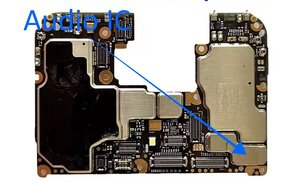
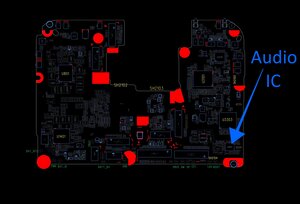
@jaqbspro the audio IC (circuitry etc.) on your circuit board is a WCD9375 and it is located under an EMI shield.

Block Image
Block Image

You will have to remove that to visually inspect your board and your IC. No, we can't diagnose this since you re the one that has the board. You will need to use the schematic and the component layout file to a) determine the location of the components on your board to check those out. and b) trace the circuit and measure the components to find a faulty one.

This is what makes remote board level repair very difficult. What we can do however is to provide you with the files you will need. Use this Xiaomi Redmi Note 9 Pro Schematic to work on it. Let us know what you find out so we can try and help you as much as possible

Был ли этот ответ полезен?

Счет 2
Добавить комментарий

Добавьте свой ответ

JaqbsPRO буду вечно благодарен.
Статистика просмотров:

За последние 24 часов: 0

За последние 7 дней: 4

За последние 30 дней: 18

За всё время: 63