
Перейти к основному содержанию
Присоединяйся к сообществу ремонтников - Создай аккаунт

Руководства по ремонту, разборке и устранению неисправностей беспроводной мыши Logitech Signature M650. Идентифицируется по номерам деталей (P/N) 910-006250, 910-006251 и 910-006252.

Logitech Signature M650 left click not working

Why is the left click on my Logitech Signature M650 mouse not working properly? I have to press it harder than usual or force click for it to register. What could be causing this, and how can I fix it?

Ответ на этот вопрос У меня та же проблема

Это хороший вопрос?

Счет 2
1 Комментарий

Had same issue, disassembled and got some WD40 into the switch button works for me.

из

Добавить комментарий

3 Ответов

Наиболее полезный ответ

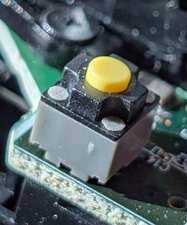
The switch failed. You can find the part on Amazon or AliEx. Search for phrases like:

Silent Mouse Button Switch 6*6*7.3MM Square Microswitch Two Pin

The switch is 7.3mm tall, and 6mm (or 6.2mm) square. You will need a solder sucker or wick, and to remove the board from the shell (4 screws and carefully pry out the battery contacts). The switch is held on by its own 2 pins and is easy to remove.

Изображение

Update (11/16/25)

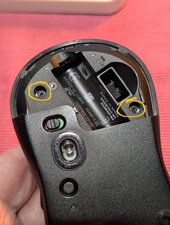
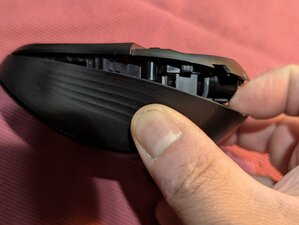
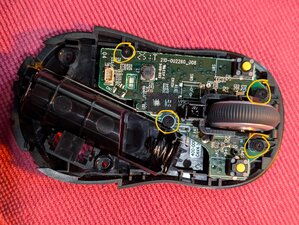
Getting in to the mouse is pretty easy. Start with these two screws inside the battery door. Then gently separate the mouse from the back. There is a clip near the front so you have to kind of slide the bottom forward to release it.

Изображение
Изображение

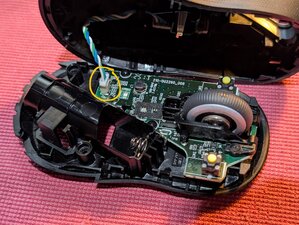
Remove the main cable

Изображение

Remove 4 screws for the PCB & scroll wheel (scroll wheel comes off separately)

Изображение

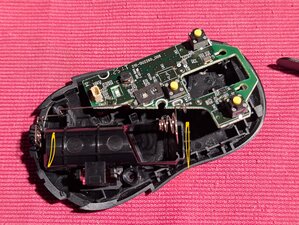
Remove the battery terminals by gently pulling up the whole PCB. Don't bend or stress the battery wires.

Изображение

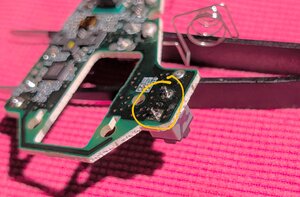
Use a solder-sucker to remove and then resolder with new switches for the left and right mouse button. .

Изображение

Был ли этот ответ полезен?

Счет 3

1 Комментарий:

Instead of replacement with non-stock ones, a semi-permanent fix may be to simply exchange the right and left switches (assuming that the left one has worn out way quicker).

из

Добавить комментарий

Yup, same problem. Disassembled it. Tried to directly press the button underneath slightly, which is just right for my use - doesn't register. Have to press it harder. The disassembly process is just like M550 (on Youtube), but be careful of the extra twisted wire for LED on the top shell on the M650.

So far, finding the switch for the 'SW1' has been unfruitful. Will update if I find anything.

Был ли этот ответ полезен?

Счет 1

1 Комментарий:

There are many on Amazon or AliEx. Search for phrases like:

Silent Mouse Button Switch 6*6*7.3MM Square Microswitch Two Pin

The switch is 7.3mm tall, and 6mm (or 6.2mm) square.

из

Добавить комментарий
Изображение
Изображение

Thanks for providing the switch specifications! Successfully replaced both switches on my Logitech M650. The disassembly is straightforward and easy. I boght the switches from china, via Shoppee in the Philippines. The left button now registers light clicks perfectly instead of needing heavy force to actuate.

Был ли этот ответ полезен?

Счет 1

1 Комментарий:

That's great news! thanks for sharing.

из

Добавить комментарий

Добавьте свой ответ

Horenus Dessalegn буду вечно благодарен.
Статистика просмотров:

За последние 24 часов: 5

За последние 7 дней: 68

За последние 30 дней: 381

За всё время: 2,860