Перейти к основному содержанию
Присоединяйся к сообществу ремонтников - Создай аккаунт

Alcatel Jitterbug Smart Charging Port Replacement

Выберете то, что вам нужно

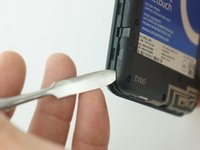
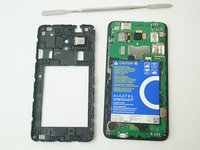
    1. Alcatel Jitterbug Smart Charging Port Replacement, Battery: шаг 1, изображение 1 из 2 Alcatel Jitterbug Smart Charging Port Replacement, Battery: шаг 1, изображение 2 из 2
      • Pry back cover open with a medal spudger, or your fingernail, in the divot at the bottom left corner of the phone.

      • Lift open case by the corner nearest the divot and remove it from the phone.

      Спросите у FixBot

      Добавить комментарий

    2. Alcatel Jitterbug Smart Charging Port Replacement: шаг 2, изображение 1 из 3 Alcatel Jitterbug Smart Charging Port Replacement: шаг 2, изображение 2 из 3 Alcatel Jitterbug Smart Charging Port Replacement: шаг 2, изображение 3 из 3
      • Remove 13 1mm JIS screws with JIS #000 Screwdriver.

      Спросите у FixBot

      Добавить комментарий

    3. Alcatel Jitterbug Smart Charging Port Replacement: шаг 3, изображение 1 из 2 Alcatel Jitterbug Smart Charging Port Replacement: шаг 3, изображение 2 из 2
      • Gently pry off the Mid frame from the phone using a Metal Spudger.

      Спросите у FixBot

      Добавить комментарий

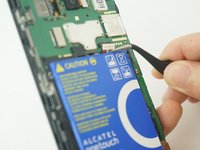
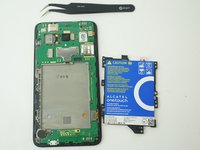
    4. Alcatel Jitterbug Smart Charging Port Replacement: шаг 4, изображение 1 из 2 Alcatel Jitterbug Smart Charging Port Replacement: шаг 4, изображение 2 из 2
      Инструмент, используемый на этом этапе:
      Tweezers
      $4.99
      • Use a pair of tweezers to pull the battery connector from its port.

      • Be careful not to tear the battery from its connection.

      Спросите у FixBot

      Добавить комментарий

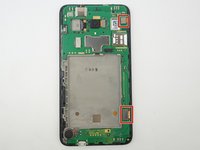
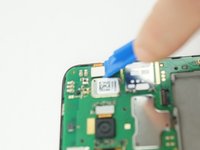
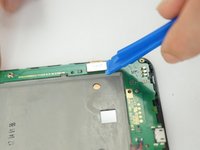
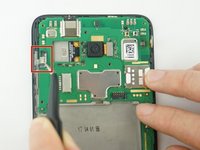
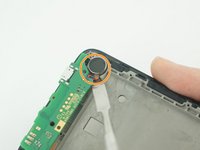
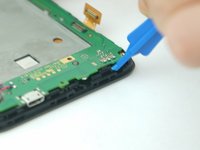
    1. Alcatel Jitterbug Smart Charging Port Replacement, Motherboard: шаг 5, изображение 1 из 3 Alcatel Jitterbug Smart Charging Port Replacement, Motherboard: шаг 5, изображение 2 из 3 Alcatel Jitterbug Smart Charging Port Replacement, Motherboard: шаг 5, изображение 3 из 3
      • Use the Plastic Opening tools to gently dislodge the two connection on the top and bottom right of the phone from the inside of the phone.

      Спросите у FixBot

      Добавить комментарий

    2. Alcatel Jitterbug Smart Charging Port Replacement: шаг 6, изображение 1 из 2 Alcatel Jitterbug Smart Charging Port Replacement: шаг 6, изображение 2 из 2
      Инструмент, используемый на этом этапе:
      Tweezers
      $4.99
      • Use a pair of tweezers to pull the black ribbon connector from its port.

      • Use a metal Spudger to gentle remove the speaker that glued at the bottom left of the phone.

      • Be careful to avoid damage the black connector or the wire connect the speaker to motherboard.

      Спросите у FixBot

      Добавить комментарий

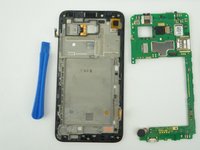
    3. Alcatel Jitterbug Smart Charging Port Replacement: шаг 7, изображение 1 из 2 Alcatel Jitterbug Smart Charging Port Replacement: шаг 7, изображение 2 из 2
      • Using a plastic opening tool, begin to gently pry the motherboard, away from the display assembly.

      • The motherboard will freely remove.

      Спросите у FixBot

      Добавить комментарий

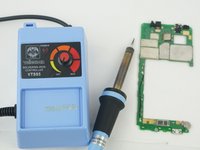
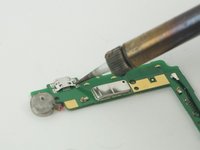
    1. Alcatel Jitterbug Smart Charging Port Replacement, Charging Port: шаг 8, изображение 1 из 2 Alcatel Jitterbug Smart Charging Port Replacement, Charging Port: шаг 8, изображение 2 из 2
      • Flip the motherboard over and desolder the charging port pin connecting on the motherboard.

      • Once pins desolder, pull off the charging port.

      • If you need helps on solder/desolder, here is the link to the soldering skills guide.

      Спросите у FixBot

      Добавить комментарий

Заключение

To reassemble your device, follow these instructions in reverse order.

Отменить: Я не выполнил это руководство.

2 человек успешно провели ремонт по этому руководству.

Minyu Zhang

Участник с: 02/13/18

181 Репутация

Автор 2 руководств

Команда

USF Tampa, Team S11-G4, Cheng Spring 2018 Участник USF Tampa, Team S11-G4, Cheng Spring 2018

USFT-CHENG-S18S11G4

4 членов

Автор 35 руководств

0 Комментарии к руководству

Добавить комментарий

Статистика просмотров:

За последние 24 часов: 0

За последние 7 дней: 13

За последние 30 дней: 42

За всё время: 2,052