Перейти к основному содержанию
Присоединяйся к сообществу ремонтников - Создай аккаунт

DJI Phantom 3 Advanced LED Replacement

Выберете то, что вам нужно

    1. DJI Phantom 3 Advanced LED Replacement, Battery: шаг 1, изображение 1 из 2 DJI Phantom 3 Advanced LED Replacement, Battery: шаг 1, изображение 2 из 2
      • With the battery facing you, locate the two tabs on the top and bottom of the battery as shown.

      • Remember to disarm and power down your quadcopter before beginning any disassembly.

      Спросите у FixBot

      Добавить комментарий

    2. DJI Phantom 3 Advanced LED Replacement: шаг 2, изображение 1 из 2 DJI Phantom 3 Advanced LED Replacement: шаг 2, изображение 2 из 2
      • Press the two tabs with your finger and thumb, and gently slide the battery towards you, out of the quadcopter frame.

      • With your other hand, be sure to hold the quadcopter steady to ensure that it stays still.

      Спросите у FixBot

      Добавить комментарий

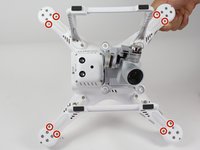
    1. DJI Phantom 3 Advanced LED Replacement, Cover: шаг 3, изображение 1 из 1
      • Turn the Phantom 3 Advanced upside down.

      Спросите у FixBot

      Добавить комментарий

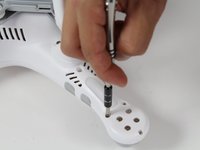
    2. DJI Phantom 3 Advanced LED Replacement: шаг 4, изображение 1 из 1
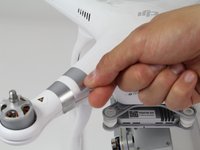
      • Remove the four 7mm long 2mm screws with a T-6 screwdriver.

      • There is one screw per arm, located at the tip of the arm.

      Спросите у FixBot

      Добавить комментарий

    3. DJI Phantom 3 Advanced LED Replacement: шаг 5, изображение 1 из 2 DJI Phantom 3 Advanced LED Replacement: шаг 5, изображение 2 из 2
      • Remove the eight 5mm long 2.5mm screws using the T-8 screwdriver.

      • There are two 5mm screws on each arm.

      Спросите у FixBot

      Добавить комментарий

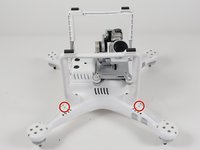
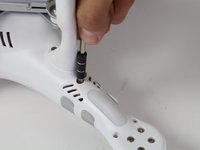
    4. DJI Phantom 3 Advanced LED Replacement: шаг 6, изображение 1 из 2 DJI Phantom 3 Advanced LED Replacement: шаг 6, изображение 2 из 2
      • Remove the four 10mm long deep 3mm screws using the T-8 screwdriver.

      • There is one screw on each arm located near the landing gear.

      Спросите у FixBot

      Добавить комментарий

    5. DJI Phantom 3 Advanced LED Replacement: шаг 7, изображение 1 из 3 DJI Phantom 3 Advanced LED Replacement: шаг 7, изображение 2 из 3 DJI Phantom 3 Advanced LED Replacement: шаг 7, изображение 3 из 3
      • Carefully flip the phantom back over with the motors facing up.

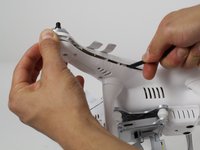
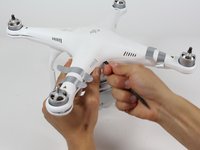
      • Peel back the silver stickers from the seam in the cover.

      • Using a plastic spudger, slowly separate the two halves of the plastic shell.

      • This step requires some force, and the plastic will click loudly as the shell separates.

      • Do not fully remove the cover. There is a wire that needs to be detached from the control board before the cover is completely free.

      Спросите у FixBot

      Добавить комментарий

    6. DJI Phantom 3 Advanced LED Replacement: шаг 8, изображение 1 из 3 DJI Phantom 3 Advanced LED Replacement: шаг 8, изображение 2 из 3 DJI Phantom 3 Advanced LED Replacement: шаг 8, изображение 3 из 3
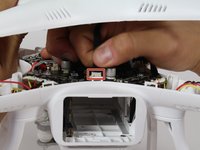
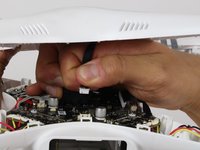
      • Slowly remove the upper half of the plastic case about halfway. There is a ribbon cable that's connects the cover and the control board.

      • Follow the ribbon cable to the control board and locate the connector that connects the cable to the control board.

      • Press the tab on the side of the connector and pull up on the cable.

      • Continue to remove the shell the rest of the way.

      Спросите у FixBot

      Добавить комментарий

    1. DJI Phantom 3 Advanced LED Replacement, LED: шаг 9, изображение 1 из 2 DJI Phantom 3 Advanced LED Replacement, LED: шаг 9, изображение 2 из 2
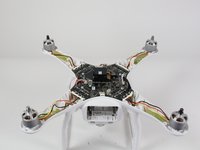
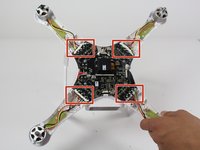
      • Follow the red,yellow and black wires from the LED to where they connect on the control board.

      • Scrape off the glue with a plastic opening tool. Use a metal opening tool if needed.

      • The LED wires are smaller than the motor wires.

      Спросите у FixBot

      Добавить комментарий

    2. DJI Phantom 3 Advanced LED Replacement: шаг 10, изображение 1 из 1
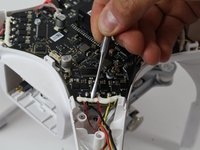
      • Desolder the red, yellow and black wires that connect the LED to the control board. Check out the link below for more information on desoldering. Desoldering Information

      Спросите у FixBot

      Добавить комментарий

    3. DJI Phantom 3 Advanced LED Replacement: шаг 11, изображение 1 из 2 DJI Phantom 3 Advanced LED Replacement: шаг 11, изображение 2 из 2
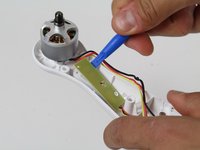
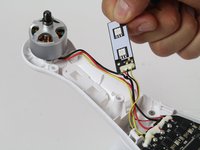
      • Use a plastic opening tool and wedge it under the LED.

      • Press down on the plastic opening tool and remove the LED.

      Спросите у FixBot

      Добавить комментарий

Заключение

To reassemble your device, follow these instructions in reverse order.

Отменить: Я не выполнил это руководство.

3 человек успешно провели ремонт по этому руководству.

Tate Morell

Участник с: 10/06/16

812 Репутация

Автор 2 руководств

Команда

Cal Poly, Team 10-2, Livingston Fall 2016 Участник Cal Poly, Team 10-2, Livingston Fall 2016

CPSU-LIVINGSTON-F16S10G2

3 членов

Автор 72 руководств

0 Комментарии к руководству

Добавить комментарий

Статистика просмотров:

За последние 24 часов: 1

За последние 7 дней: 5

За последние 30 дней: 30

За всё время: 3,126