Введение
This guide demonstrates how to remove and replace the air filter in your Epson PowerLite 460.
A filter keeps the dust and debris out of the device in order for the device to stay clean. Overheating can occur if the air filter is damaged or clogged, which can cause the device to not run properly. If so, replace or clean the filter.
Review the troubleshooting guide before replacing the filter. Other factors can cause overheating in the Powerlite 460.
-
-
-
Orient the device with the projection window on top with the name of the device right side up.
 Спросите у FixBot
-
-
-
Slide the air filter cover opener in the direction indicated by the arrow to release the air filter cover.
-
-
-
-
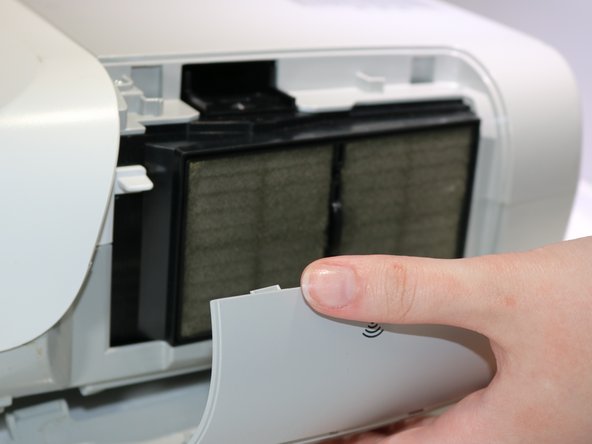
Open the air filter cover by pulling the top down and away from the device.
-
-
-
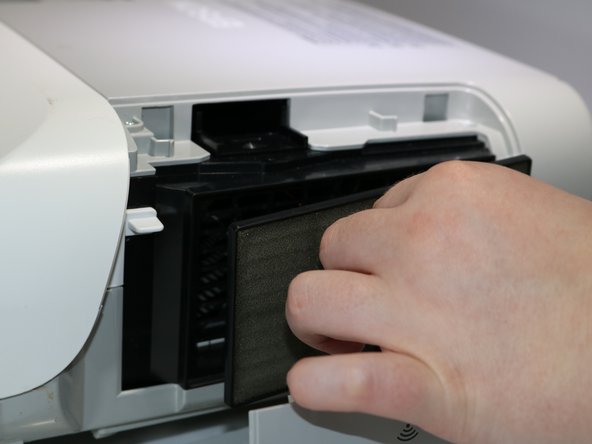
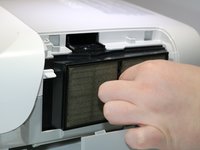
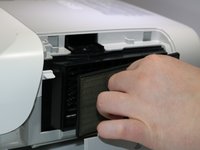
Pinch the air filter cover handle and gently pull the filter away from the device
-
-



To reassemble your device, follow these instructions in reverse order.

Команда

Eastern Washington University, Team 1-1, Carnegie Spring 2022 Участник Eastern Washington University, Team 1-1, Carnegie Spring 2022
EWU-CARNEGIE-S22S1G1
3 членов
Автор 10 руководств
