Перейти к основному содержанию
Присоединяйся к сообществу ремонтников - Создай аккаунт

Flydigi Apex 5 Battery Replacement

Выберете то, что вам нужно

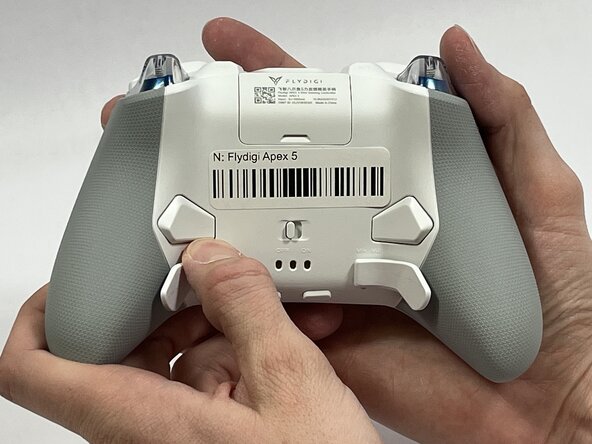
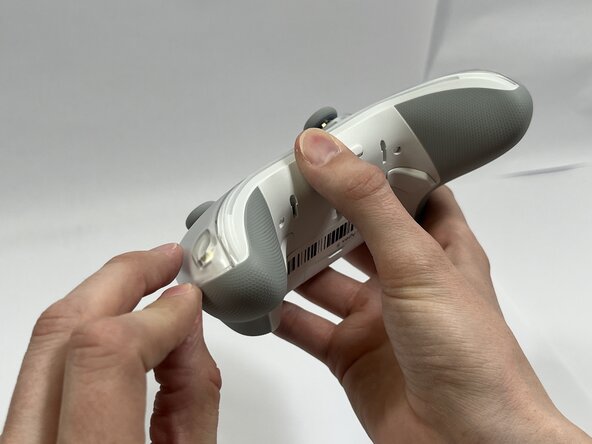
  1. Flydigi Apex 5 Battery Replacement, Battery: шаг 1, изображение 1 из 2 Flydigi Apex 5 Battery Replacement, Battery: шаг 1, изображение 2 из 2
    • Orient the controller so that its back is facing you.

    • Apply firm downward pressure to remove both the M3 and M4 back paddles.

    Спросите у FixBot

    Добавить комментарий

  2. Flydigi Apex 5 Battery Replacement: шаг 2, изображение 1 из 3 Flydigi Apex 5 Battery Replacement: шаг 2, изображение 2 из 3 Flydigi Apex 5 Battery Replacement: шаг 2, изображение 3 из 3
    • Turn the controller over so its front faces you.

    • Remove the D-pad by firmly pulling it away from the body of the controller.

    Спросите у FixBot

    Добавить комментарий

  3. Flydigi Apex 5 Battery Replacement: шаг 3, изображение 1 из 3 Flydigi Apex 5 Battery Replacement: шаг 3, изображение 2 из 3 Flydigi Apex 5 Battery Replacement: шаг 3, изображение 3 из 3
    • Remove the clear, magnetically-adhered faceplate of the controller by firmly pulling it away from the body of the controller starting from the edge of the faceplate.

    Спросите у FixBot

    Добавить комментарий

  4. Flydigi Apex 5 Battery Replacement: шаг 4, изображение 1 из 3 Flydigi Apex 5 Battery Replacement: шаг 4, изображение 2 из 3 Flydigi Apex 5 Battery Replacement: шаг 4, изображение 3 из 3
    • Remove the small cover from the rear of the controller by pushing it upward.

    • Remove the two 5.8mm screws behind the battery cover using a Phillips #0 screwdriver.

    Спросите у FixBot

    Добавить комментарий

  5. Flydigi Apex 5 Battery Replacement: шаг 5, изображение 1 из 2 Flydigi Apex 5 Battery Replacement: шаг 5, изображение 2 из 2
    • Turn the controller over so its front faces you.

    • Remove the six 10mm long screws from the front of the controller using a Torx T6 screwdriver.

    Спросите у FixBot

    Добавить комментарий

  6. Flydigi Apex 5 Battery Replacement: шаг 6, изображение 1 из 3 Flydigi Apex 5 Battery Replacement: шаг 6, изображение 2 из 3 Flydigi Apex 5 Battery Replacement: шаг 6, изображение 3 из 3
    • Insert the plastic opening tool between the top and bottom plastic controller molds, then pry until the two pieces separate.

    • Be careful not to fully separate the two pieces of the controller. There is a fragile ribbon cable connecting the two sides that must be carefully disconnected in the next step.

    Спросите у FixBot

    Добавить комментарий

  7. Flydigi Apex 5 Battery Replacement: шаг 7, изображение 1 из 3 Flydigi Apex 5 Battery Replacement: шаг 7, изображение 2 из 3 Flydigi Apex 5 Battery Replacement: шаг 7, изображение 3 из 3
    • Carefully remove the back paddle ribbon cable with the angled tweezers or spudger.

    Спросите у FixBot

    Добавить комментарий

  8. Flydigi Apex 5 Battery Replacement: шаг 8, изображение 1 из 3 Flydigi Apex 5 Battery Replacement: шаг 8, изображение 2 из 3 Flydigi Apex 5 Battery Replacement: шаг 8, изображение 3 из 3
    • Press a prong of each side of the angled tweezers under the lip of the power supply cable connector and pull the plastic connector out of its terminal.

    • Pull the power supply cable through the plastic cable guides.

    Спросите у FixBot

    Добавить комментарий

  9. Flydigi Apex 5 Battery Replacement: шаг 9, изображение 1 из 3 Flydigi Apex 5 Battery Replacement: шаг 9, изображение 2 из 3 Flydigi Apex 5 Battery Replacement: шаг 9, изображение 3 из 3
    • Optional: Drip isopropyl alcohol along the sides of the battery. Then rotate the controller to distribute the alcohol and dissolve the adhesive holding the battery to the mount

    • Pry up the battery with the plastic hook and pry tool.

    • Do not use sharp metal tools to pry the battery out. That action risks puncturing the battery.

    Спросите у FixBot

    Добавить комментарий

Заключение

To reassemble your device, follow these instructions in reverse order.

Отменить: Я не выполнил это руководство.

Еще один человек закончил это руководство.

Benjamin Tapp

Участник с: 03/10/26

375 Репутация

Автор 2 руководств

Команда

Idaho State University, Team 1-3, Watkins Spring 2026 Участник Idaho State University, Team 1-3, Watkins Spring 2026

ISU-WATKINS-S26S1G3

4 членов

Автор 5 руководств

0 Комментарии к руководству

Добавить комментарий

Статистика просмотров:

За последние 24 часов: 2

За последние 7 дней: 8

За последние 30 дней: 51

За всё время: 109