Перейти к основному содержанию
Присоединяйся к сообществу ремонтников - Создай аккаунт

Front Panel Assembly Replacement

Абсолютно необходимое руководство
Это руководство только для предварительной подготовки! Этот гайд является частью другой процедуры и не предназначен для самостоятельного использования.

Выберете то, что вам нужно

  1. Front Panel Assembly Replacement, Front Panel Assembly: шаг 1, изображение 1 из 1
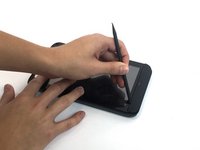
    • Insert the spudger under the capacitive button panel, and slide the spudger all the way around.

    • You will want to heat up the screen edges with the iOpener to help facilitate removal.

    Спросите у FixBot

    Добавить комментарий

  2. Front Panel Assembly Replacement: шаг 2, изображение 1 из 1
    • Remove the button cover by lifting the cover away from the tablet.

    Спросите у FixBot

    Добавить комментарий

  3. Front Panel Assembly Replacement: шаг 3, изображение 1 из 1
    • Using the Torx screwdriver, remove the 4mm screws.

    Спросите у FixBot

    Добавить комментарий

  4. Front Panel Assembly Replacement: шаг 4, изображение 1 из 1
    • With the Torx screwdriver, remove the two 5mm screws.

    Спросите у FixBot

    Добавить комментарий

  5. Front Panel Assembly Replacement: шаг 5, изображение 1 из 2 Front Panel Assembly Replacement: шаг 5, изображение 2 из 2
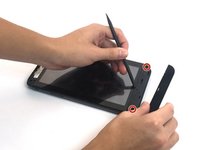
    • Using the spudger, insert it under the black side panel. Slide the spudger all the way around until the cover piece comes off.

    • With the Torx screwdriver, remove the two 4mm screws.

    Спросите у FixBot

    Добавить комментарий

  6. Front Panel Assembly Replacement: шаг 6, изображение 1 из 1
    • Use the spudger to go along the edges of the device and pop out the latches securing the display to the case.

    Спросите у FixBot

    Добавить комментарий

  7. Front Panel Assembly Replacement: шаг 7, изображение 1 из 2 Front Panel Assembly Replacement: шаг 7, изображение 2 из 2
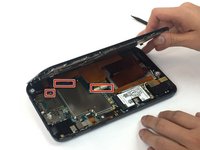
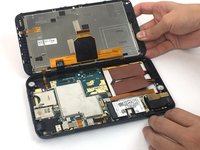
    • Ribbon cables are very sensitive and prone to breaking

    • Disconnect the ribbon cables by unlocking the connector and pulling the cable out slowly.

    • Make sure all the cables are unplugged before opening the device completely. Failure to do so might lead to broken or torn cables.

    Спросите у FixBot

    Добавить комментарий

Заключение

To reassemble your device, follow these instructions in reverse order.

Отменить: Я не выполнил это руководство.

Еще один человек закончил это руководство.

Carlos Salas

Участник с: 09/30/16

194 Репутация

1 руководство автора

Команда

USF Tampa, Team 4-6, Passmore Fall 2016 Участник USF Tampa, Team 4-6, Passmore Fall 2016

USFT-PASSMORE-F16S4G6

3 членов

Автор 12 руководств

0 Комментарии к руководству

Добавить комментарий

Статистика просмотров:

За последние 24 часов: 0

За последние 7 дней: 5

За последние 30 дней: 34

За всё время: 222