Перейти к основному содержанию
Присоединяйся к сообществу ремонтников - Создай аккаунт

Game Boy Speaker Replacement

Выберете то, что вам нужно

Видеообзор

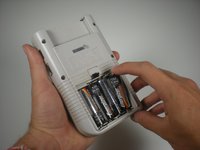
  1. Game Boy Speaker Replacement, Batteries: шаг 1, изображение 1 из 2 Game Boy Speaker Replacement, Batteries: шаг 1, изображение 2 из 2
    • Switch your Game Boy off and remove the cartridge.

    Спросите у FixBot

    Добавить комментарий

  2. Game Boy Speaker Replacement: шаг 2, изображение 1 из 3 Game Boy Speaker Replacement: шаг 2, изображение 2 из 3 Game Boy Speaker Replacement: шаг 2, изображение 3 из 3
    • Use a fingernail (or small coin) to push down on the battery door latch and remove the battery door.

    • The release latch is a plastic spring clip. If your Game Boy is getting on in years, be careful as the plastic may be brittle.

    • When you're replacing the cover, be sure to get its two plastic tabs into the slots in the bottom of the battery compartment before pushing the cover back in place.

    Спросите у FixBot
    Добавить комментарий

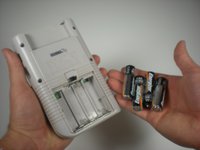
  3. Game Boy Speaker Replacement: шаг 3, изображение 1 из 2 Game Boy Speaker Replacement: шаг 3, изображение 2 из 2
    • Use a fingernail to pry each battery outward from the positive (+) terminal to remove them.

    • Dispose of used batteries properly!

    • Remove the batteries from your Game Boy before storing it for more than a month or so.

    Спросите у FixBot
    Добавить комментарий

  4. Game Boy Speaker Replacement, Outer Case: шаг 4, изображение 1 из 1
    • Remove the six Triwing screws from the back of the device.

    Спросите у FixBot
    Добавить комментарий

  5. Game Boy Speaker Replacement: шаг 5, изображение 1 из 1
    • Gently separate the device's front casing from the back casing after you remove the screws.

    • Be careful not to completely separate the casing halves, as they are still joined by a large ribbon cable that may be damaged.

    Спросите у FixBot

    Добавить комментарий

  6. Game Boy Speaker Replacement: шаг 6, изображение 1 из 1
    • Slide the front side of the casing down to expose the ribbon cable connector.

    Спросите у FixBot

    Добавить комментарий

  7. Game Boy Speaker Replacement: шаг 7, изображение 1 из 1
    • Grip the ribbon connector with your thumb and forefinger. Pull down gently until the connector, not the ribbon itself, comes out of its socket.

    • Separate the front and back casings.

    Спросите у FixBot

    Добавить комментарий

  8. Game Boy Speaker Replacement, Speaker: шаг 8, изображение 1 из 1
    • Remove the 10 Phillips #00 screws from the motherboard.

    Спросите у FixBot

    Добавить комментарий

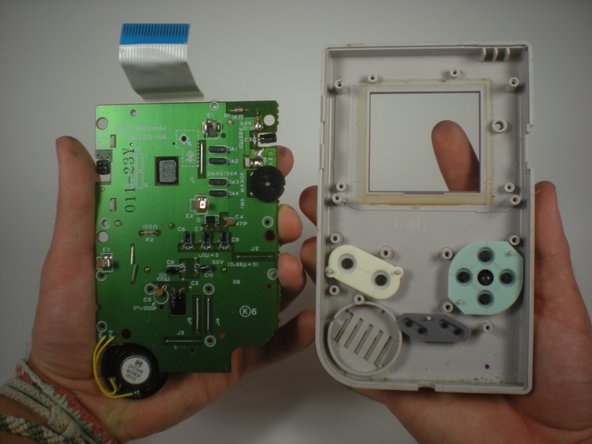
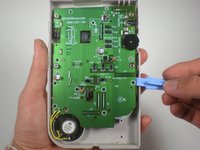
  9. Game Boy Speaker Replacement: шаг 9, изображение 1 из 2 Game Boy Speaker Replacement: шаг 9, изображение 2 из 2
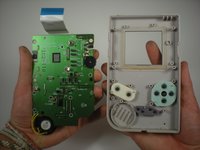
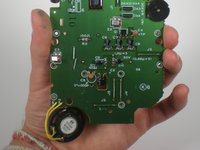
    • Use a plastic opening tool to gently lift the motherboard up and remove it from the front plastic case.

    • Use caution when lifting the board since the speaker is attached.

    Спросите у FixBot

    Добавить комментарий

  10. Game Boy Speaker Replacement: шаг 10, изображение 1 из 3 Game Boy Speaker Replacement: шаг 10, изображение 2 из 3 Game Boy Speaker Replacement: шаг 10, изображение 3 из 3
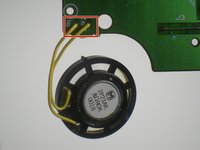
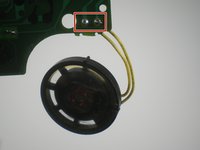
    • Desolder the two wires connecting the speaker to the motherboard.

    • Remove the speaker.

    • If you're new to soldering, refer to this guide for tips that will help with desoldering the speaker wires and/or soldering the new ones in place.

    Спросите у FixBot

    Добавить комментарий

Заключение

To reassemble your device, follow these instructions in reverse order.

Отменить: Я не выполнил это руководство.

17 человек успешно провели ремонт по этому руководству.

Andrew Tramposch

Участник с: 06/24/10

2 378 Репутация

Автор 6 руководств

Команда

Cal Poly, Team 3-2, Johann Summer 2010 Участник Cal Poly, Team 3-2, Johann Summer 2010

CPSU-JOHANN-R10S3G2

3 членов

Автор 40 руководств

2 Комментарии к руководству

This is just a guide to remove the speaker not replacing it so change the title as it is misleading as people that following this will want know how to replace not remove only

Paul - Ответить Поделиться

As stated in the conclusion, you simply follow the steps in reverse to install your replacement speaker.

Jeff Suovanen - Ответить Поделиться

Добавить комментарий

Статистика просмотров:

За последние 24 часов: 12

За последние 7 дней: 42

За последние 30 дней: 220

За всё время: 38,128