Введение
If your screen fails to light up or is physically damaged, you most likely have a faulty screen that requires replacement.
To access the screen, you will first need to open your HP Pavilion 15-cd040wm by disassembling its back cover.
Before beginning, make sure to power off your laptop completely and disconnect it from any external power source. Once the back cover is off, be sure to disconnect the battery from the motherboard to ensure there is no power going to the laptop while it is being worked on.
Выберете то, что вам нужно
-
-
-
The first step is to remove the four rubber non-slip pads on the bottom of the laptop to expose screws hidden underneath them. Peel off each tab with your fingers.
 Спросите у FixBot
-
-
-
3x 10mm Phillips scews
-
2x 5mm Phillips screws
-
6x 6mm Phillips screws
-
Remove all screws using a size Phillips #0 screwdriver.
-
-
-
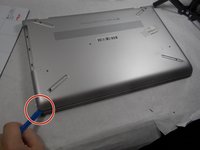
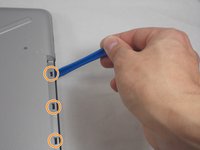
Using the iFixit opening tool, carefully pry along the sides of the back cover.
-
After all of the edges of the back cover have been freed, use your opening tool to carefully unclip the tabs holding the back cover to the CD drive.
-
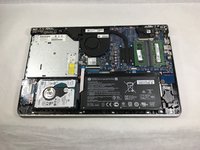
After everything is unclipped, you can safely remove the back cover from the rest of the device.
-
-
-
-
-
-
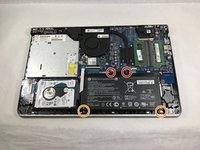
2x 5mm Philips screws
-
2x 3mm Philips screws
-
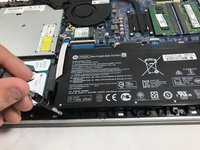
Remove all screws using a size Phillips #0 screwdriver.
-
-
-
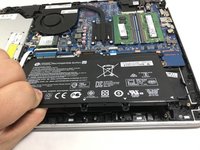
Gently pull up on the battery and tilt it away from the rest of the laptop chassis.
-
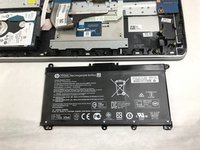
Pull out the battery at an angle and lift it out of the laptop.
-
-
-
-
-
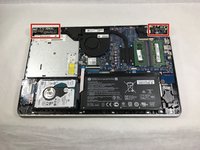
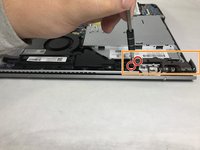
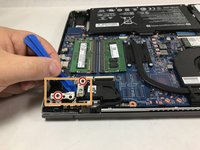
Remove the four 6.0 mm screws from the hinges using a size Phillips #0 screwdriver.
-
Use the iFixit opening tool to lift both of the hinges.
-
-
-
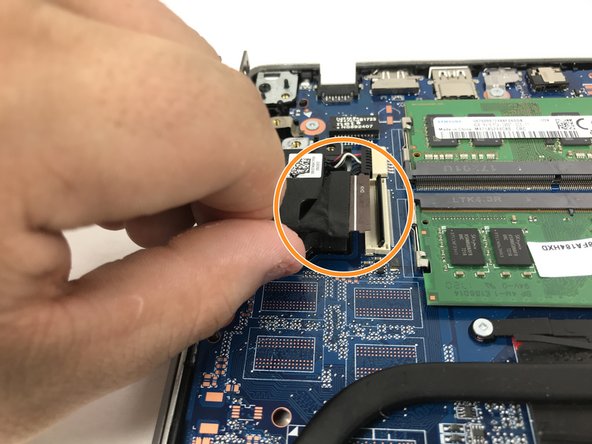
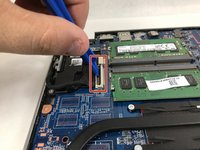
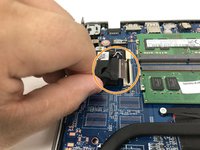
Using the spudger or opening tool, remove the ribbon that connects to the screen.
-
Gently pull the ribbon out of the port after using the spudger to lift the supporter up.
-
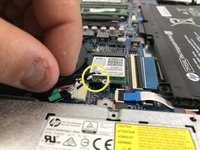
Carefully remove the two antenna wires that connect to the screen as well. Do this by gently pulling them free from their connectors at the wifi card.
-
-
-
Once these steps are completed, you may lift the display assembly free from the rest of the device.
-
-











To reassemble your device, follow these instructions in reverse order.
Отменить: Я не выполнил это руководство.
2 человек успешно провели ремонт по этому руководству.

Команда

UMass Dartmouth, Team S1-G1, Botvin Fall 2019 Участник UMass Dartmouth, Team S1-G1, Botvin Fall 2019
UMASSD-BOTVIN-F19S1G1
4 членов
Автор 59 руководств
