Перейти к основному содержанию
Присоединяйся к сообществу ремонтников - Создай аккаунт

HTC Vive Pro 2 All-In-One Cable Replacement

Выберете то, что вам нужно

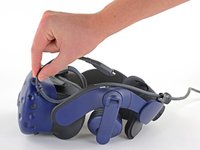
    1. HTC Vive Pro 2 All-In-One Cable Replacement, Reposition the head strap: шаг 1, изображение 1 из 2 HTC Vive Pro 2 All-In-One Cable Replacement, Reposition the head strap: шаг 1, изображение 2 из 2
      • Rotate the head strap forward as far as it will go.

      Спросите у FixBot

      Добавить комментарий

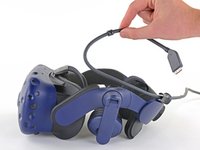
    2. HTC Vive Pro 2 All-In-One Cable Replacement, Unplug the All-In-One Cable: шаг 2, изображение 1 из 2 HTC Vive Pro 2 All-In-One Cable Replacement, Unplug the All-In-One Cable: шаг 2, изображение 2 из 2
      • Unplug the All-In-One Cable from your headset.

      Спросите у FixBot

      Добавить комментарий

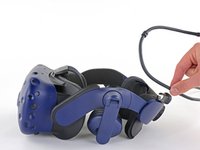
    3. HTC Vive Pro 2 All-In-One Cable Replacement, Remove the All-In-One Cable: шаг 3, изображение 1 из 3 HTC Vive Pro 2 All-In-One Cable Replacement, Remove the All-In-One Cable: шаг 3, изображение 2 из 3 HTC Vive Pro 2 All-In-One Cable Replacement, Remove the All-In-One Cable: шаг 3, изображение 3 из 3
      • Remove the All-In-One Cable from the cable guides along the left side of the head strap.

      • During reassembly, connect the All-In-One Cable to the headset before routing it through the cable guides. This will ensure it has the right amount of slack.

      Спросите у FixBot

      Добавить комментарий

Заключение

To reassemble your device, follow the above steps in reverse order.

Repair didn’t go as planned? Try some basic troubleshooting, or ask our Answers community for help.


Отменить: Я не выполнил это руководство.

Alex Diaz-Kokaisl

Участник с: 01/16/22

247 513 Репутация

Автор 1 203 руководств

Команда

iFixit Участник iFixit

Staff

123 членов

Автор 80 101 руководств

0 Комментарии к руководству

Добавить комментарий

Статистика просмотров:

За последние 24 часов: 2

За последние 7 дней: 15

За последние 30 дней: 53

За всё время: 857