Введение
Use this guide to fix the mouse if there is a double click problem on your Logitech G403.
Double clicking is a very common problem for G403. If your warranty is finished, you can fix the mouse by yourself, rather than buy a new one.
You will need a precision screwdriver set to fix the mouse. However, in case your screwdriver doesn’t work, you can look at these pages for help:
Don’t forget to unplug your mouse before you start.
Выберете то, что вам нужно
-
-
Use a prying tool or your hand to take out both sides of the mouse feet.
 Спросите у FixBot
-
-
-
Use a precision screwdriver to remove four screws from the mouse.
-
-
-
Slowly open the mouse, and take care not to tear the ribbon cable.
-
Detach the cable connector.
-
-
-
-
Remove four screws from the mouse.
-
Remove the mouse click cover.
-
-
-
Find the place where more tension is needed.
-
Use a prying tool or your hand to give more tension to the copper piece, making sure the copper is curved.
-


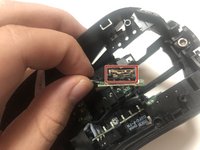

To reassemble your device, follow these instructions in reverse order.
Отменить: Я не выполнил это руководство.
10 человек успешно провели ремонт по этому руководству.

Команда

York University, Team S1-G25, Allen Summer 2020 Участник York University, Team S1-G25, Allen Summer 2020
YORK-ALLEN-SU20S1G25
1 член
Автор 2 руководств
10 Комментарии к руководству
Worked, thanks
step 8 made no sense and had to google it
did you find a video about that? if you could send it pls or if it was some place where talk more about it
Worked!!! I had this problem for years, even stoped playing valorant bacause of that. Thanks
I could not open these screws :( What are the screwdriver size to open these?
