Перейти к основному содержанию
Присоединяйся к сообществу ремонтников - Создай аккаунт

JBL Flip 6 Battery Replacement

Выберете то, что вам нужно

  1. JBL Flip 6 Battery Replacement, Pry up the fabric cover: шаг 1, изображение 1 из 3 JBL Flip 6 Battery Replacement, Pry up the fabric cover: шаг 1, изображение 2 из 3 JBL Flip 6 Battery Replacement, Pry up the fabric cover: шаг 1, изображение 3 из 3
    • Before starting repairs, turn off your device and unplug any cables.

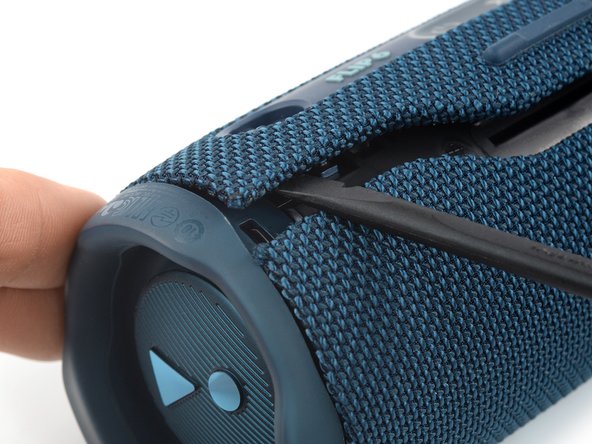
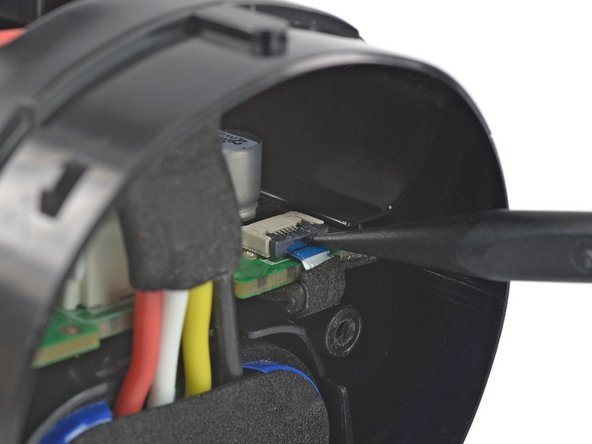
    • The fabric cover of the JBL Flip 6 is secured by plastic clips.

    • Insert the flat end of a spudger into the seam between the two halves of the fabric cover.

    • Push the spudger underneath the edge of the fabric cover without the control panel and pry upwards to release its plastic clips.

    Спросите у FixBot
  2. JBL Flip 6 Battery Replacement, Release the plastic clips: шаг 2, изображение 1 из 3 JBL Flip 6 Battery Replacement, Release the plastic clips: шаг 2, изображение 2 из 3 JBL Flip 6 Battery Replacement, Release the plastic clips: шаг 2, изображение 3 из 3
    • Repeat the previous step, using your spudger to work your way along the entire seam to release the remaining plastic clips.

    Спросите у FixBot
  3. JBL Flip 6 Battery Replacement, Pry up the fabric cover: шаг 3, изображение 1 из 2 JBL Flip 6 Battery Replacement, Pry up the fabric cover: шаг 3, изображение 2 из 2
    • Insert the flat end of a spudger underneath the opposite edge of the fabric cover—the side with the control panel.

    • Pry upwards to release the plastic clip.

    Спросите у FixBot
  4. JBL Flip 6 Battery Replacement, Release the plastic clips: шаг 4, изображение 1 из 2 JBL Flip 6 Battery Replacement, Release the plastic clips: шаг 4, изображение 2 из 2
    • Repeat the previous step to release the last plastic clip on the other end of the fabric cover.

    Спросите у FixBot
  5. JBL Flip 6 Battery Replacement, Remove the fabric cover: шаг 5, изображение 1 из 3 JBL Flip 6 Battery Replacement, Remove the fabric cover: шаг 5, изображение 2 из 3 JBL Flip 6 Battery Replacement, Remove the fabric cover: шаг 5, изображение 3 из 3
    • Use one hand to spread the edges of the fabric cover apart and your other hand to pull the speaker assembly away from the cover.

    • Remove the fabric cover.

    • During reassembly, this is a good point to power on your device and test your repair before reinstalling the fabric cover.

    Спросите у FixBot
  6. JBL Flip 6 Battery Replacement, Unclip the right passive radiator: шаг 6, изображение 1 из 3 JBL Flip 6 Battery Replacement, Unclip the right passive radiator: шаг 6, изображение 2 из 3 JBL Flip 6 Battery Replacement, Unclip the right passive radiator: шаг 6, изображение 3 из 3
    • The right passive radiator is secured by plastic clips and labeled R.

    • Insert the flat end of a spudger underneath the passive radiator housing near one of the plastic clips.

    • Pry upwards to release the first plastic clip holding the passive radiator housing in place.

    Спросите у FixBot
  7. JBL Flip 6 Battery Replacement: шаг 7, изображение 1 из 2 JBL Flip 6 Battery Replacement: шаг 7, изображение 2 из 2
    • Repeat the previous step to release all of the plastic clips holding the housing in place.

    Спросите у FixBot
  8. JBL Flip 6 Battery Replacement, Remove the right passive radiator: шаг 8, изображение 1 из 2 JBL Flip 6 Battery Replacement, Remove the right passive radiator: шаг 8, изображение 2 из 2
    • Remove the right passive radiator.

    Спросите у FixBot
  9. JBL Flip 6 Battery Replacement, Unfasten the safety bracket: шаг 9, изображение 1 из 2 JBL Flip 6 Battery Replacement, Unfasten the safety bracket: шаг 9, изображение 2 из 2
    • Use a Phillips screwdriver to remove the two 9.5 mm-long screws securing the safety bracket.

    Спросите у FixBot
  10. JBL Flip 6 Battery Replacement, Remove the safety bracket: шаг 10, изображение 1 из 2 JBL Flip 6 Battery Replacement, Remove the safety bracket: шаг 10, изображение 2 из 2
    Инструмент, используемый на этом этапе:
    Tweezers
    $4.99
    • Use a pair of tweezers or your fingers to remove the safety bracket.

    Спросите у FixBot
  11. JBL Flip 6 Battery Replacement, Unfasten the woofer: шаг 11, изображение 1 из 2 JBL Flip 6 Battery Replacement, Unfasten the woofer: шаг 11, изображение 2 из 2
    • Use a Phillips screwdriver to remove the four 9.5 mm-long screws securing the woofer.

    • Don't try to remove the woofer all the way yet, as it‘s still connected to the motherboard.

    Спросите у FixBot
  12. JBL Flip 6 Battery Replacement, Move the woofer: шаг 12, изображение 1 из 3 JBL Flip 6 Battery Replacement, Move the woofer: шаг 12, изображение 2 из 3 JBL Flip 6 Battery Replacement, Move the woofer: шаг 12, изображение 3 из 3
    • The woofer cables are long enough to allow placing the woofer outside the speaker assembly, but avoid straining or sharply folding the cables when doing so.

    • When handling the woofer, grab it by its edges to avoid damaging the fragile center material.

    • Lift the woofer out of its recess and place it next to the speaker assembly.

    Спросите у FixBot
  13. JBL Flip 6 Battery Replacement, Disconnect the woofer: шаг 13, изображение 1 из 2 JBL Flip 6 Battery Replacement, Disconnect the woofer: шаг 13, изображение 2 из 2
    • The woofer is connected to the motherboard with a JST connector.

    • Use a pair of tweezers to grasp the sides of the woofer connector.

    • Slide the connector out of its socket, gently wiggling it left and right to loosen the clips securing it.

    Спросите у FixBot
  14. JBL Flip 6 Battery Replacement, Remove the woofer: шаг 14, изображение 1 из 1
    • Remove the woofer.

    Спросите у FixBot
  15. JBL Flip 6 Battery Replacement, Unfasten the tweeter: шаг 15, изображение 1 из 2 JBL Flip 6 Battery Replacement, Unfasten the tweeter: шаг 15, изображение 2 из 2
    • Use a Phillips screwdriver to remove the two 9.5 mm-long screws securing the tweeter.

    Спросите у FixBot
  16. JBL Flip 6 Battery Replacement, Tweeter connector information: шаг 16, изображение 1 из 2 JBL Flip 6 Battery Replacement, Tweeter connector information: шаг 16, изображение 2 из 2
    • There are different versions of the JBL Flip 6 with different tweeter connectors. Both require a slightly different disconnection procedure.

    • A connector next to the woofer connector, which can be disconnected just like the woofer's.

    • A spade connector with contact springs, which can be disconnected by simply prying up the tweeter.

    • To pry up the tweeter, insert the tip of a spudger between the battery connector and the connector stem of the tweeter and gently press the tweeter upwards to push the stems out of their contact springs.

    • To reconnect the spade connector, just press the contacts back into the springs.

    Спросите у FixBot
  17. JBL Flip 6 Battery Replacement, Remove the tweeter: шаг 17, изображение 1 из 3 JBL Flip 6 Battery Replacement, Remove the tweeter: шаг 17, изображение 2 из 3 JBL Flip 6 Battery Replacement, Remove the tweeter: шаг 17, изображение 3 из 3
    • Use a spudger to pry up the tweeter.

    • Remove the tweeter.

    Спросите у FixBot
  18. JBL Flip 6 Battery Replacement, Unlatch the power button cable ZIF connector: шаг 18, изображение 1 из 2 JBL Flip 6 Battery Replacement, Unlatch the power button cable ZIF connector: шаг 18, изображение 2 из 2
    • Use the tip of a spudger or your fingernail to flip up the small, hinged locking flap on the power button cable ZIF connector.

    Спросите у FixBot
  19. JBL Flip 6 Battery Replacement, Disconnect the power button cable: шаг 19, изображение 1 из 2 JBL Flip 6 Battery Replacement, Disconnect the power button cable: шаг 19, изображение 2 из 2
    • Use a pair of tweezers to pull the power button cable out of the ZIF connector.

    Спросите у FixBot
  20. JBL Flip 6 Battery Replacement, Unlatch the charging cable ZIF connector: шаг 20, изображение 1 из 2 JBL Flip 6 Battery Replacement, Unlatch the charging cable ZIF connector: шаг 20, изображение 2 из 2
    • Use the tip of a spudger or your fingernail to flip up the small, hinged locking flap on the charging cable ZIF connector.

    Спросите у FixBot
  21. JBL Flip 6 Battery Replacement, Disconnect the charging cable: шаг 21, изображение 1 из 2 JBL Flip 6 Battery Replacement, Disconnect the charging cable: шаг 21, изображение 2 из 2
    • Use a pair of tweezers to pull the charging cable out of the ZIF connector.

    Спросите у FixBot
  22. JBL Flip 6 Battery Replacement, Unlatch the volume button cable ZIF connector: шаг 22, изображение 1 из 2 JBL Flip 6 Battery Replacement, Unlatch the volume button cable ZIF connector: шаг 22, изображение 2 из 2
    • Use the tip of a spudger or your fingernail to flip up the small, hinged locking flap on the volume button cable ZIF connector.

    Спросите у FixBot
  23. JBL Flip 6 Battery Replacement, Disconnect the volume button cable: шаг 23, изображение 1 из 2 JBL Flip 6 Battery Replacement, Disconnect the volume button cable: шаг 23, изображение 2 из 2
    • Use a pair of tweezers to pull the volume button cable out of the ZIF connector.

    Спросите у FixBot
  24. JBL Flip 6 Battery Replacement, Move the motherboard: шаг 24, изображение 1 из 2 JBL Flip 6 Battery Replacement, Move the motherboard: шаг 24, изображение 2 из 2
    • Insert a finger into the woofer cutout and press against the left edge of the motherboard.

    • Push the motherboard out of the speaker assembly just until you get free access to the battery connector. You don't need to push it out all the way.

    Спросите у FixBot
  25. JBL Flip 6 Battery Replacement, Disconnect the battery: шаг 25, изображение 1 из 3 JBL Flip 6 Battery Replacement, Disconnect the battery: шаг 25, изображение 2 из 3 JBL Flip 6 Battery Replacement, Disconnect the battery: шаг 25, изображение 3 из 3
    • The battery is connected to the motherboard with a power cable connector that has a small tab on the side that locks it in place.

    • Squeeze the tab against the connector, and pull the connector straight up from its socket to disconnect the battery.

    Спросите у FixBot
  26. JBL Flip 6 Battery Replacement, Remove the battery: шаг 26, изображение 1 из 3 JBL Flip 6 Battery Replacement, Remove the battery: шаг 26, изображение 2 из 3 JBL Flip 6 Battery Replacement, Remove the battery: шаг 26, изображение 3 из 3
    • Pull the battery out of the speaker assembly to remove it.

    Спросите у FixBot
Заключение

If possible, power on your device and test your repair before reassembly. For optimal performance, calibrate your newly installed battery after completing this guide.

To reassemble your device, follow these instructions in reverse order.

Take your e-waste to an R2 or e-Stewards certified recycler.

Repair didn’t go as planned? Try some basic troubleshooting, or ask our Answers community for help.

14 человек успешно провели ремонт по этому руководству.

Dominik Schnabelrauch

Участник с: 11/23/16

258 312 Репутация

Автор 682 руководств

Команда

iFixit Участник iFixit

Staff

123 членов

Автор 25 710 руководств

2 Комментарии к руководству

Donde puedo y me recomiendas comprar la bateria de mi Flip 6

Juan - Ответить Поделиться

Yowza! ABSOLUTELY Great directions. THANK YOU!

I Read thru this while trying to decide which small portable Bluetooth speaker to buy. Tired of tossing units because the battery is not replaceable. This JBL Flip 6 IS but >>> WOW - not exactly easy for someone not too experienced. Guess I will just have to learn and gain experience. Sure wish Samsung/JBL made life easier for users tho. The only thing that looks 'iffy' for this speaker is the fraying fabric. I guess nail polish might stop the fraying.

[As for getting back into 'fixing' things - reminds me that when i was 6 i took my Baby Ben Clock apart and after reconstruction there was ONE screw left over. Clock worked for the next 23 years as I moved frm place to place and then it somehow just disappeared (alas). Since then (some 50 yrs) I've always wondered WHY the clock was constructed with an 'extra' screw in the first place]

Abi Woodbridge - Ответить Поделиться

Добавить комментарий

Статистика просмотров:

За последние 24 часов: 30

За последние 7 дней: 162

За последние 30 дней: 711

За всё время: 21,818