Введение
Battery replacement is the process of removing the battery, you have to unsolder the wires connected to the motherboard. Replace the old battery with a new battery for better performance. Battery replacement is very important for the device as It plays an big part on how it performs, make sure to use safety tools while removing the battery. For safety guidelines on how to solder, go to this page.
Выберете то, что вам нужно
-
-
-
Pry the edges of the tablet apart using an iFixit opening tool.
 Спросите у FixBot
-
-
-
-
-
-
Desolder the solder joints that connect the motherboard to the battery.
-
-
-
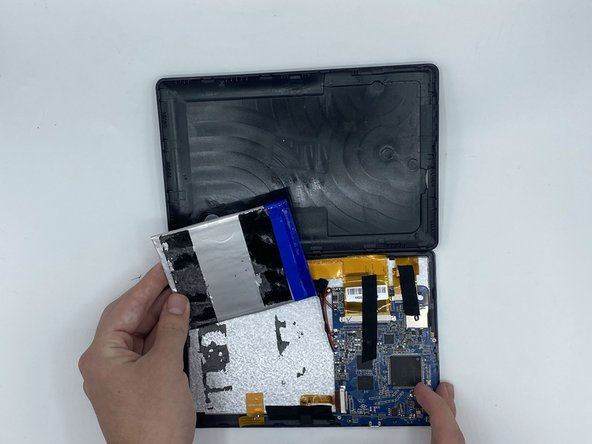
Pry the battery up using the flat end of a spudger.
-
Remove the adhesive under the battery and carefully lift it up to replace it.
-
-


To reassemble your device, follow these instructions in reverse order, also to be very careful while removing the battery and use the safety tools.

Команда

University of North Texas, Team 4-9, Harold Fall 2023 Участник University of North Texas, Team 4-9, Harold Fall 2023
UNT-HAROLD-F23S4G9
4 членов
Автор 11 руководств
