Введение
Fan damage or normal wear may cause the computer to overheat during use. This guide shows how to replace the fan within the Lenovo V14-IIL laptop. Be sure to remove small parts carefully.
Before using this guide, make sure to review the Lenovo V14-IIL troubleshooting page to review if there may be a solution that does not require component replacement.
Make sure to power off your laptop completely and disconnect from any external power source before beginning the process.
Выберете то, что вам нужно
-
-
-
Flip your laptop over and place on a flat surface so you can access the screws on the base cover.
-
Remove the six 7 mm screws from the back panel of the laptop using a Phillips #0 screwdriver.
-
Remove the four 4 mm screws from the bottom edge of the laptop using a Phillips #0 screwdriver.
 Спросите у FixBot
-
-
-
Use an iFixit opening tool to pry apart the case by sliding it along each side of the laptop.
-
-
-
-
-
-
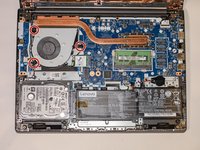
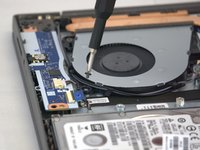
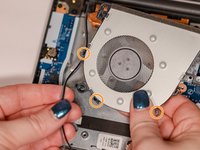
Using a Phillips #0 screwdriver, remove the three 6 mm screws holding the fan.
-
-
-
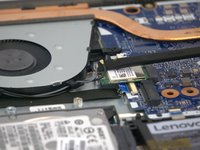
Using the spudger, disconnect the two wireless LAN cables (black and gray) from the wireless LAN card.
-
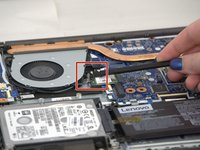
Remove the LAN cables from the three brackets on the fan.
-
-
-
Lift out the fan gently pulling until the four cables disconnect from the motherboard.
-
-





To reassemble your device, follow these instructions in reverse order.
Отменить: Я не выполнил это руководство.
2 человек успешно провели ремонт по этому руководству.

Команда

Tennessee Tech University, Team 1-2, Pickering Spring 2024 Участник Tennessee Tech University, Team 1-2, Pickering Spring 2024
TNTECH-PICKERING-S24S1G2
3 членов
Автор 36 руководств
