Введение
This guide is used to explain how to replace the rear camera on the Microsoft Surface Book 2 15. It uses the motherboard replacement guide as a prerequisite guide, which is a difficult task to perform.
The rear camera replacement itself is a fairly simple one, that just requires detaching a ribbon cable and reattaching it. However, the steps before it where you open the laptop can difficult.
A majority of the issues that are found with the Microsoft Surface Book 2 15 can be solved through software solutions. Therefore make sure to review troubleshooting page and trying the solutions listed their before making any repairs to the device.
Выберете то, что вам нужно
-
-
-
Open the laptop, then orient it so the touchpad is on your left.
-
Starting at the hinge, count six holes up on the tablet portion of the laptop.
 Спросите у FixBot
-
-
-
Take a paper clip and unfold it.
-
Place the paper clip in the sixth hole and push until you hear a click.
-
Once you hear the click, lift up on the right side of the tablet from the base until it separates.
-
After the right side has been detached, lift up the left side as well.
-
-
-
Place the tablet on a flat surface.
-
Using a heat gun or iOpener, heat up the edges of the screen to soften up the adhesive.
-
-
-
Using a plastic pick, slice underneath the edge of the screen.
-
Slowly make your way around the screen, and carefully cut the adhesive that secures the screen to the frame.
-
-
-
-
Lift up the screen.
-
Detach the ribbon cables connecting the underside of the screen to the motherboard.
-
-
-
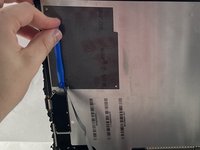
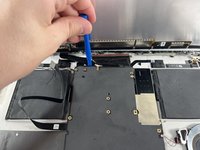
Use a T3 Torx screwdriver to remove eleven 4 mm screws from the motherboard.
-
Use a T3 Torx screwdriver to remove the ten 2.5 mm screws from the top bar.
-
-
-
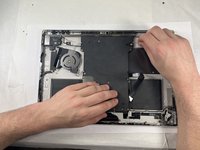
Once the screws are removed from the top bar, gently lift up and remove it.
-
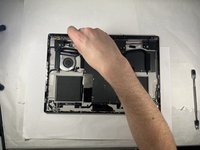
Gently lift up on the motherboard to remove it.
-
-
-
-
-
After lifting the motherboard, locate the two cameras near the center of the motherboard.
-
Unplug front camera (right side) from the motherboard (lift carefully).
-
-
-
-
-
In the top left-hand corner of the tablet is where the camera sits.
-
Unscrew the T3 torx screw.
-
-






To reassemble your device, follow these instructions in reverse order.
Отменить: Я не выполнил это руководство.
Еще один человек закончил это руководство.

Команда

UMass Dartmouth, Team 3-3, Petersen Spring 2023 Участник UMass Dartmouth, Team 3-3, Petersen Spring 2023
UMASSD-PETERSEN-S23S3G3
4 членов
Автор 30 руководств
