Этот перевод был сделан машиной и пока не проверен человеком. Говорите на этом языке? Просмотрите его.

Замена дисковода Nintendo Wii mini

Kristin Anderson и 6 другие участники
Последнее обновление 29 июл 2026 г.
Просмотров: 6,5 тыс.
Просмотр статистики:
- За последние 24 часа:
- 4
- За последние 7 дней:
- 28
- За последние 30 дней:
- 137
- За все время:
- 6 490
Комментарии: 2
1 комментариев на шаге, 1 комментарий к инструкции.
Перейти к комментариям инструкцииЗавершено: 4 5
4 пользователей отметили эту инстркукцию как "завершенное". Вы будете следующим?
5 пользователей отметили эту инструкцию как "завершенное". В том числе и Вы — отличная работа!
Избранные: 1 2
1 человек поставил лайк на эту инструкцию (и подписался на нее). Вы будете следующим?
2 эта инструкция понравилось многим пользователям (и они подписались на нее), в том числе и Вам!
Введение
Перейти к шагу 1 ↓Это руководство содержит инструкции по замене дисковода в вашей приставке Nintendo Wii mini, чтобы вы могли вставлять игровые диски. Помимо ситуации, когда дисковод не принимает диск, другие причины проблем могут заключаться в загрязнении или царапинах на поверхности диска, из-за чего игра может подтормаживать или отображаться некорректно. Возможно, вам потребуется заменить сам диск. На странице устранения неполадок вы найдете больше информации о других возможных проблемах.
Рекомендуется использовать пинцет для работы с мелкими деталями, такими как винты, чтобы не потерять их. Чтобы избежать проблем с «железом», не трогайте разъемы и шлейфы во время снятия вентилятора, так как это может привести к ослаблению контактов в разъеме.
Выберете то, что Вам нужно
Запчасти

Инструменты


-
-
-
Снимите две резиновые ножки на задней панели консоли, чтобы открыть доступ к скрытым винтам.
-
Выкрутите четыре винта Phillips #0 длиной 6 мм.
 Спросите у FixBot
-
-
-
Переверните Wii mini верхней стороной вверх. Затем проведите пластиковым инструментом для открывания по среднему краю консоли, чтобы ослабить верхнюю панель.
-
Аккуратно приподнимите верхнюю панель консоли и отложите её в сторону.
-
-
-
-
Инструмент, используемый на этом этапе:Tweezers$4.99
-
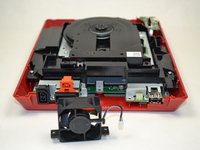
Поверните Wii mini задней панелью к себе.
-
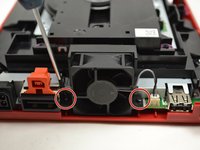
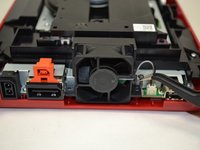
С помощью крестовой отвертки Phillips #0 открутите два винта длиной 6 мм по обе стороны от вентилятора.
-
-
-
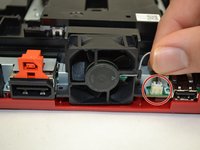
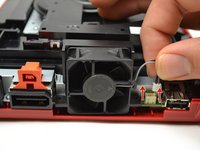
Пальцами аккуратно потяните верхнюю часть разъема с контактами строго вверх, чтобы отсоединить вентилятор от консоли.
-
Снимите вентилятор и отложите его в сторону.
-
-
-
-
-
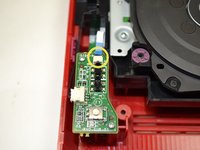
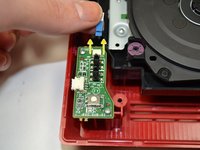
Пальцами выдвиньте синий шлейф из верхней части платы питания.
-
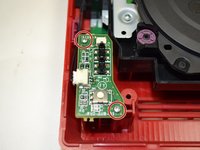
С помощью крестовой отвертки Phillips #0 открутите два винта длиной 4 мм в верхней и нижней части платы питания.
-
-
-
Пальцами аккуратно потяните за штекерный разъем, чтобы отсоединить плату питания от дисковода.
-
-
-
-
-
-
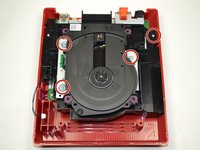
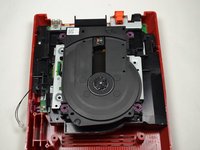
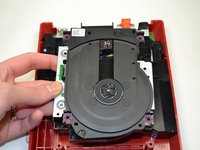
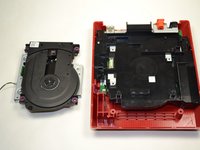
С помощью крестовой отвертки (Phillips #0) открутите четыре винта длиной 6 мм.
-
-








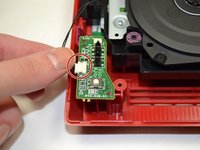
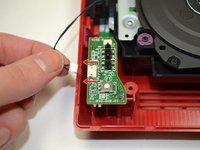


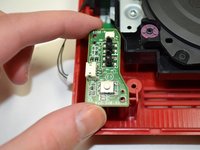
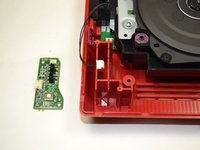




Для сборки устройства выполните эти инструкции в обратном порядке.
Отменить: Я не выполнил это руководство.
4 человек успешно провели ремонт по этому руководству.

Команду

1 Комментарий к руководству
i even took apart the disk drive. turns out it wasn't working because the lid was missing one of the plastic parts that pushes the sensor in the disk drive that indicates that the lid is closed
