Введение
This step-by-step guide is designed to help you disassemble the Nokia 3100b to access and replace or inspect its microphone. The microphone is a crucial component of the phone, as it captures the sound you produce during calls, ensuring clear communication. Whether you're troubleshooting audio issues or replacing a faulty microphone, this guide will provide clear and concise instructions to navigate the process with ease.
Before beginning, ensure you have a clean, well-lit workspace and are equipped with the necessary tools for disassembly. Make sure to power off your phone, disconnect it from the charger, and remove the battery before you begin this repair.
Выберете то, что вам нужно
-
-
Press the button on the back of the phone and slide the back panel off.
-
Remove the battery by pulling it from the phone.
-
-
-
Gently pull back the small metal frame holding the SIM card into place, and lift open the frame.
-
-
-
-
Press the black tabs to release the front cover from the phone.
-
-
-
Remove the front cover from the phone.
-
Set the front cover as indicated, aside.
-
-
-
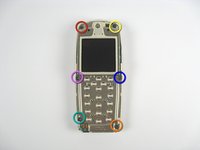
Remove the screws as they are indicated in the order of the colors of the rainbow. (Red, Orange, Yellow, Green, Blue, Purple.)
-
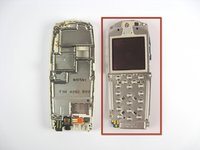
Remove the screen assembly from the phone base.
-
Set the screen assembly aside.
-
-
Инструмент, используемый на этом этапе:Tweezers$4.99
-
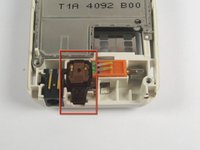
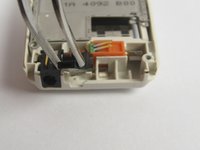
Note the location of the microphone.
-
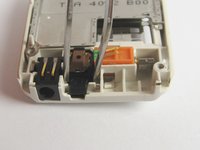
Use tweezers to remove the microphone from the phone's base.
-

 Спросите у FixBot




To reassemble your device, follow these instructions in reverse order. Take your e-waste to an R2 or e-Stewards certified recycler.
Отменить: Я не выполнил это руководство.
Еще один человек закончил это руководство.

Команда

Cal Poly, Team 29-64, Johann Spring 2010 Участник Cal Poly, Team 29-64, Johann Spring 2010
CPSU-JOHANN-S10S29G64
3 членов
Автор 24 руководств
