Перейти к основному содержанию
Присоединяйся к сообществу ремонтников - Создай аккаунт

PSP Go Front Panel Replacement

Выберете то, что вам нужно

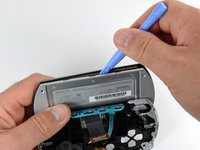
  1. PSP Go Front Panel Replacement, Back Cover: шаг 1, изображение 1 из 2 PSP Go Front Panel Replacement, Back Cover: шаг 1, изображение 2 из 2
    • Unscrew the four Phillips screws on the back of the PSP Go.

    • Rotate the PSP so you can see the top of the device.

    • Unscrew the two Phillips screws next to the volume buttons.

    Спросите у FixBot

    Добавить комментарий

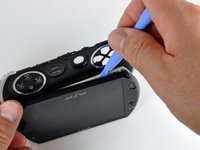
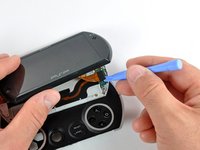
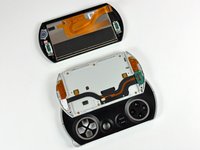
  2. PSP Go Front Panel Replacement: шаг 2, изображение 1 из 2 PSP Go Front Panel Replacement: шаг 2, изображение 2 из 2
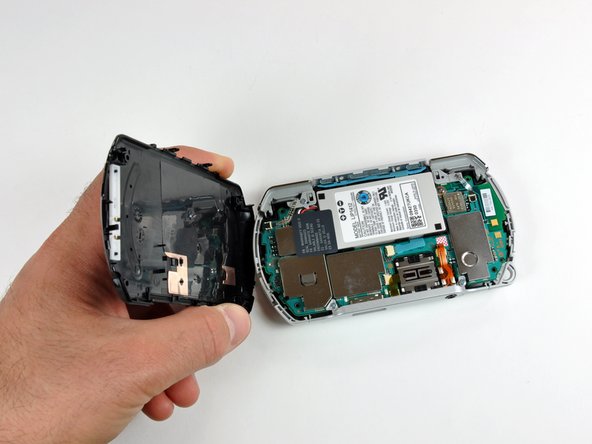
    • Use a plastic opening tool around the perimeter of the back cover to loosen it on all sides.

    • Open the back cover by gently lifting the right side, and rotating it to the left side (as if you were opening a book).

    • Be careful not to rotate the back cover from the bottom, as you will break the plastic screw holes on top of the device.

    Спросите у FixBot

    Добавить комментарий

  3. PSP Go Front Panel Replacement, Top Cover: шаг 3, изображение 1 из 1
    • Pull the top cover upwards gently from its housing.

    Спросите у FixBot

    Добавить комментарий

  4. PSP Go Front Panel Replacement, Left Trigger: шаг 4, изображение 1 из 1
    • Use a plastic opening tool to gently flip up the left trigger connector.

    Спросите у FixBot

    Добавить комментарий

  5. PSP Go Front Panel Replacement: шаг 5, изображение 1 из 2 PSP Go Front Panel Replacement: шаг 5, изображение 2 из 2
    • Unscrew the lone Phillips screw holding the trigger in place. Remove both trigger and retaining plate from the PSP Go.

    • If necessary, repeat steps 2 and 3 to remove the right trigger button.

    Спросите у FixBot

    Добавить комментарий

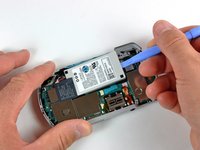
  6. PSP Go Front Panel Replacement, Battery: шаг 6, изображение 1 из 3 PSP Go Front Panel Replacement, Battery: шаг 6, изображение 2 из 3 PSP Go Front Panel Replacement, Battery: шаг 6, изображение 3 из 3
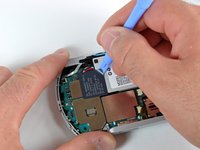
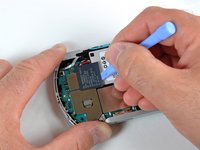
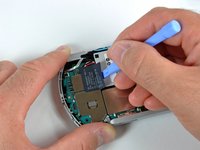
    • Do not peel the sticker away from the left EMI shield. It will expose the "VOID VOID" lettering that will void your warranty!

    • Use the plastic opening tool to gently peel away at the "Warranty Void" sticker. Start on one edge, as shown, and slide the tool from side to side until the sticker is removed from just the battery.

    Спросите у FixBot

    Добавить комментарий

  7. PSP Go Front Panel Replacement: шаг 7, изображение 1 из 1
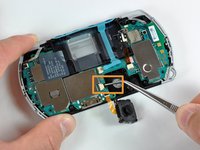
    • Gently pull the sticker away from the battery connector, just enough so that the connector is visible.

    • Wedge a plastic opening tool in between the connector and logic board, and gently pull the connector upwards.

    • Make sure not to disconnect the white connector socket on the logic board, and just the connector itself.

    Спросите у FixBot

    Добавить комментарий

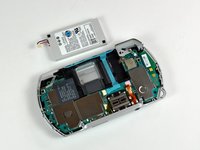
  8. PSP Go Front Panel Replacement: шаг 8, изображение 1 из 2 PSP Go Front Panel Replacement: шаг 8, изображение 2 из 2
    • Use a plastic opening tool to pop out the battery, being careful not to snag the "Warranty Void" sticker in the process.

    • When putting a new battery into the PSP Go, make sure you hold the "Warranty Sticker" so you don't put the battery on top of it.

    Спросите у FixBot

    Добавить комментарий

  9. PSP Go Front Panel Replacement, Logic Board: шаг 9, изображение 1 из 1
    • Remove the single Phillips screw securing the logic board to the inner case.

    Спросите у FixBot

    Добавить комментарий

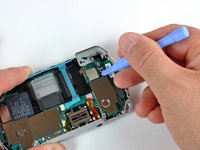
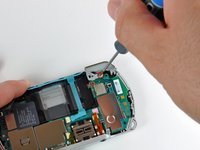
  10. PSP Go Front Panel Replacement: шаг 10, изображение 1 из 2 PSP Go Front Panel Replacement: шаг 10, изображение 2 из 2
    • Use a plastic opening tool to gently flip up the right trigger connector.

    • Unscrew the lone Phillips screw holding the trigger in place. Remove both trigger and retaining plate from the PSP Go.

    Спросите у FixBot

    Добавить комментарий

  11. PSP Go Front Panel Replacement: шаг 11, изображение 1 из 2 PSP Go Front Panel Replacement: шаг 11, изображение 2 из 2
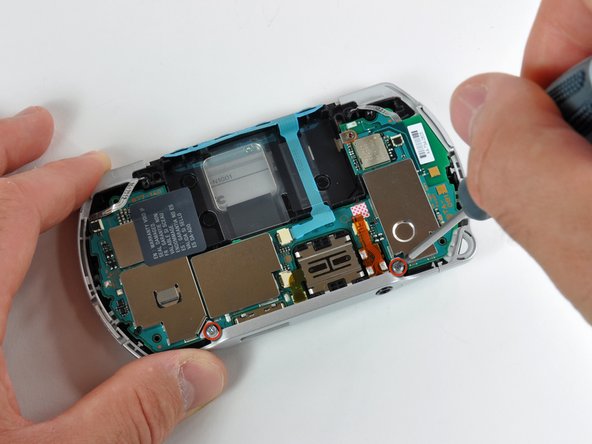
    • Use a #00 Phillips screwdriver to unscrew both bottom plate screws.

    • Remove the bottom plate by lifting it away from the device.

    Спросите у FixBot

    Добавить комментарий

  12. PSP Go Front Panel Replacement: шаг 12, изображение 1 из 1
    • Remove both headphone jack and analog joystick screws using your #00 Phillips screwdriver.

    Спросите у FixBot

    Добавить комментарий

  13. PSP Go Front Panel Replacement: шаг 13, изображение 1 из 2 PSP Go Front Panel Replacement: шаг 13, изображение 2 из 2
    Инструмент, используемый на этом этапе:
    Tweezers
    $4.99
    • Be very careful when disconnecting the following cables. The connectors do not have flip-up tabs; just hold each cable steady and pull it out of the connector.

    • Unplug the volume button cable using a pair of tweezers. Be careful not to damage the cable.

    • Unplug the Start/Select button cable the same way. Make sure to grasp the black plastic pull tab of the cable.

    Спросите у FixBot

    Добавить комментарий

  14. PSP Go Front Panel Replacement: шаг 14, изображение 1 из 1
    • Use a pair of tweezers to pull out the battery's clear plastic cover.

    • Notice the little metal tab and slot (marked in red) where the clear plastic cover slides into. Make sure you slide the cover into place properly when reassembling the PSP Go.

    Спросите у FixBot

    Добавить комментарий

  15. PSP Go Front Panel Replacement: шаг 15, изображение 1 из 1
    • The logic board is still connected to the display, so do not fully remove it from its housing!

    • Gently lift the logic board slightly out of its housing.

    Спросите у FixBot

    Добавить комментарий

  16. PSP Go Front Panel Replacement: шаг 16, изображение 1 из 2 PSP Go Front Panel Replacement: шаг 16, изображение 2 из 2
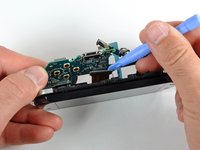
    • Use a plastic opening tool to disconnect the display cable from the logic board.

    • The D-pad may come loose while prying the logic board.

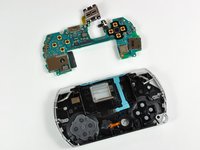
    • The logic board should now be free from the rest of the device.

    • During reassembly, make sure to properly line up the power button with the power button lever on the logic board.

    Спросите у FixBot

    Добавить комментарий

  17. PSP Go Front Panel Replacement, Display: шаг 17, изображение 1 из 1
    • Use a #00 Phillips screwdriver to remove the four display screws.

    Спросите у FixBot

    Добавить комментарий

  18. PSP Go Front Panel Replacement: шаг 18, изображение 1 из 3 PSP Go Front Panel Replacement: шаг 18, изображение 2 из 3 PSP Go Front Panel Replacement: шаг 18, изображение 3 из 3
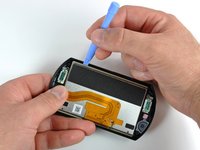
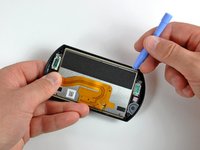
    • Wedge a plastic opening tool in the location shown in the first picture, and slightly separate the metal frame from the plastic front panel.

    • Slide the plastic opening tool around the perimeter of the display, increasing the gap between the metal frame and the front panel.

    • The front panel should now be free from the metal frame. However, it is still connected to the frame, so don't remove it completely.

    Спросите у FixBot

    Добавить комментарий

  19. PSP Go Front Panel Replacement: шаг 19, изображение 1 из 2 PSP Go Front Panel Replacement: шаг 19, изображение 2 из 2
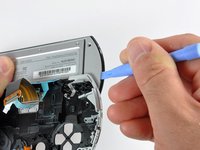
    • Use a plastic opening tool to disconnect the display cable from the rest of the device.

    • The PSP Go should now look similar to the second picture.

    Спросите у FixBot

    Добавить комментарий

  20. PSP Go Front Panel Replacement: шаг 20, изображение 1 из 2 PSP Go Front Panel Replacement: шаг 20, изображение 2 из 2
    • Be very careful when performing this procedure! If you put too much pressure on the display, you risk cracking it.

    • Wedge a plastic opening tool between the plastic front panel and display. Be very careful that you wedge it in the same location shown in the first picture.

    • Slide the plastic opening tool across the length of the display. This should loosen the glue binding the display to the plastic front panel.

    • Rotate the display 180 degrees and free the bottom side of the display in the same manner.

    Спросите у FixBot

    Добавить комментарий

  21. PSP Go Front Panel Replacement: шаг 21, изображение 1 из 1
    • Gently separate the display from the front panel.

    • Match the orientation of the PSP logo on the display with the Sony logo on the front panel when reassembling the PSP Go.

    Спросите у FixBot

    Добавить комментарий

  22. PSP Go Front Panel Replacement, Front Panel: шаг 22, изображение 1 из 1
    • Front panel remains.

    Спросите у FixBot

    Добавить комментарий

Заключение

To reassemble your device, follow these instructions in reverse order.

Отменить: Я не выполнил это руководство.

3 человек успешно провели ремонт по этому руководству.

1 Комментарий к руководству

I don’t have this device, but I’m curious if the front panel is just an border or if it is a sheet, because the later would mean you don’t have to replace the screen to get rid of scratches. I assume this is the case, but just wanted to be sure.

Jerri Kohl - Ответить Поделиться

Добавить комментарий

Статистика просмотров:

За последние 24 часов: 2

За последние 7 дней: 30

За последние 30 дней: 115

За всё время: 22,042