Перейти к основному содержанию
Присоединяйся к сообществу ремонтников - Создай аккаунт

Palm TX Battery Pack Replacement

Выберете то, что вам нужно

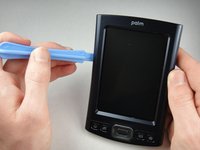
    1. Palm TX Battery Pack Replacement, Back Panel: шаг 1, изображение 1 из 2 Palm TX Battery Pack Replacement, Back Panel: шаг 1, изображение 2 из 2
      • Orient the device so that the display faces forward.

      • Remove the stylus from the right side.

      Спросите у FixBot

      Добавить комментарий

    2. Palm TX Battery Pack Replacement: шаг 2, изображение 1 из 1
      • Turn over the device so that the back panel faces forward.

      • Use a T5 Torx screwdriver to remove the four 6.35mm corner screws.

      Спросите у FixBot

      Добавить комментарий

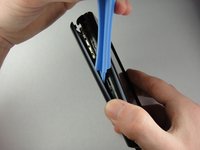
    3. Palm TX Battery Pack Replacement: шаг 3, изображение 1 из 2 Palm TX Battery Pack Replacement: шаг 3, изображение 2 из 2
      • Rotate the device so that the display faces forward.

      • Insert a plastic opening tool with the angled tip pointing downward into the crevice on the left side of the device.

      • Pry along the crevice to loosen the back panel.

      • Repeat this process for the right side.

      Спросите у FixBot

      Добавить комментарий

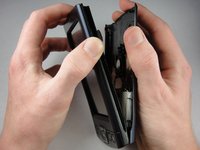
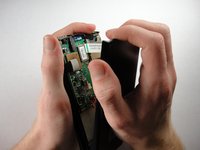
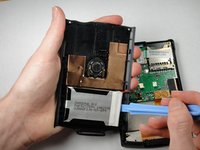
    4. Palm TX Battery Pack Replacement: шаг 4, изображение 1 из 2 Palm TX Battery Pack Replacement: шаг 4, изображение 2 из 2
      • Carefully pry the back panel to open the device.

      • Be careful not to break the wire that connects the battery pack to the motherboard.

      • When reassembling, snap the back panel back into place and then insert the top cover.

      Спросите у FixBot

      Добавить комментарий

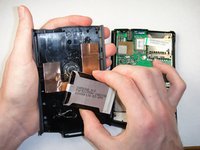
    5. Palm TX Battery Pack Replacement: шаг 5, изображение 1 из 2 Palm TX Battery Pack Replacement: шаг 5, изображение 2 из 2
      • Use a plastic opening tool to peel the battery pack from the back panel.

      • The battery pack is glued to the back panel so removing it may require considerable effort.

      Спросите у FixBot

      Добавить комментарий

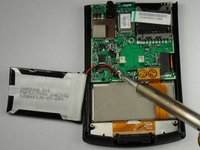
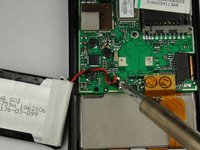
    1. Palm TX Battery Pack Replacement, Battery Pack: шаг 6, изображение 1 из 2 Palm TX Battery Pack Replacement, Battery Pack: шаг 6, изображение 2 из 2
      • Use a soldering iron to disconnect the battery wires from the motherboard.

      • For soldering instructions, you can view the Soldering Guide.

      Спросите у FixBot

      Добавить комментарий

Заключение

To reassemble your device, follow these instructions in reverse order.

Отменить: Я не выполнил это руководство.

5 человек успешно провели ремонт по этому руководству.

Spencer Lewson

Участник с: 01/19/11

793 Репутация

Автор 6 руководств

Команда

Cal Poly, Team 1-15, Amido Winter 2011 Участник Cal Poly, Team 1-15, Amido Winter 2011

CPSU-AMIDO-W11S1G15

4 членов

Автор 56 руководств

1 Комментарий к руководству

In step 1 - Also remove the cover hinge by sliding downwards

In step 3 - there are actually 2 crevices on the left side of the device. Use the larger, which originally held the cover hinge (the smaller crevice seems to remove the facia)

Jack - Ответить Поделиться

Добавить комментарий

Статистика просмотров:

За последние 24 часов: 4

За последние 7 дней: 12

За последние 30 дней: 75

За всё время: 8,591