Перейти к основному содержанию
Присоединяйся к сообществу ремонтников - Создай аккаунт

Palm Treo 650 Keyboard Replacement

Выберете то, что вам нужно

    1. Palm Treo 650 Keyboard Replacement, Battery and Stylus: шаг 1, изображение 1 из 1
      • Position the phone so the screen faces down.

      • Remove the stylus found on the back of the phone.

      Спросите у FixBot

      Добавить комментарий

    2. Palm Treo 650 Keyboard Replacement: шаг 2, изображение 1 из 1
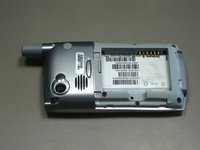
      • Hold the button in the middle of the phone's back to remove the battery cover.

      • Slide the cover down to remove it, and set the cover aside.

      Спросите у FixBot

      Добавить комментарий

    3. Palm Treo 650 Keyboard Replacement: шаг 3, изображение 1 из 2 Palm Treo 650 Keyboard Replacement: шаг 3, изображение 2 из 2
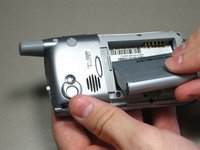
      • Lift the edge of the battery, separating contact points, and pull out as pictured.

      Спросите у FixBot

      Добавить комментарий

    1. Palm Treo 650 Keyboard Replacement, Case: шаг 4, изображение 1 из 1
      • Remove the round, rubber cover to expose a screw that will be removed in the next step.

      Спросите у FixBot

      Добавить комментарий

    2. Palm Treo 650 Keyboard Replacement: шаг 5, изображение 1 из 2 Palm Treo 650 Keyboard Replacement: шаг 5, изображение 2 из 2
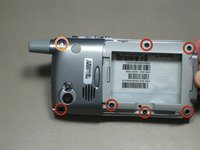
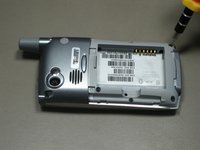
      • Remove the six 6.9 mm screws as pictured with a T5 Torx screwdriver.

      • Remove the single 9.8 mm screw next to the antenna on the back plate, using a Phillips #00 screwdriver.

      Спросите у FixBot

      Добавить комментарий

    3. Palm Treo 650 Keyboard Replacement: шаг 6, изображение 1 из 1
      • Pull the antenna outward to remove the antenna from the body of the phone.

      Спросите у FixBot

      Добавить комментарий

    4. Palm Treo 650 Keyboard Replacement: шаг 7, изображение 1 из 2 Palm Treo 650 Keyboard Replacement: шаг 7, изображение 2 из 2
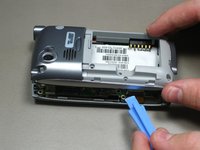
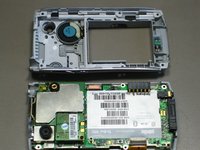
      • Pry the back cover off using an iFixit opening tool.

      • Several small clips on the inside attach to the back cover.

      Спросите у FixBot

      Добавить комментарий

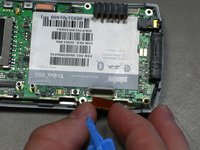
    1. Palm Treo 650 Keyboard Replacement, Motherboard: шаг 8, изображение 1 из 3 Palm Treo 650 Keyboard Replacement, Motherboard: шаг 8, изображение 2 из 3 Palm Treo 650 Keyboard Replacement, Motherboard: шаг 8, изображение 3 из 3
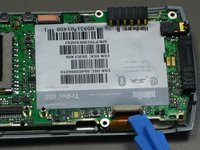
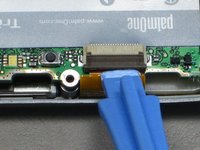
      • Disconnect the ribbon cable before removing the motherboard.

      • Unclip the gray tab.

      • Pull out the orange ribbon cable.

      Спросите у FixBot

      Добавить комментарий

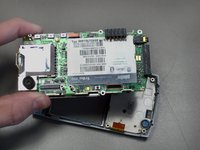
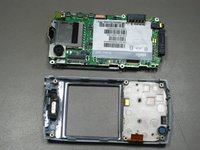
    2. Palm Treo 650 Keyboard Replacement: шаг 9, изображение 1 из 2 Palm Treo 650 Keyboard Replacement: шаг 9, изображение 2 из 2
      • Pull off the motherboard.

      Спросите у FixBot

      Добавить комментарий

    1. Palm Treo 650 Keyboard Replacement, Keyboard: шаг 10, изображение 1 из 1
      • Unscrew the two 3.2 mm screws with a Phillips #00 screwdriver.

      Спросите у FixBot

      Добавить комментарий

    2. Palm Treo 650 Keyboard Replacement: шаг 11, изображение 1 из 1
      • Pull off the circuit board.

      Спросите у FixBot

      Добавить комментарий

    3. Palm Treo 650 Keyboard Replacement: шаг 12, изображение 1 из 1
      • Remove the keypad for cleaning or replacing.

      Спросите у FixBot

      Добавить комментарий

Заключение

To reassemble your device, follow these instructions in reverse order. Take your e-waste to an R2 or e-Stewards certified recycler.

Отменить: Я не выполнил это руководство.

2 человек успешно провели ремонт по этому руководству.

cgood

Участник с: 10/28/09

134 Репутация

Автор 7 руководств

Команда

Cal Poly, Team 19-3, Maness Fall 2009 Участник Cal Poly, Team 19-3, Maness Fall 2009

CPSU-MANESS-F09S19G3

4 членов

Автор 45 руководств

0 Комментарии к руководству

Добавить комментарий

Статистика просмотров:

За последние 24 часов: 0

За последние 7 дней: 3

За последние 30 дней: 24

За всё время: 5,061