Перейти к основному содержанию
Присоединяйся к сообществу ремонтников - Создай аккаунт

Samsung SGH A707 Display Replacement

Выберете то, что вам нужно

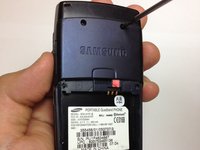
  1. Samsung SGH A707 Display Replacement, Battery: шаг 1, изображение 1 из 1
    • Press on the markings on the cover and pull it down to reveal the battery.

    Спросите у FixBot

    Добавить комментарий

  2. Samsung SGH A707 Display Replacement: шаг 2, изображение 1 из 1
    • Use your fingers to pull the battery out of its position. You may also flip the phone and the battery will fall out.

    Спросите у FixBot

    Добавить комментарий

  3. Samsung SGH A707 Display Replacement: шаг 3, изображение 1 из 1
    • Here is the phone without the battery.

    Спросите у FixBot

    Добавить комментарий

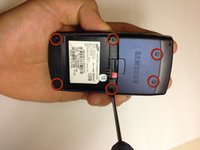
  4. Samsung SGH A707 Display Replacement, Motherboard: шаг 4, изображение 1 из 2 Samsung SGH A707 Display Replacement, Motherboard: шаг 4, изображение 2 из 2
    • Unscrew the six screws on the back of the phone using the Phillips #0 screw driver.

    Спросите у FixBot

    Добавить комментарий

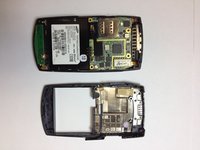
  5. Samsung SGH A707 Display Replacement: шаг 5, изображение 1 из 1
    • Use the prying tool the pry off the phone's plastic frame.

    Спросите у FixBot

    Добавить комментарий

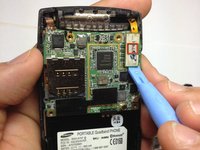
  6. Samsung SGH A707 Display Replacement: шаг 6, изображение 1 из 3 Samsung SGH A707 Display Replacement: шаг 6, изображение 2 из 3 Samsung SGH A707 Display Replacement: шаг 6, изображение 3 из 3
    • Use the prying tool to disconnect the rectangular connector.

    Спросите у FixBot

    Добавить комментарий

  7. Samsung SGH A707 Display Replacement: шаг 7, изображение 1 из 1
    • Use the prying tool to disconnect the small connector.

    Спросите у FixBot

    Добавить комментарий

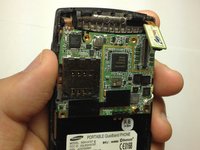
  8. Samsung SGH A707 Display Replacement: шаг 8, изображение 1 из 1
    • Gently pull off the circuit board.

    Спросите у FixBot

    Добавить комментарий

  9. Samsung SGH A707 Display Replacement: шаг 9, изображение 1 из 1
    • Here is the phone without the logic board.

    Спросите у FixBot

    Добавить комментарий

  10. Samsung SGH A707 Display Replacement, Front Pane: шаг 10, изображение 1 из 2 Samsung SGH A707 Display Replacement, Front Pane: шаг 10, изображение 2 из 2
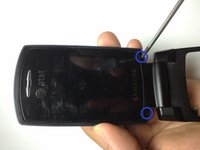
    • Use the Phillips #0 screw driver to remove the two screws.

    • Place the screws in a safe place.

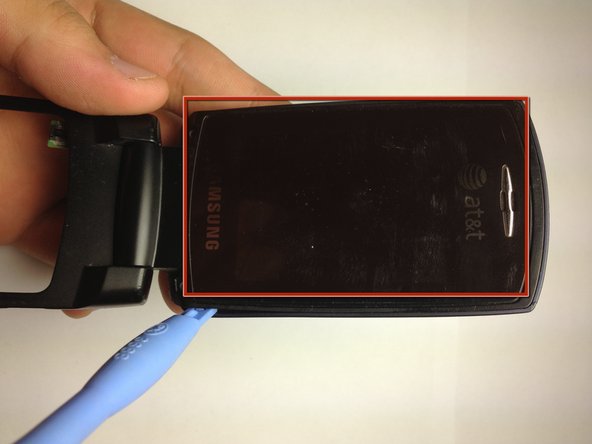
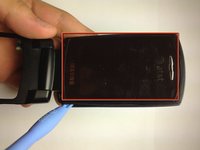
    • Use the prying tool to gently pry the screen off, by slowly moving the prying tool around the entire edge of the screen (roughly highlighted with a red rectangle). You must be very gentle, otherwise the screen will crack.

    Спросите у FixBot

    Добавить комментарий

  11. Samsung SGH A707 Display Replacement: шаг 11, изображение 1 из 1
    • Now we have access to the camera.

    • We also have access to the speakers.

    • Disconnect the flat cable to separate the two pieces.

    Спросите у FixBot

    Добавить комментарий

  12. Samsung SGH A707 Display Replacement: шаг 12, изображение 1 из 1
    • Samsung SGH A707

    Спросите у FixBot

    Добавить комментарий

  13. Samsung SGH A707 Display Replacement, Display: шаг 13, изображение 1 из 1
    • Separate the two flaps to make handling easier.

    • Use a screw driver to press a latch in along the axis of the hinge and simultaneously pull the pieces apart.

    • Gently pull the flat cable through the hinge.

    Спросите у FixBot

    Добавить комментарий

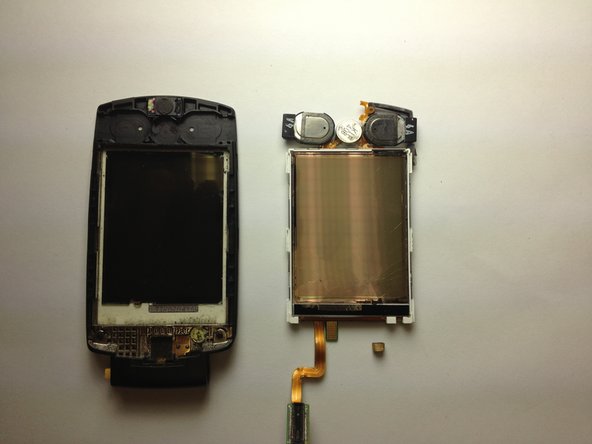
  14. Samsung SGH A707 Display Replacement: шаг 14, изображение 1 из 1
    • Use the prying tool to separate the screen from the rest of the phone.

    • Be careful not to lose the little cube of foam and wire that is under the circuit board. It is important in connecting two different circuits and must be placed back when the phone is reassembled.

    Спросите у FixBot

    Добавить комментарий

  15. Samsung SGH A707 Display Replacement: шаг 15, изображение 1 из 2 Samsung SGH A707 Display Replacement: шаг 15, изображение 2 из 2
    • Samsung SGH A707

    Спросите у FixBot

    Добавить комментарий

Заключение

To reassemble your device, follow these instructions in reverse order. Take your e-waste to an R2 or e-Stewards certified recycler.

Отменить: Я не выполнил это руководство.

yfm

Участник с: 11/06/12

25 Репутация

Автор 7 руководств

Команда

University of Maryland, Team 1-1, Calloway Fall 2012 Участник University of Maryland, Team 1-1, Calloway Fall 2012

UMD-CALLOWAY-F12S1G1

4 членов

Автор 15 руководств

0 Комментарии к руководству

Добавить комментарий

Статистика просмотров:

За последние 24 часов: 0

За последние 7 дней: 7

За последние 30 дней: 28

За всё время: 1,807