Перейти к основному содержанию
Присоединяйся к сообществу ремонтников - Создай аккаунт

Samsung WB1100F Camera Flash Replacement

Выберете то, что вам нужно

  1. Samsung WB1100F Camera Flash Replacement, LCD Screen Cover: шаг 1, изображение 1 из 2 Samsung WB1100F Camera Flash Replacement, LCD Screen Cover: шаг 1, изображение 2 из 2
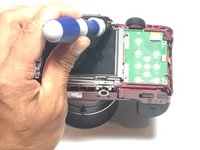
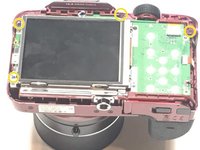
    • Remove six 1.2 mm Phillips #00 screws connected to the tripod dock and adjacent screws.

    • Remove six 1.2 mm Phillips #00 screws from the side of the camera.

  2. Samsung WB1100F Camera Flash Replacement: шаг 2, изображение 1 из 2 Samsung WB1100F Camera Flash Replacement: шаг 2, изображение 2 из 2
    • Use a plastic opening tool or spudger if available.

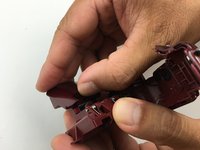
    • Using the flat end of a spudger, loosen the connection between the back panel and the device. Remove the back panel using your hands.

  3. Samsung WB1100F Camera Flash Replacement, Camera Flash: шаг 3, изображение 1 из 3 Samsung WB1100F Camera Flash Replacement, Camera Flash: шаг 3, изображение 2 из 3 Samsung WB1100F Camera Flash Replacement, Camera Flash: шаг 3, изображение 3 из 3
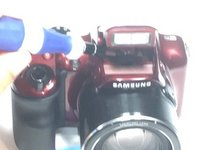
    • Remove four 1.2 mm Phillips #00 screws from the top panel.

  4. Samsung WB1100F Camera Flash Replacement: шаг 4, изображение 1 из 1
    • Using the flat end of a spudger, loosen the connection between the top panel and the device. Remove the top panel using your hands.

  5. Samsung WB1100F Camera Flash Replacement: шаг 5, изображение 1 из 1
    • Remove four 1.2 mm Phillips #00 screws from the flash assembly

  6. Samsung WB1100F Camera Flash Replacement: шаг 6, изображение 1 из 1
    • Using your hands, remove the flash assembly. This should not require much force.

  7. Samsung WB1100F Camera Flash Replacement: шаг 7, изображение 1 из 2 Samsung WB1100F Camera Flash Replacement: шаг 7, изображение 2 из 2
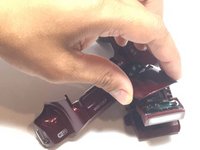
    • Using your hands, remove the top flash panel by pressuring down on the back to release a locking tab.

  8. Samsung WB1100F Camera Flash Replacement: шаг 8, изображение 1 из 1
    • Desolder three wires on the flash assembly.

  9. Samsung WB1100F Camera Flash Replacement: шаг 9, изображение 1 из 1
    • Gently remove the flash assembly from the body.

Заключение

To reassemble your device, follow these instructions in reverse order.

Jesse Lindsey

Участник с: 05/13/16

581 Репутация

Автор 5 руководств

Команда

Metro State, Team 1-1, Carpenter SU 2016 Участник Metro State, Team 1-1, Carpenter SU 2016

MSU-CARPENTER-SU16S1G1

3 членов

Автор 5 руководств

0 Комментарии к руководству

Добавить комментарий

Статистика просмотров:

За последние 24 часов: 1

За последние 7 дней: 4

За последние 30 дней: 15

За всё время: 726