Перейти к основному содержанию
Присоединяйся к сообществу ремонтников - Создай аккаунт

Samsung WB35F Flash Capacitor Replacement

Выберете то, что вам нужно

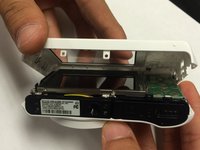
  1. Samsung WB35F Flash Capacitor Replacement, Rear Case: шаг 1, изображение 1 из 3 Samsung WB35F Flash Capacitor Replacement, Rear Case: шаг 1, изображение 2 из 3 Samsung WB35F Flash Capacitor Replacement, Rear Case: шаг 1, изображение 3 из 3
    • The first thing to do will be unscrew all the screws using Phillips #000 Screwdriver.

    • Keep all the screws in order. Black screws goes under the bottom of camera, and the silver screws goes on the sides and inside of the camera.

    Спросите у FixBot
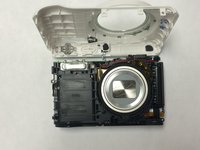
  2. Samsung WB35F Flash Capacitor Replacement: шаг 2, изображение 1 из 2 Samsung WB35F Flash Capacitor Replacement: шаг 2, изображение 2 из 2
    • Using the spudger, and plastic opening tool open the casing of camera.

    Спросите у FixBot
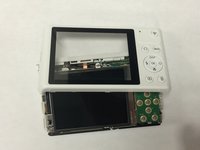
  3. Samsung WB35F Flash Capacitor Replacement: шаг 3, изображение 1 из 3 Samsung WB35F Flash Capacitor Replacement: шаг 3, изображение 2 из 3 Samsung WB35F Flash Capacitor Replacement: шаг 3, изображение 3 из 3
    • Once you open the camera case, you will be able to work on any part of the camera.

    Спросите у FixBot
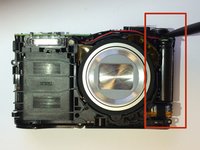
  4. Samsung WB35F Flash Capacitor Replacement, Flash Capacitor: шаг 4, изображение 1 из 2 Samsung WB35F Flash Capacitor Replacement, Flash Capacitor: шаг 4, изображение 2 из 2
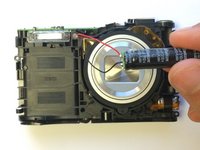
    • Caution: Touching the capacitor wires may cause serious injury. Use a capacitor discharge probe to safely rid the capacitors of dangerous charges.

    • Carefully take out the capacitor using the spudger.

    Спросите у FixBot
  5. Samsung WB35F Flash Capacitor Replacement: шаг 5, изображение 1 из 1
    • Disconnect the wire from battery and replace the old battery with new battery.

    • Connect the wires to new battery and put the battery back in terminal.

    • Connect the positive wire to the positive terminal of the battery and negative wire to the the negative terminal of the battery.

    Спросите у FixBot
Заключение

To reassemble your device, follow these instructions in reverse order.

Sarmad Khan

Участник с: 01/09/15

525 Репутация

Автор 5 руководств

Команда

USF Tampa, Team 1-6, Tanski Winter 2015 Участник USF Tampa, Team 1-6, Tanski Winter 2015

USFT-TANSKI-W15S1G6

4 членов

Автор 10 руководств

0 Комментарии к руководству

Добавить комментарий

Статистика просмотров:

За последние 24 часов: 0

За последние 7 дней: 17

За последние 30 дней: 65

За всё время: 2,648