Введение
This guide shows the reader how to remove the case from the Tagital T7X and replace the battery. This repair is often done to replace a battery that has lost its ability to hold a charge. The battery is directly connected to the motherboard, meaning basic soldering skills are necessary.
Выберете то, что вам нужно
-
-
-
Place the Tagital T7X on a sturdy surface.
-
Insert the plastic opening tool into the crack and pry open the tablet. Move the tool along the edge, while continuing to pry up the casing.
 Спросите у FixBot
-
-
-
-
-
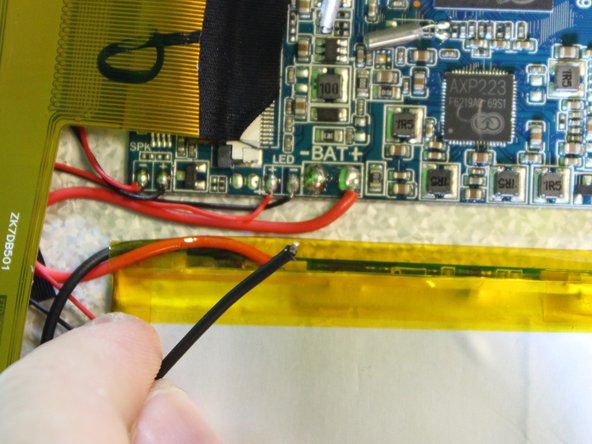
Follow the attached wires to the positive and negative connections.
-
-
-
-
Touch the tip of the soldering iron to the solder connecting the negative wire.
-
Pull back on the wire with the iron in place, removing it from the hot solder.
-
Repeat this step for the positive wire.
-
-
-
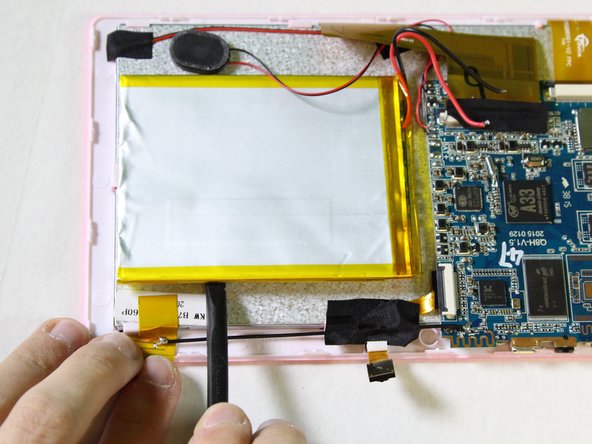
Use the nylon spudger to pry the battery from the back of the screen. Work your way around the edges, similar to opening the casing.
-
-






To reassemble your device, follow these instructions in reverse order.
Отменить: Я не выполнил это руководство.
Еще один человек закончил это руководство.

Команда

USF Tampa, Team 2-1, Sullivan Spring 2016 Участник USF Tampa, Team 2-1, Sullivan Spring 2016
USFT-SULLIVAN-S16S2G1
4 членов
Автор 12 руководств
1 Комментарий к руководству
We're can I get a battery? And I don't think the part should have died in less than a year . The battery lasted less than 6 mos. I bought the tablet for my mom to play cards on and that's it .She doesn't go on line. I put a book on it before I gave it to her and that is it. She doesn't even use it every day . What's the deal?
