Перейти к основному содержанию
Присоединяйся к сообществу ремонтников - Создай аккаунт

ZTE Whirl 2 Screen Replacement

Выберете то, что вам нужно

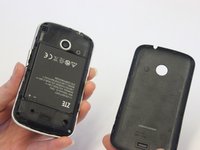
    1. ZTE Whirl 2 Screen Replacement, Battery: шаг 1, изображение 1 из 3 ZTE Whirl 2 Screen Replacement, Battery: шаг 1, изображение 2 из 3 ZTE Whirl 2 Screen Replacement, Battery: шаг 1, изображение 3 из 3
      • Power off your phone before removing the battery.

      • Pry the cover off the back of the phone using your fingers.

      Спросите у FixBot

      Добавить комментарий

    2. ZTE Whirl 2 Screen Replacement: шаг 2, изображение 1 из 3 ZTE Whirl 2 Screen Replacement: шаг 2, изображение 2 из 3 ZTE Whirl 2 Screen Replacement: шаг 2, изображение 3 из 3
      • Pry the battery from the phone using your fingers.

      Спросите у FixBot

      Добавить комментарий

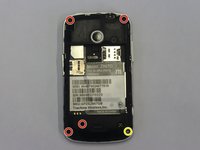
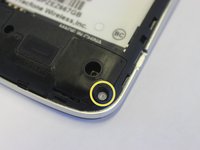
    1. ZTE Whirl 2 Screen Replacement, Back Panel: шаг 3, изображение 1 из 3 ZTE Whirl 2 Screen Replacement, Back Panel: шаг 3, изображение 2 из 3 ZTE Whirl 2 Screen Replacement, Back Panel: шаг 3, изображение 3 из 3
      Инструмент, используемый на этом этапе:
      Tweezers
      $4.99
      • Remove four 4 mm screws using a Phillips #00 screwdriver.

      • Use a tweezers to remove the lock sticker from the bottom right screw. Remove the 4 mm screw using a Phillips #00 screwdriver.

      Спросите у FixBot

      Добавить комментарий

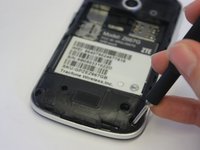
    2. ZTE Whirl 2 Screen Replacement: шаг 4, изображение 1 из 3 ZTE Whirl 2 Screen Replacement: шаг 4, изображение 2 из 3 ZTE Whirl 2 Screen Replacement: шаг 4, изображение 3 из 3
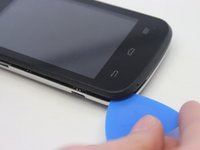
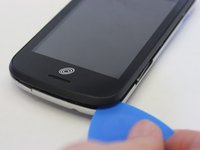
      • Insert an opening pick between the midframe and the digitizer.

      • Move the pick around the midframe to detach the midframe from the digitizer.

      • The lock button and volume buttons may fall out during this process.

      Спросите у FixBot

      Добавить комментарий

    3. ZTE Whirl 2 Screen Replacement: шаг 5, изображение 1 из 1
      • Remove the midframe from the digitizer.

      Спросите у FixBot

      Добавить комментарий

    1. ZTE Whirl 2 Screen Replacement, Screen: шаг 6, изображение 1 из 2 ZTE Whirl 2 Screen Replacement, Screen: шаг 6, изображение 2 из 2
      Инструмент, используемый на этом этапе:
      Tweezers
      $4.99
      • Use tweezers to pull the lock button and volume stickers out from the side panels.

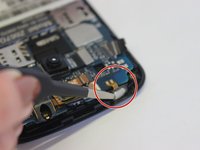
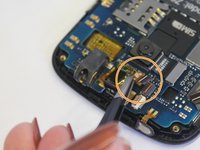
      • Use the iFixit Opening Tool to unlock the ribbon connector above the camera. Pull the ribbon from the connector.

      Спросите у FixBot

      Добавить комментарий

    2. ZTE Whirl 2 Screen Replacement: шаг 7, изображение 1 из 1
      • Use a spudger tool to unlock the screen ribbon cable.

      • Pull the ribbon cable from the connecter with a pair of tweezers.

      Спросите у FixBot

      Добавить комментарий

    3. ZTE Whirl 2 Screen Replacement: шаг 8, изображение 1 из 3 ZTE Whirl 2 Screen Replacement: шаг 8, изображение 2 из 3 ZTE Whirl 2 Screen Replacement: шаг 8, изображение 3 из 3
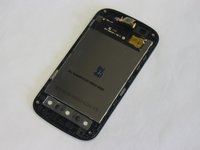
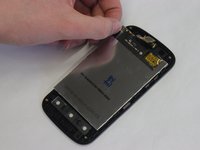
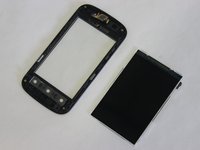
      • Remove the motherboard to access the screen. Lift the screen away from the front cover and replace.

      Спросите у FixBot

      Добавить комментарий

Заключение

To reassemble your device, follow these instructions in reverse order.

Отменить: Я не выполнил это руководство.

Molli Reeder

Участник с: 02/04/20

97 Репутация

1 руководство автора

Команда

UW Stout, Team S1-G1, Schneider-Bateman Spring 2020 Участник UW Stout, Team S1-G1, Schneider-Bateman Spring 2020

UWSTOUT-SCHNEIDER-BATEMAN-S20S1G1

3 членов

Автор 35 руководств

0 Комментарии к руководству

Добавить комментарий

Статистика просмотров:

За последние 24 часов: 0

За последние 7 дней: 6

За последние 30 дней: 11

За всё время: 345