
ΠŸΠ΅Ρ€Π΅ΠΉΡ‚ΠΈ ΠΊ основному ΡΠΎΠ΄Π΅Ρ€ΠΆΠ°Π½ΠΈΡŽ
ΠŸΡ€ΠΈΡΠΎΠ΅Π΄ΠΈΠ½ΡΠΉΡΡ ΠΊ сообщСству Ρ€Π΅ΠΌΠΎΠ½Ρ‚Π½ΠΈΠΊΠΎΠ² - Π‘ΠΎΠ·Π΄Π°ΠΉ Π°ΠΊΠΊΠ°ΡƒΠ½Ρ‚

ΠŸΡΡ‚Ρ‹ΠΉ смартфон Π»ΠΈΠ½Π΅ΠΉΠΊΠΈ Google Nexus. ΠžΡ„ΠΈΡ†ΠΈΠ°Π»ΡŒΠ½ΠΎ анонсирован 31 октября 2013 Π³ΠΎΠ΄Π°, оснащСн 4,95-Π΄ΡŽΠΉΠΌΠΎΠ²Ρ‹ΠΌ дисплССм с Ρ€Π°Π·Ρ€Π΅ΡˆΠ΅Π½ΠΈΠ΅ΠΌ 1080p, процСссором Snapdragon с Ρ‚Π°ΠΊΡ‚ΠΎΠ²ΠΎΠΉ частотой 2,26 Π“Π“Ρ† ΠΈ ΠΏΠΎΠ΄Π΄Π΅Ρ€ΠΆΠΊΠΎΠΉ LTE. Π Π°Π±ΠΎΡ‚Π°Π΅Ρ‚ ΠΏΠΎΠ΄ ΡƒΠΏΡ€Π°Π²Π»Π΅Π½ΠΈΠ΅ΠΌ Android 4.4.2 KitKat. ΠŸΡ€ΠΎΠΈΠ·Π²Π΅Π΄Π΅Π½ ΠΊΠΎΠΌΠΏΠ°Π½ΠΈΠ΅ΠΉ LG.

nexus 5 wireless charging broken after...

So I successfully replaced the screen door the n5 after a run in with a brick floor in Arizona. Is all together but now the wireless charging isn't working. As I believe it to be the magnetic circles in the back cover and two leads coming off the to left.... I can't understand why it won't see it to charge it. What an I missing? Any ideas?

ΠžΡ‚Π²Π΅Ρ‚ Π½Π° этот вопрос Π£ мСня Ρ‚Π° ΠΆΠ΅ ΠΏΡ€ΠΎΠ±Π»Π΅ΠΌΠ°

Π­Ρ‚ΠΎ Ρ…ΠΎΡ€ΠΎΡˆΠΈΠΉ вопрос?

Π‘Ρ‡Π΅Ρ‚ 12
2 ΠšΠΎΠΌΠΌΠ΅Π½Ρ‚Π°Ρ€ΠΈΠ΅Π²

This question was migrated from http://meta.ifixit.com/Answers.

ΠΈΠ· ΠŸΠΎΠ΄Π΅Π»ΠΈΡ‚ΡŒΡΡ

I replaced the n5 battery and also made sure to snap the back at the S, but my phone still won't charge. I had a few hours of power because of the battery but I have not been able to charge it. What am I missing please????

ΠΈΠ· ΠŸΠΎΠ΄Π΅Π»ΠΈΡ‚ΡŒΡΡ

Π”ΠΎΠ±Π°Π²ΠΈΡ‚ΡŒ ΠΊΠΎΠΌΠΌΠ΅Π½Ρ‚Π°Ρ€ΠΈΠΉ

11 ΠžΡ‚Π²Π΅Ρ‚ΠΎΠ²

НаиболСС ΠΏΠΎΠ»Π΅Π·Π½Ρ‹ΠΉ ΠΎΡ‚Π²Π΅Ρ‚

Hey Scott,

I had the same issue before when I swapped the back on my N5. Try making sure the last clip is snapped in place the centre of the phone. It holds the contacts to the wireless coil.

Π‘Ρ‹Π» Π»ΠΈ этот ΠΎΡ‚Π²Π΅Ρ‚ ΠΏΠΎΠ»Π΅Π·Π΅Π½?

Π‘Ρ‡Π΅Ρ‚ 95

49 ΠšΠΎΠΌΠΌΠ΅Π½Ρ‚Π°Ρ€ΠΈΠ΅Π²:

I thought this was referring to the outside clips, but there is in fact one dead center of back that meets with the main logic board, just press firmly a couple of centimeters above the S in nexus.

Thanks for the tip Greg!

ΠΈΠ· ΠŸΠΎΠ΄Π΅Π»ΠΈΡ‚ΡŒΡΡ

Thanks. This fixed mine!

ΠΈΠ· ΠŸΠΎΠ΄Π΅Π»ΠΈΡ‚ΡŒΡΡ

Me too, thanks for this tip!

ΠΈΠ· ΠŸΠΎΠ΄Π΅Π»ΠΈΡ‚ΡŒΡΡ

Thanks! This worked for me too!

ΠΈΠ· ΠŸΠΎΠ΄Π΅Π»ΠΈΡ‚ΡŒΡΡ

fixed mine. When reading "Nexus" on the phone while holding it sideways, it was about where you would add a period to the phrase (just below and to the right of the s). Thanks thanks thanks!

ΠΈΠ· ΠŸΠΎΠ΄Π΅Π»ΠΈΡ‚ΡŒΡΡ

ΠŸΠΎΠΊΠ°Π·Π°Ρ‚ΡŒ Π΅Ρ‰Ρ‘ 44 ΠΊΠΎΠΌΠΌΠ΅Π½Ρ‚Π°Ρ€ΠΈΠ΅Π²

Π”ΠΎΠ±Π°Π²ΠΈΡ‚ΡŒ ΠΊΠΎΠΌΠΌΠ΅Π½Ρ‚Π°Ρ€ΠΈΠΉ

I also seem to have broken my wireless charging after removing the back. I had missed the middle snap that Scott mentioned, but snapping this only made it work intermittently for a few days. It is now back to not working at all, and I can see nothing mechanically wrong.

I'll be interested to see if you find a fix....

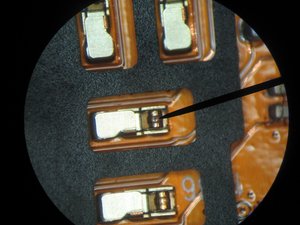
Edit: I seem to have found the problem in mine. After taking the back off several times, and looking at it under the microscope, I finally noticed something. Where the needle is pointing you can see a small brown spot on the top of one of the springy contacts. This picture was taken _after_ I scraped off a dark brown mass that looked like it had melted on. (Note to self - take before pictures too...)

My theory as to what happened is that when I put the back on without a good contact (the middle snap loose) there was some arcing that melted/oxidized the contact. This prevented good contact from being made. Now that I have scraped that off (which was pretty hard to do), it seems to be working again. For the last 5 minutes at least...

Π˜Π·ΠΎΠ±Ρ€Π°ΠΆΠ΅Π½ΠΈΠ΅

Π‘Ρ‹Π» Π»ΠΈ этот ΠΎΡ‚Π²Π΅Ρ‚ ΠΏΠΎΠ»Π΅Π·Π΅Π½?

Π‘Ρ‡Π΅Ρ‚ 12

11 ΠšΠΎΠΌΠΌΠ΅Π½Ρ‚Π°Ρ€ΠΈΠ΅Π²:

I almost had the same, I just noticed it wasn't make proper contact. So I pushed them out a bit for better contact. Worked like a charm

ΠΈΠ· ΠŸΠΎΠ΄Π΅Π»ΠΈΡ‚ΡŒΡΡ

thxxxx IT reallly workkkkk !!!!!!

ΠΈΠ· ΠŸΠΎΠ΄Π΅Π»ΠΈΡ‚ΡŒΡΡ

Cleaning with electrical cleaner was the key for me. I just cleaned all contact points, and Walla! Back in business. Thanks Roy!

ΠΈΠ· ΠŸΠΎΠ΄Π΅Π»ΠΈΡ‚ΡŒΡΡ

I am having a similar issue, I clipping in the snap near the 'S' but it will still not work... if I have it on the QI charger and press down on the phone it will connect... I'm still not able to make contact it appears...

Any Suggestions?

ΠΈΠ· ΠŸΠΎΠ΄Π΅Π»ΠΈΡ‚ΡŒΡΡ

Yup, pulling up the contacts a bit with a dental pick did it for me. This after having to change out the USB charging board because the phone overheated the USB connector and melted a couple of cables before I figured that out.

ΠΈΠ· ΠŸΠΎΠ΄Π΅Π»ΠΈΡ‚ΡŒΡΡ

ΠŸΠΎΠΊΠ°Π·Π°Ρ‚ΡŒ Π΅Ρ‰Ρ‘ 6 ΠΊΠΎΠΌΠΌΠ΅Π½Ρ‚Π°Ρ€ΠΈΠ΅Π²

Π”ΠΎΠ±Π°Π²ΠΈΡ‚ΡŒ ΠΊΠΎΠΌΠΌΠ΅Π½Ρ‚Π°Ρ€ΠΈΠΉ

This answer from Jose on the ifixit N5 teardown page offers even better detail on where to reconnect the Qi wireless charging connector.

"Make sure to press not only the side tabs back in place when putting it back together but the middle also. I put mine back together and my wireless charging stopped working. Once I ran my fingers through the middle of the phone in a pressing motion moving from bottom and working my way up, I heard a click and then the wireless charging started working again. You will notice if that tab is not in all the way because the back bubbles and if you poke it you see it give a little."

I discovered the click happened in the middle of the phone right below where the camera lens is.

Π Π°Π·Π±ΠΎΡ€ΠΊΠ° Nexus 5

Π‘Ρ‹Π» Π»ΠΈ этот ΠΎΡ‚Π²Π΅Ρ‚ ΠΏΠΎΠ»Π΅Π·Π΅Π½?

Π‘Ρ‡Π΅Ρ‚ 6

1 ΠšΠΎΠΌΠΌΠ΅Π½Ρ‚Π°Ρ€ΠΈΠΉ:

Thanks that worked for as well.

ΠΈΠ· ΠŸΠΎΠ΄Π΅Π»ΠΈΡ‚ΡŒΡΡ

Π”ΠΎΠ±Π°Π²ΠΈΡ‚ΡŒ ΠΊΠΎΠΌΠΌΠ΅Π½Ρ‚Π°Ρ€ΠΈΠΉ

Just push the middle part of the cover, then you will hear the "CLICK" sound. The wireless charging should be work if all contact were connected.

Π‘Ρ‹Π» Π»ΠΈ этот ΠΎΡ‚Π²Π΅Ρ‚ ΠΏΠΎΠ»Π΅Π·Π΅Π½?

Π‘Ρ‡Π΅Ρ‚ 2

1 ΠšΠΎΠΌΠΌΠ΅Π½Ρ‚Π°Ρ€ΠΈΠΉ:

It works for me too. Thank you.

ΠΈΠ· ΠŸΠΎΠ΄Π΅Π»ΠΈΡ‚ΡŒΡΡ

Π”ΠΎΠ±Π°Π²ΠΈΡ‚ΡŒ ΠΊΠΎΠΌΠΌΠ΅Π½Ρ‚Π°Ρ€ΠΈΠΉ

Which Wireless Charger is the best in the current market? CHOETECH launch affordable & best Dual USB AC Wall Charger Spatially Design For Apple & Android Phones - http://www.amazon.com/dp/B00HZF6UD4

Π‘Ρ‹Π» Π»ΠΈ этот ΠΎΡ‚Π²Π΅Ρ‚ ΠΏΠΎΠ»Π΅Π·Π΅Π½?

Π‘Ρ‡Π΅Ρ‚ 0
Π”ΠΎΠ±Π°Π²ΠΈΡ‚ΡŒ ΠΊΠΎΠΌΠΌΠ΅Π½Ρ‚Π°Ρ€ΠΈΠΉ

Removed the back, scraped the 4 contacts a bit and I made sure to apply a good pressure at the point of contact after I put back the cover. Works well now. I think it stopped working after a medium fall on a wooden floor.

Π‘Ρ‹Π» Π»ΠΈ этот ΠΎΡ‚Π²Π΅Ρ‚ ΠΏΠΎΠ»Π΅Π·Π΅Π½?

Π‘Ρ‡Π΅Ρ‚ 0
Π”ΠΎΠ±Π°Π²ΠΈΡ‚ΡŒ ΠΊΠΎΠΌΠΌΠ΅Π½Ρ‚Π°Ρ€ΠΈΠΉ

Hello there, I have the same problem. I think the contacts have oxidized and wireless charging no longer works. How do I go about scraping it so that it works?

Π‘Ρ‹Π» Π»ΠΈ этот ΠΎΡ‚Π²Π΅Ρ‚ ΠΏΠΎΠ»Π΅Π·Π΅Π½?

Π‘Ρ‡Π΅Ρ‚ 0

1 ΠšΠΎΠΌΠΌΠ΅Π½Ρ‚Π°Ρ€ΠΈΠΉ:

Never mind. I tried replacing the white one with a black one that I got from China. I put the white one back on, and figured that that problem is probably with the black one. Noticed that the place where the contact is being bade is not touching the right place because of the small dent. Going to try and move it and try it again.

ΠΈΠ· ΠŸΠΎΠ΄Π΅Π»ΠΈΡ‚ΡŒΡΡ

Π”ΠΎΠ±Π°Π²ΠΈΡ‚ΡŒ ΠΊΠΎΠΌΠΌΠ΅Π½Ρ‚Π°Ρ€ΠΈΠΉ

Hi There

I seem to have the same issue iwth my N5. I tried to buy a replacement cover but it didn't work at all. I also tried to scrape the black stuff away, but hadn't that much success with it.

So my question goes to Greg; how did you scrape that stuff off? I tried using a cutter - I didn't want to use heavier tools because these spring contacts seem very fragile. Should I give it a try with a nail file?

Thanks!

Π‘Ρ‹Π» Π»ΠΈ этот ΠΎΡ‚Π²Π΅Ρ‚ ΠΏΠΎΠ»Π΅Π·Π΅Π½?

Π‘Ρ‡Π΅Ρ‚ 0
Π”ΠΎΠ±Π°Π²ΠΈΡ‚ΡŒ ΠΊΠΎΠΌΠΌΠ΅Π½Ρ‚Π°Ρ€ΠΈΠΉ

I too also ordered another back cover from China, unfortunately ran into the same issues with the back snaps. I ended up using my original backcover... with this workaround:

Take a razor blade and gently peel the adhesive contacts away from the back cover. Then place 2 small strips of duct tape (stacked) underneath and glue the contacts to it. Voila! Closes the gap nicely and works like a charm! :D

I don't see this problem recurring after now that the gap has been closed!

Π‘Ρ‹Π» Π»ΠΈ этот ΠΎΡ‚Π²Π΅Ρ‚ ΠΏΠΎΠ»Π΅Π·Π΅Π½?

Π‘Ρ‡Π΅Ρ‚ 0
Π”ΠΎΠ±Π°Π²ΠΈΡ‚ΡŒ ΠΊΠΎΠΌΠΌΠ΅Π½Ρ‚Π°Ρ€ΠΈΠΉ

I had the same problem as roy, apparently. However, not snapping the middle snap of the back properly had left little craters in the gold contacts on the back, the springs on the phone side were OK.

Scraping and cleaning the contacts in the back with tuner spray was not enough. I slightly bent the tiny spring contacts on the phone side sideways (with a needle) so they now touch unharmed surface of the gold contacts in the back.

This did it.

If you need to copy this, be warned to be very cautious, as you can break the contacts...

Π‘Ρ‹Π» Π»ΠΈ этот ΠΎΡ‚Π²Π΅Ρ‚ ΠΏΠΎΠ»Π΅Π·Π΅Π½?

Π‘Ρ‡Π΅Ρ‚ 0
Π”ΠΎΠ±Π°Π²ΠΈΡ‚ΡŒ ΠΊΠΎΠΌΠΌΠ΅Π½Ρ‚Π°Ρ€ΠΈΠΉ

The inductive circuit for charging is attached to the battery door. assuming you didn't crack it during the removal of the battery door, you can attempt the following

1)Scan for damage. ensure all 4 of the pins that pressure connect to the panel, are still in tact on the board, and there is no tears in the inductive coil flex

2) clip down the battery door into the housing to ensure proper connection

3) if clipping it in doesn't work, then try putting a dollop of solder on each of the traces of the flex. make sure it is rounded up a bit to give a better connection

4) if all else fails, try replacing the battery door. (ensure the new component comes with the inductive coil)

5) if none of these fix the issue, you are looking at a board failure. this will not be worth your money to fix.

Π‘Ρ‹Π» Π»ΠΈ этот ΠΎΡ‚Π²Π΅Ρ‚ ΠΏΠΎΠ»Π΅Π·Π΅Π½?

Π‘Ρ‡Π΅Ρ‚ 0

2 ΠšΠΎΠΌΠΌΠ΅Π½Ρ‚Π°Ρ€ΠΈΠ΅Π²:

This had been solved, no need to answer here

ΠΈΠ· ΠŸΠΎΠ΄Π΅Π»ΠΈΡ‚ΡŒΡΡ

if it had been solved, then it would come up as solved. but thank you for your input.

ΠΈΠ· ΠŸΠΎΠ΄Π΅Π»ΠΈΡ‚ΡŒΡΡ

Π”ΠΎΠ±Π°Π²ΠΈΡ‚ΡŒ ΠΊΠΎΠΌΠΌΠ΅Π½Ρ‚Π°Ρ€ΠΈΠΉ

Π”ΠΎΠ±Π°Π²ΡŒΡ‚Π΅ свой ΠΎΡ‚Π²Π΅Ρ‚

Scott Xavier Π±ΡƒΠ΄Ρƒ Π²Π΅Ρ‡Π½ΠΎ Π±Π»Π°Π³ΠΎΠ΄Π°Ρ€Π΅Π½.
Бтатистика просмотров:

Π—Π° послСдниС 24 часов: 1

Π—Π° послСдниС 7 Π΄Π½Π΅ΠΉ: 9

Π—Π° послСдниС 30 Π΄Π½Π΅ΠΉ: 33

Π—Π° всС врСмя: 39,728