

How do I replace the thermal paste on the gpu.
I took my gpu out of my pc but I don't know how to safely get to the compound.
Update (02/12/2018)

this is the gpu I need to repaste


Update (02/12/2018)
gpu
Это хороший вопрос?
Счет
1
Репутация: 13
 2
2
I took my gpu out of my pc but I don't know how to safely get to the compound.
this is the gpu I need to repaste
gpu
Это хороший вопрос?
Репутация: 22,5к
31
 63
63
 42
42
This may be what you're looking for: Нанесение термопасты
Unscrew these screws:
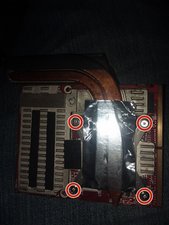
And it should come off. Be sure to clean and reapply thermal paste to mating surfaces when done.
Был ли этот ответ полезен?
Not quite what im looking for ,thank you. Is there a way for me too send you a picture of my gpu. It has a x like clamp on it that I assume the paste is under but I don't know how to safely remove it. It kinda looks like the clamp on a Xbox one gpu.
Репутация: 249
5
1
1
Flat head screwdriver if it's like the Xbox. Then u can get thermal paste cleaner and thermal paste online. A plastic razor blade (similar to the red kind used on lcd displays) should easily remove the paste.
Был ли этот ответ полезен?
За последние 24 часов: 0
За последние 7 дней: 0
За последние 30 дней: 3
За всё время: 857


1 Комментарий
@samadam It appears all you need to do is unscrew the screws around the heatsink that attach to the clamp on the other side. It looks like a philips.
I've updated my answer.
из George A.