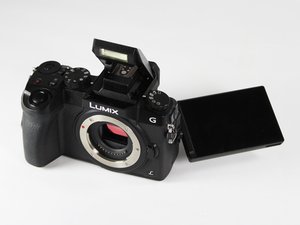
Panasonic Lumix DMC-G7 — это беззеркальная камера начального уровня со сменными объективами, выпущенная в мае 2015 года. Камера имеет разрешение 16 Мп и способна записывать видео в формате 4K. Номер модели — DMC-G7 в большинстве стран мира и DMC-G70 в Европе.
I've just bought a second-hand Lumix G7, and the screen is not displaying. The camera is otherwise functioning fine - I can view everything through the EVF, but the display is completely black. I've tried the Fn5/LVF button, reset the camera settings, changed the eye sensor sensitivity, but no luck. Any ideas? Thanks in advance! :)
Прокрутите эту тему, чтобы найти подходящее место для этого комментария. Затем нажмите "Прикрепить комментарий к этому сообщению", чтобы переместить его.
Unfortunately neither has a detailed wiring diagram for the camera although the service manual has a wiring connection diagram - see p.66, but the backlight power is fed to the screen on the smaller 2 wire flex cable as seen in the image from a supplier of the LCD screen.
If it is determined that the screen is the problem, the screen cannot be repaired, it has to be replaced. Search online for Panasonic Lumix DMC-G7 LCD screen to find suppliers that suit you best.
Was the camera described as "fully working" when you bought it or did you manage to try it out first before purchase? If yes and no, contact the seller about the problem and negotiate a new price
Прокрутите эту тему, чтобы найти подходящее место для этого комментария. Затем нажмите "Прикрепить комментарий к этому сообщению", чтобы переместить его.
All Lumix Digital Cameras have a built-in feature to conserve battery power. After a certain amount of inactivity, the LCD will power down to preserve the battery. Simply hit the SHTR button, and the LCD will turn ON.
Прокрутите эту тему, чтобы найти подходящее место для этого комментария. Затем нажмите "Прикрепить комментарий к этому сообщению", чтобы переместить его.
1 Комментарий:
Not always the case. I was shooting video and my LED screen just went blank and displays a screen with the PVideo symbol, the auto ISO, white balance, AFS etc. There seems to be no way of bringing back the live view in the LED for the video I am shooting and the only way is shooting through the absolutely terrible viewfinder LED which cannot be seen unless you are indoors or in poor light conditions. Completely wrecked the video I was trying to take. Pressing shutter buttons makes no difference at all.
Прокрутите эту тему, чтобы найти подходящее место для этого комментария. Затем нажмите "Прикрепить комментарий к этому сообщению", чтобы переместить его.


 11
11  426
426  1,6к
1,6к 

