Перейти к основному содержанию
Присоединяйся к сообществу ремонтников - Создай аккаунт

How to Reinstall the iFixit Digital Multimeter Outer Cover

  1. How to Reinstall the iFixit Digital Multimeter Outer Cover, Install the outer cover: шаг 1, изображение 1 из 2 How to Reinstall the iFixit Digital Multimeter Outer Cover, Install the outer cover: шаг 1, изображение 2 из 2
    • Firmly push the top edge of the multimeter into the cover's top cutout.

    • Try to get the top edge well aligned and seated. This will give you enough room to pull the cover's bottom edge in place.

  2. How to Reinstall the iFixit Digital Multimeter Outer Cover: шаг 2, изображение 1 из 3 How to Reinstall the iFixit Digital Multimeter Outer Cover: шаг 2, изображение 2 из 3 How to Reinstall the iFixit Digital Multimeter Outer Cover: шаг 2, изображение 3 из 3
    • Flip the multimeter over.

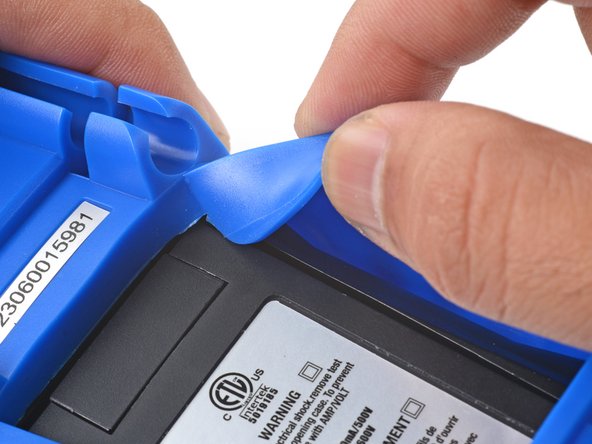
    • The cover has a lip that needs to seat into the groove around the multimeter's kickstand.

    • Align and press the cover lip into the groove above the kickstand.

  3. How to Reinstall the iFixit Digital Multimeter Outer Cover: шаг 3, изображение 1 из 3 How to Reinstall the iFixit Digital Multimeter Outer Cover: шаг 3, изображение 2 из 3 How to Reinstall the iFixit Digital Multimeter Outer Cover: шаг 3, изображение 3 из 3
    • Lift and tuck the cover lip into the groove near the top right corner of the kickstand.

    • Repeat the procedure for the top left corner of the kickstand.

  4. How to Reinstall the iFixit Digital Multimeter Outer Cover: шаг 4, изображение 1 из 2 How to Reinstall the iFixit Digital Multimeter Outer Cover: шаг 4, изображение 2 из 2
    • Guide and press the cover lip into the grooves along the sides of the kickstand.

    • Pull the cover over the bottom edge of the multimeter and press the bottom lip into the groove under the kickstand.

    • Carefully check to make sure the cover lip sits completely in the groove around the kickstand.

  5. How to Reinstall the iFixit Digital Multimeter Outer Cover: шаг 5, изображение 1 из 3 How to Reinstall the iFixit Digital Multimeter Outer Cover: шаг 5, изображение 2 из 3 How to Reinstall the iFixit Digital Multimeter Outer Cover: шаг 5, изображение 3 из 3
    • Flip the multimeter over so that the front is facing up.

    • Squeeze the cover along the right edge to pop the cover lip into the groove along the side of the multimeter.

    • Repeat the process along the left edge of the multimeter.

    • Carefully check to make sure the cover is properly seated along the perimeter of the multimeter.

Заключение

For more information on how to use your iFixit multimeter, check out this page.

Arthur Shi

Участник с: 01/03/18

318 251 Репутация

Автор 736 руководств

Команда

iFixit Участник iFixit

Staff

123 членов

Автор 24 065 руководств

0 Комментарии к руководству

Добавить комментарий

Статистика просмотров:

За последние 24 часов: 7

За последние 7 дней: 48

За последние 30 дней: 48

За всё время: 66