Введение
In this guide we show you how to remove and replace a broken or defective display on your Huawei P10 Plus smartphone.
If the screen is broken you might want to protect your eyes from glass shreds and get a better grip to open the phone by applying some tape onto the screen.
If your replacement part does not come with adhesive mounted on it, you will also need to purchase new adhesive.
Выберете то, что вам нужно
-
-
-
Use an iOpener to loosen the adhesive beneath the display, focusing on the upper and lower part of the display.
-
Use an opening pick, or iFlex, to separate the adhesive on all sides of the display.
 Спросите у FixBot
-
-
-
Place a suction cup, or iSclack, on the upper portion of the phone and lift the display off the midframe.
-
Don't remove the display, the cable is trapped under a bracket screwed to the phone. You can flip the display to lay it down without straining the cable, or simply hold it in the next steps.
-
-
-
-
Remove the 3.3 mm-long Phillips screw securing the display flex connector bracket.
-
-
Инструмент, используемый на этом этапе:Tesa 61395 Tape$8.95
-
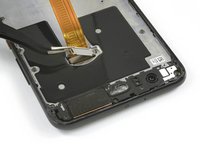
Open the metal bracket that covers the display flex cable.
-
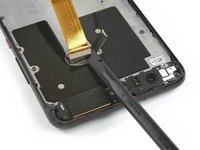
Use a spudger to disconnect the display flex cable.
-
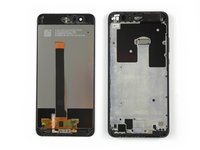
Remove the display.
-
-


To reassemble your device, follow these instructions in reverse order.
Отменить: Я не выполнил это руководство.
9 человек успешно провели ремонт по этому руководству.

Команда

Tobias Isakeit - Repairability Engineer Участник Tobias Isakeit - Repairability Engineer
Business
1 член
Автор 1 416 руководств
