Перейти к основному содержанию
Присоединяйся к сообществу ремонтников - Создай аккаунт

Sony DualSense Controller Battery Replacement

Выберете то, что вам нужно

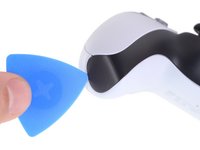
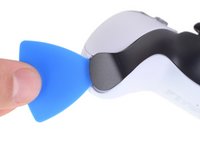
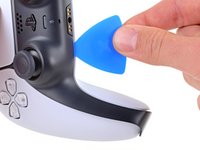
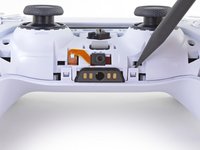
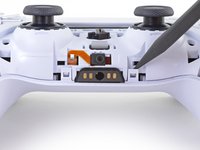
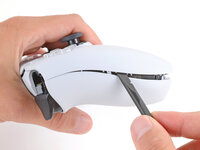
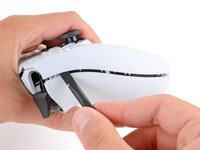
  1. Sony DualSense Controller Battery Replacement, Unclip the right end of the middle trim: шаг 1, изображение 1 из 2 Sony DualSense Controller Battery Replacement, Unclip the right end of the middle trim: шаг 1, изображение 2 из 2
    • Disconnect and power down your controller before you begin.

    • Insert an opening pick underneath the middle trim at the bottom-right corner of the controller to release the clips securing it to the case.

    Спросите у FixBot

    Добавить комментарий

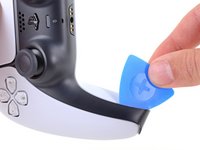
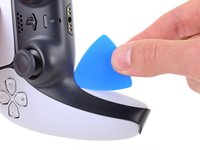
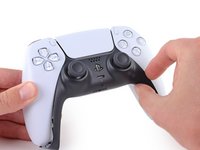
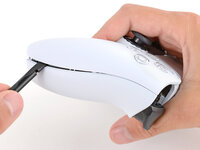
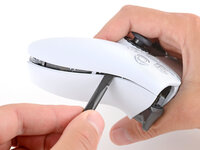
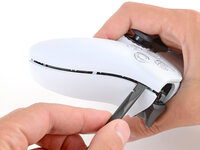
  2. Sony DualSense Controller Battery Replacement, Unclip the lower-right edge of the middle trim: шаг 2, изображение 1 из 3 Sony DualSense Controller Battery Replacement, Unclip the lower-right edge of the middle trim: шаг 2, изображение 2 из 3 Sony DualSense Controller Battery Replacement, Unclip the lower-right edge of the middle trim: шаг 2, изображение 3 из 3
    • Slide the opening pick along the lower-right edge of the middle trim to release the clips securing it to the case.

    Спросите у FixBot

    Добавить комментарий

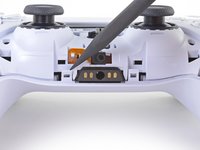
  3. Sony DualSense Controller Battery Replacement, Unclip the left end of the middle trim: шаг 3, изображение 1 из 2 Sony DualSense Controller Battery Replacement, Unclip the left end of the middle trim: шаг 3, изображение 2 из 2
    • Insert an opening pick underneath the middle trim at the bottom-left corner of the controller to release the clips securing it to the case.

    Спросите у FixBot

    Добавить комментарий

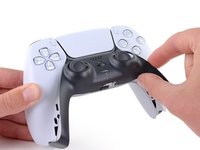
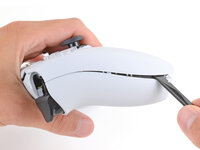
  4. Sony DualSense Controller Battery Replacement, Unclip the lower-left edge of the middle trim: шаг 4, изображение 1 из 3 Sony DualSense Controller Battery Replacement, Unclip the lower-left edge of the middle trim: шаг 4, изображение 2 из 3 Sony DualSense Controller Battery Replacement, Unclip the lower-left edge of the middle trim: шаг 4, изображение 3 из 3
    • Slide the opening pick along the lower-left edge of the middle trim to release the clips securing it to the case.

    Спросите у FixBot

    Добавить комментарий

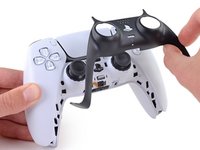
  5. Sony DualSense Controller Battery Replacement, Remove the middle trim: шаг 5, изображение 1 из 3 Sony DualSense Controller Battery Replacement, Remove the middle trim: шаг 5, изображение 2 из 3 Sony DualSense Controller Battery Replacement, Remove the middle trim: шаг 5, изображение 3 из 3
    • Use your fingers to lift up the bottom edge of the middle trim to release the remaining clips.

    • Lift the middle trim over the joysticks to remove it.

    Спросите у FixBot

    Добавить комментарий

  6. Sony DualSense Controller Battery Replacement, Remove the L1 button: шаг 6, изображение 1 из 3 Sony DualSense Controller Battery Replacement, Remove the L1 button: шаг 6, изображение 2 из 3 Sony DualSense Controller Battery Replacement, Remove the L1 button: шаг 6, изображение 3 из 3
    • With one hand, grip the controller and use your thumb to hold down the left trigger.

    • With your free hand, insert the flat end of a spudger between the L1 and L2 buttons.

    • Use the spudger to gently pry the L1 button away from the controller and remove it, holding your finger over the button so it doesn't eject.

    Спросите у FixBot

    Добавить комментарий

  7. Sony DualSense Controller Battery Replacement, Remove the R1 button: шаг 7, изображение 1 из 3 Sony DualSense Controller Battery Replacement, Remove the R1 button: шаг 7, изображение 2 из 3 Sony DualSense Controller Battery Replacement, Remove the R1 button: шаг 7, изображение 3 из 3
    • Repeat the previous step to remove the R1 button.

    Спросите у FixBot

    Добавить комментарий

  8. Sony DualSense Controller Battery Replacement, Remove the rear case screws: шаг 8, изображение 1 из 2 Sony DualSense Controller Battery Replacement, Remove the rear case screws: шаг 8, изображение 2 из 2
    • Use a Phillips screwdriver to remove the two 6.4 mm screws securing the bottom corners of the lower case.

    Спросите у FixBot

    Добавить комментарий

  9. Sony DualSense Controller Battery Replacement: шаг 9, изображение 1 из 2 Sony DualSense Controller Battery Replacement: шаг 9, изображение 2 из 2
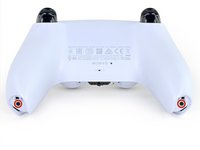
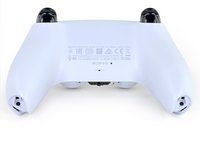
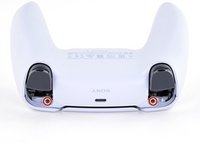
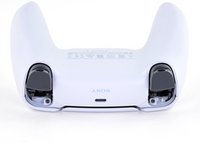
    • Use a Phillips screwdriver to remove the two 6.4 mm screws behind the L1 and R1 buttons.

    Спросите у FixBot

    Добавить комментарий

  10. Sony DualSense Controller Battery Replacement, Separate the rear case: шаг 10, изображение 1 из 3 Sony DualSense Controller Battery Replacement, Separate the rear case: шаг 10, изображение 2 из 3 Sony DualSense Controller Battery Replacement, Separate the rear case: шаг 10, изображение 3 из 3
    • Be gentle when releasing the rear cover clips—they're delicate and can easily break.

    • Use the point of a spudger to release the two clips on either side of the headset jack.

    Спросите у FixBot

    Добавить комментарий

  11. Sony DualSense Controller Battery Replacement: шаг 11, изображение 1 из 3 Sony DualSense Controller Battery Replacement: шаг 11, изображение 2 из 3 Sony DualSense Controller Battery Replacement: шаг 11, изображение 3 из 3
    • Tight plastic clips secure the left and right edges of the rear case.

    • Insert the flat end of a spudger between the front and rear shells near the bottom of the left edge.

    • Slide the spudger along the left edge and gently pry the shells apart to release the clips.

    Спросите у FixBot

    Добавить комментарий

  12. Sony DualSense Controller Battery Replacement: шаг 12, изображение 1 из 3 Sony DualSense Controller Battery Replacement: шаг 12, изображение 2 из 3 Sony DualSense Controller Battery Replacement: шаг 12, изображение 3 из 3
    • Repeat the previous step on the right edge to release its clips.

    Спросите у FixBot

    Добавить комментарий

  13. Sony DualSense Controller Battery Replacement: шаг 13, изображение 1 из 2 Sony DualSense Controller Battery Replacement: шаг 13, изображение 2 из 2
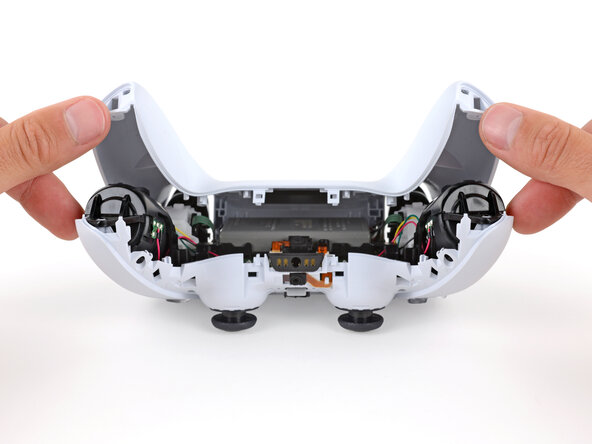
    • Lay your controller upside down so the joysticks are on your work surface.

    • Hold the controller down with your fingers and use your thumbs to lift the rear case away from the controller to fully separate it.

    Спросите у FixBot

    Добавить комментарий

  14. Sony DualSense Controller Battery Replacement, Remove the rear case: шаг 14, изображение 1 из 1
    • Remove the rear case.

    Спросите у FixBot

    Добавить комментарий

  15. Sony DualSense Controller Battery Replacement, Disconnect the battery: шаг 15, изображение 1 из 2 Sony DualSense Controller Battery Replacement, Disconnect the battery: шаг 15, изображение 2 из 2
    Инструмент, используемый на этом этапе:
    Tweezers
    $4.99
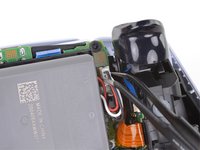
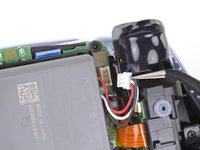
    • Use a pair of tweezers or your fingers to disconnect the battery from the motherboard.

    • Grip the connector, not the wires, when disconnecting.

    Спросите у FixBot

    Добавить комментарий

  16. Sony DualSense Controller Battery Replacement, Remove the battery: шаг 16, изображение 1 из 2 Sony DualSense Controller Battery Replacement, Remove the battery: шаг 16, изображение 2 из 2
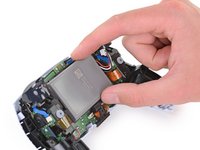
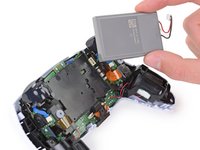
    • Lift the battery straight out of the battery bracket.

    Спросите у FixBot

    Добавить комментарий

Заключение

To reassemble your device, follow the above steps in reverse order.

Take your e-waste to an R2 or e-Stewards certified recycler.

Repair didn’t go as planned? Try some basic troubleshooting, or ask our Answers community for help.

Отменить: Я не выполнил это руководство.

113 человек успешно провели ремонт по этому руководству.

Sam Omiotek

Участник с: 02/25/19

98 692 Репутация

Автор 290 руководств

19 Комментарии к руководству

Is there a better battery that can be used rather than the standard battery? This controller dies so fast that I don’t bother disconnecting it ever. I’m pretty sure that’s bad, but It’s frustrating having it die midgame in my second game.

Anthony Ramirez - Ответить Поделиться

Yes. You can purchase a 2000mah battery replacement. It’s not much of a difference, but lowering your led settings and controller vibration also works wonders for prolonging the battery life.

John Jevitz - Ответить Поделиться

Any chance you could figure out why the %#*@ thing won't work USB powered with no battery? I shouldn't have to keep replacing a battery when I don't actually want to play wireless.

NoLife - Ответить Поделиться

@NoLife

If you bridge the pins for the red and white battery wires, the controller will power on properly without a battery. This will be easiest with a soldering iron.

Amboy Scout - Ответить Поделиться

I need a new battery for my Dualsense controller, Sony is saying to just buy a new one while I'm not gonna take broken for a answer. So if anyone knows a reliable site where I can get a battery replacement for my dualsense, do recommend

Diaper Fixer 360 - Ответить Поделиться

Добавить комментарий

Статистика просмотров:

За последние 24 часов: 186

За последние 7 дней: 1,392

За последние 30 дней: 5,740

За всё время: 225,504