Введение
This guide will teach you how to replace the battery for your Sony WH-1000MX5 headset. The headset uses lithium-ion batteries, which can swell.
In the event the battery looks swollen or hot to touch, stop and read this guide on how to handle a swollen battery
Выберете то, что вам нужно
-
Инструмент, используемый на этом этапе:iFixit Opening Tool$1.99
-
Place the edge of an iFixit opening tool under the earpad cushion.
-
Slide it alongside the edge of the cushion until it detaches from the rest of the headphones.
 Спросите у FixBot
-
-
-
Инструмент, используемый на этом этапе:Phillips #000 Screwdriver$5.49
-
Use a Phillips #000 screwdriver to remove the eight screws along the outer inside edge.
-
Flip the headphones to the other side and slowly lift up the back plastic cover piece.
-
Gently disconnect the touch sensor ribbon cable by pulling it out evenly from the main board.
-
-
-
Peel off the tape covering the battery connector.
-
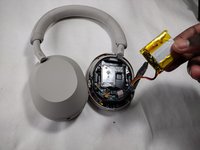
Pull out the battery and disconnect the battery cable from the motherboard.
-


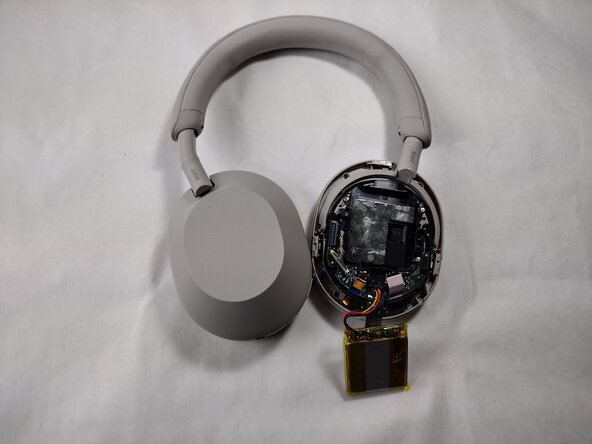
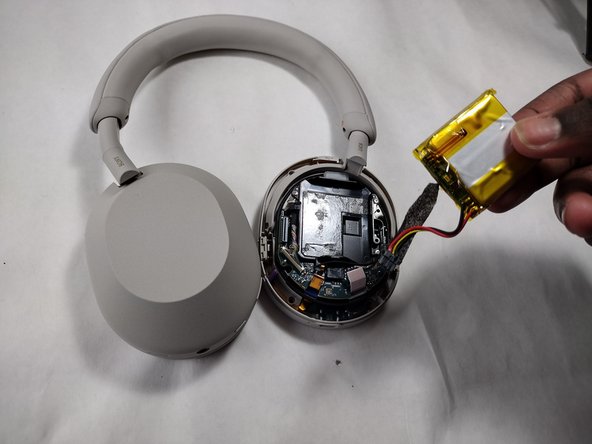
To reassemble your device, follow the above steps in reverse order.
For optimal performance, after completing this guide, calibrate your newly installed battery.
Take your e-waste to an R2 or e-Stewards certified recycler.
Repair didn’t go as planned? Try some basic troubleshooting or ask our Answers community for help.
Отменить: Я не выполнил это руководство.
4 человек успешно провели ремонт по этому руководству.

Команда

UMass Dartmouth, Team 1-4, Santin Spring 2024 Участник UMass Dartmouth, Team 1-4, Santin Spring 2024
UMASSD-SANTIN-S24S1G4
3 членов
Автор 8 руководств
1 Комментарий к руководству
Hey folks, thanks for taking the time to layout this procedure. These headphones are amazing, and this really helps me get my friends onboard.
