Введение
Follow this guide to adjust the settings and update the firmware on your FixHub Portable Power Station using a computer.
-
-
-
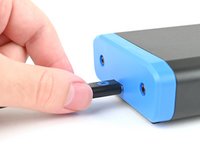
Plug the Portable Power Station into your computer, making sure the cable is connected to the power station's rear port (the side opposite the screen).
-
Navigate to iFixit.com/FixHub/console
 Спросите у FixBot
-
-
-
Click Connect my device.
-
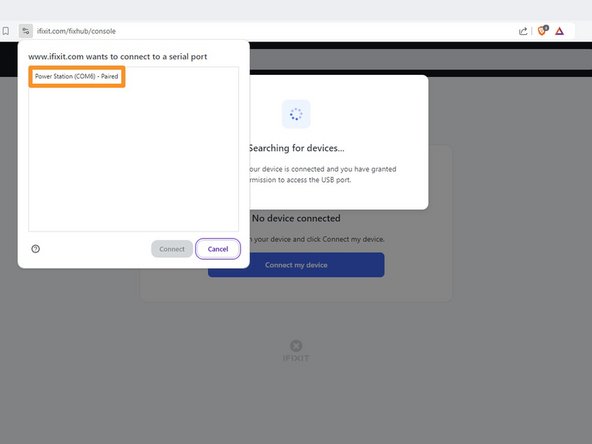
Select your Portable Power Station from the pop-up window asking you to connect a serial port.
-
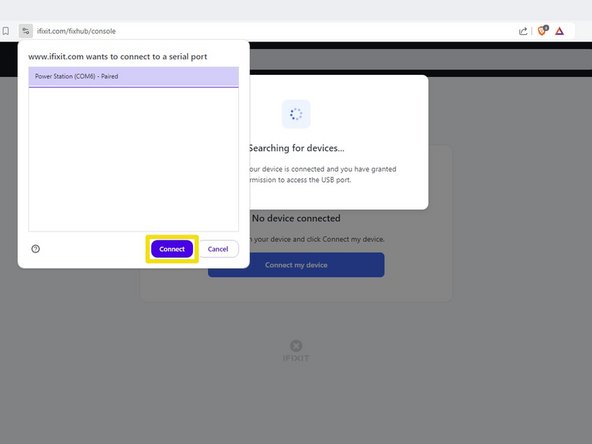
Click Connect.
-
-
-
-
USB 1 shows info about the device connected to the power station's front left USB-C port.
-
USB 2 shows info about the device connected to the power station's front right USB-C port.
-
Battery shows the battery percentage in real time.
-
Serial number shows the serial number of the power station.
-
Version shows the firmware version and updates for the power station.
-
-
-
Select the Version box.
-
Click Update now and wait for the firmware update to complete. Don't disconnect your power station or close the window during the firmware update.
-
-
-
Unplug the power station from the computer.
-
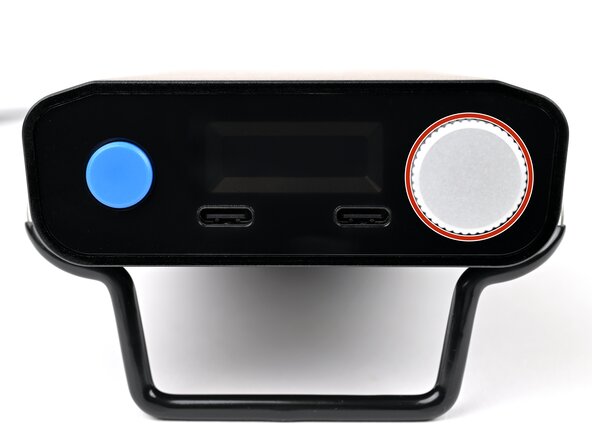
Press and hold the adjustment knob.
-
Plug the power station back into to the computer, then release the adjustment knob.
-
Use the web console to manually update the firmware.
-
-








That's it!
Still need help? Ask our Answers community, or try some basic troubleshooting.
Отменить: Я не выполнил это руководство.
20 человек успешно провели ремонт по этому руководству.


8 Комментарии к руководству
Can you update the app or website to display the latest firmware release information for this device? When I plug in my hub, it only shows the current firmware version on the device but doesn't indicate if it's the latest. Unlike other options, I can't click on the box for more details. Additionally, I couldn't find any information on your website about the current firmware version or its release notes.
The web console page is: https://www.ifixit.com/fixhub/console
This is where you can browse through the current and prior firmware versions. However, I don't believe the packaged firmware (at least with CI/CD) is currently open-source at the time of writing. Yet you can see what is currently available here on GitHub: https://github.com/ifixit/fixhub (The commands here work if you're able to access the FixHub with either minicomp on Linux or PuTTY on Windows; you can determine which TTY device the FixHub is assigned to with the help of the FixHub web console, which reliably picks out the correct low-level serial device name for the FixHub.)
Settings tab is missing in the FixHub page for the Ifix-it portable power station. I am unable to reset battery health Calibration data for the PPS so i can perform initial battery calibration. is this a glitch? any suggestions?
Same the settings tab is missing for me with no option to reset battery health calibration data after updating the firmware on the power station.
il manque le boutons settings, il y a un autre moyen de recalibrer la batterie ?
