Введение
The HyperX Cloud III (model 727A9AA) is plugged into a computer, but the system fails to detect it, and no audio is transmitted? The connecting cable might be the problem.
Follow this guide to replace the connecting cable in a HyperX Cloud III headset.
The connecting cable is essential to connect the headset to any electronic device in order to receive audio and communicate using the microphone.
Note that replacing the connecting cable requires skills in soldering. If you are new or not familiar with soldering, use our guide on soldering and desoldering connections.
Before following this guide, check the troubleshooting page to be sure of what the problem is.
Выберете то, что вам нужно
-
-
-
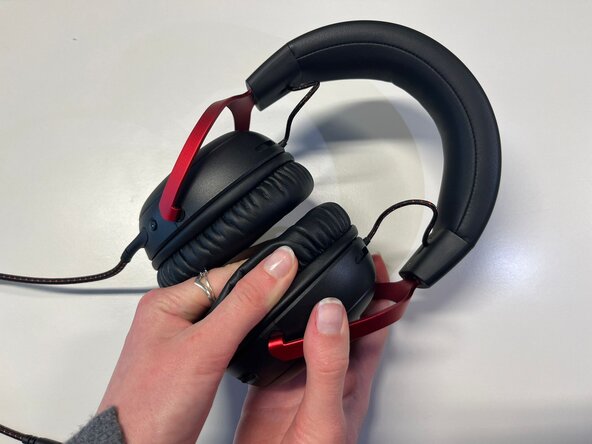
Pinch the side of one ear cushion with your thumb.
-
Slide it with your thumb to remove it completely from the outline.
-
Do the same on the other side of the headset if you want to replace both ear cushions.
 Спросите у FixBot
-
-
-
-
-
Use a Phillips #2 screwdriver to remove the four 9.4 mm-long screws securing the speaker plate to the earphone.
-
Use your fingers to pull and remove the black speaker plate.
-
-
-
-
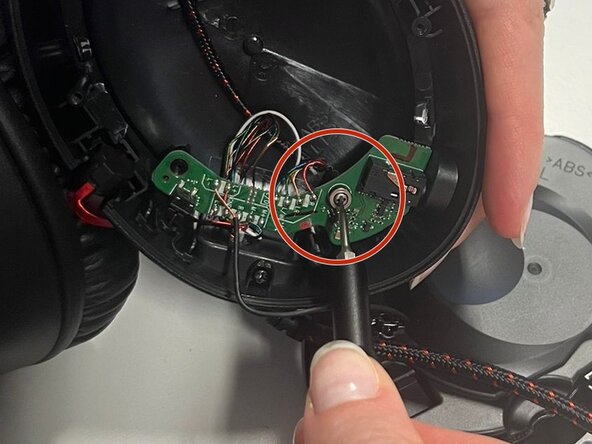
Use the Phillips #2 screwdriver to remove the 9.4 mm-long single screw securing the head of the connecting cable.
-
-
-
Use the Phillips #2 screwdriver to remove the two 6.8 mm-long screws securing the motherboard.
-
-
-
Use tweezers to turn the motherboard backward, to desolder the connecting cables wires on this side.
-
-




To reassemble your device, follow the steps instructions in reverse order.
Prior knowledge of soldering is required and working with wires is necessary.
Repair didn’t go as planned? Try some basic troubleshooting or ask our Answers community for help.
Отменить: Я не выполнил это руководство.
Еще один человек закончил это руководство.

Команда

Université Paris Cité, Team 4-4, Duvezin Winter 2026 Участник Université Paris Cité, Team 4-4, Duvezin Winter 2026
UPARIS-DUVEZIN-W26S4G4
3 членов
Автор 20 руководств
